
Last updated on
Nov 9, 2026

CA Pilates Pro Rehabilitation Conditioning Centre free printable template
We are not affiliated with any brand or entity on this form

Fill out
Complete the form online in a simple drag-and-drop editor.

eSign
Add your legally binding signature or send the form for signing.

Share
Share the form via a link, letting anyone fill it out from any device.

Export
Download, print, email, or move the form to your cloud storage.
Why pdfFiller is the best tool for your documents and forms


End-to-end document management
From editing and signing to collaboration and tracking, pdfFiller has everything you need to get your documents done quickly and efficiently.
Accessible from anywhere
pdfFiller is fully cloud-based. This means you can edit, sign, and share documents from anywhere using your computer, smartphone, or tablet.
Secure and compliant
pdfFiller lets you securely manage documents following global laws like ESIGN, CCPA, and GDPR. It's also HIPAA and SOC 2 compliant.
What is CA Pilates Pro Rehabilitation Conditioning Centre
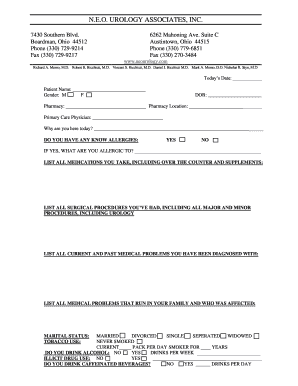
The Client Intake Form is a medical history document used by healthcare providers to gather essential health information from new patients.
pdfFiller scores top ratings on review platforms




Who needs CA Pilates Pro Rehabilitation Conditioning Centre?
Explore how professionals across industries use pdfFiller.

CA Pilates Pro Rehabilitation Conditioning Centre is needed by:
-
New patients seeking medical care
-
Healthcare professionals conducting patient assessments
-
Fitness trainers evaluating client health
-
Medical institutions updating patient records
-
Wellness coaches setting health goals
Comprehensive Guide to CA Pilates Pro Rehabilitation Conditioning Centre
What is the Client Intake Form?
The Client Intake Form serves as a crucial tool for healthcare providers to gather detailed medical history and current health information from patients. This form plays a significant role in helping practitioners understand the overall health status of their patients, significantly influencing the quality of care provided. It collects essential data such as personal details and previous health conditions, ensuring that the medical team is well-informed before the initial consultation. In different contexts, this document may also be referred to as a medical history form or a patient registration form.
Purpose and Benefits of the Client Intake Form
The significance of the Client Intake Form extends beyond mere completion; it enhances both patient experiences and healthcare delivery. Accurately gathering patient information fosters better healthcare outcomes as it allows for personalized treatment options tailored to individual needs. Additionally, the form's structured nature saves time in the healthcare process, allowing providers to focus more on delivering care rather than collecting information. Overall, the Client Intake Form is pivotal in streamlining initial interactions between patients and healthcare providers.
Key Features of the Client Intake Form
This form is designed with user convenience in mind, featuring various sections that capture comprehensive patient data. The key components include:
-
Personal details, ensuring all identification information is readily available.
-
Health history, which documents past medical conditions and treatments.
-
Fitness goals, allowing healthcare providers to align treatment with patients' aspirations.
Fillable fields and checkboxes are incorporated to facilitate ease of completion. Additionally, clear instructions accompany the form to guide users in accurately filling out all necessary information.
Who Needs the Client Intake Form?
The Client Intake Form is essential for both new and returning patients who need to provide their medical information. New patients fill out the form to establish their health history with a provider, while returning patients may update their health details as required. Healthcare providers rely on this document to ensure they have the most current and relevant information to offer optimal care. Familiarity with this process is crucial for both patients and providers to maximize the benefits of the healthcare experience.
How to Fill Out the Client Intake Form Online (Step-by-Step)
Filling out the Client Intake Form online can be a straightforward process when using pdfFiller. Follow these steps for a seamless experience:
-
Access the Client Intake Form through the pdfFiller platform.
-
Begin by entering your personal details in the designated fields.
-
Carefully provide your health history, ensuring you include all relevant past conditions.
-
Complete sections regarding current medications and fitness goals.
-
Review your entries for accuracy before submitting the form.
Each section is designed to guide you through the process systematically, ensuring that you provide accurate information for better health outcomes.
Common Errors and How to Avoid Them
While completing the Client Intake Form, users often encounter common pitfalls that can lead to incomplete or incorrect submissions. Some examples of these errors include:
-
Omitting required information, which may delay your registration.
-
Misunderstanding medical terms that lead to inaccurate entries.
To minimize these mistakes, it’s advisable to double-check all fields for completeness and clarity before submission. Validating your entries ensures that you present an accurate portrayal of your health history to your healthcare provider.
Security and Compliance for the Client Intake Form
When filling out the Client Intake Form, users can be assured of their data safety. pdfFiller employs robust security measures, including 256-bit encryption, to protect sensitive healthcare information. Additionally, compliance with HIPAA and GDPR standards reflects the platform's commitment to privacy and data protection. Awareness of these measures is essential for users to feel confident that their information is handled with the utmost care.
What Happens After You Submit the Client Intake Form?
Once you submit the Client Intake Form, healthcare providers will review the information provided for accuracy and relevance. This review process is critical, as it informs the next steps in your healthcare journey. Providers may reach out for clarification or schedule follow-up appointments based on the information presented in your submission.
Sample of a Completed Client Intake Form
To assist users, a sample of a completed Client Intake Form is available for reference. This sample includes fictional details to demonstrate how to accurately fill out each section. Users can learn from common pitfalls highlighted in the sample, ensuring they avoid similar mistakes during their submission.
Experience Seamless Form Filling with pdfFiller
Utilizing pdfFiller for the Client Intake Form not only simplifies the process but also enhances overall efficiency. Key advantages of using pdfFiller include streamlined form management, strong security protocols, and user-friendly tools. By leveraging these capabilities, users can start completing the Client Intake Form today, ensuring a smooth experience in their healthcare interactions.
How to fill out the CA Pilates Pro Rehabilitation Conditioning Centre
-
1.To access the Client Intake Form on pdfFiller, visit the website and use the search function to locate the form by its name.
-
2.Once the form is open, utilize the fillable fields to insert your personal information, including name, address, and contact details.
-
3.Before starting, gather necessary documents such as identification, insurance information, and your current medication list to complete the form accurately.
-
4.Navigate through the sections by clicking on each field. Use checkboxes for questions about your medical history and current health status.
-
5.Take your time to review each section and ensure all fields are filled out completely, checking for accuracy and completeness.
-
6.After filling in the required fields, double-check for any missing information and correct any errors.
-
7.Once you're satisfied with the form, save your work by selecting the save option. You can also download it to keep a copy for your records.
-
8.If needed, submit the completed form directly through pdfFiller using the submit option. Follow any prompts for electronic submission to your chosen healthcare provider.

Who can fill out the Client Intake Form?
The Client Intake Form can be filled out by new patients seeking medical care, or by guardians on behalf of minors or individuals unable to complete it themselves.
What information do I need to complete the form?
Before starting the form, gather your personal identification, insurance details, a list of current medications, and any relevant medical history to ensure all sections are accurately completed.
How do I submit the completed form?
After completing the form on pdfFiller, you can submit it electronically via the platform or download it for manual submission to your healthcare provider.
Are there any deadlines for submitting the form?
While there are typically no strict deadlines for the Client Intake Form, it's best submitted before your first appointment to ensure timely processing of your medical history.
What are common mistakes to avoid on the form?
Common mistakes include omitting medical history details, failing to sign the document, and neglecting to provide complete contact information. Double-check all entries before submission.
How long does it take to process the form?
Processing times may vary depending on the healthcare provider's policies. Generally, forms are reviewed during the initial appointment or shortly after submission.
Do I need to notarize the Client Intake Form?
No, the Client Intake Form does not require notarization. However, it should be signed by the patient or their authorized representative.
Related Forms





Related Catalogs
Get the latest insights from our blog


If you believe that this page should be taken down, please follow our DMCA take down process
here
.
This form may include fields for payment information. Data entered in these fields is not covered by PCI DSS compliance.