
Last updated on
Nov 7, 2026

Get the free Application for Employment
pdfFiller is not affiliated with any government organization

Fill out
Complete the form online in a simple drag-and-drop editor.

eSign
Add your legally binding signature or send the form for signing.

Share
Share the form via a link, letting anyone fill it out from any device.

Export
Download, print, email, or move the form to your cloud storage.
Why pdfFiller is the best tool for your documents and forms


End-to-end document management
From editing and signing to collaboration and tracking, pdfFiller has everything you need to get your documents done quickly and efficiently.
Accessible from anywhere
pdfFiller is fully cloud-based. This means you can edit, sign, and share documents from anywhere using your computer, smartphone, or tablet.
Secure and compliant
pdfFiller lets you securely manage documents following global laws like ESIGN, CCPA, and GDPR. It's also HIPAA and SOC 2 compliant.
What is Employment Application
The Application for Employment is a document used by job applicants to submit their personal, educational, and employment history information to employers.
pdfFiller scores top ratings on review platforms




Who needs Employment Application?
Explore how professionals across industries use pdfFiller.

Employment Application is needed by:
-
Individuals seeking job opportunities in California
-
HR personnel managing job applications and recruitment
-
Employers reviewing potential candidates' backgrounds
-
Employment agencies supporting job seekers
-
Students entering the workforce
Comprehensive Guide to Employment Application
What is the Application for Employment?
The Application for Employment is a standardized form utilized by job applicants to provide essential information to potential employers. It typically includes sections that require detailed personal data, educational background, and a comprehensive employment history. Each of these sections plays a crucial role in the job application process, ensuring that employers have a clear view of the applicant's qualifications and experiences. Understanding the components of the employment application form can significantly enhance an applicant's chances during recruitment.
Purpose and Benefits of the Application for Employment
The application serves the primary purpose of helping employers assess candidates effectively. It not only streamlines the selection process but also aids applicants in organizing their qualifications systematically. A completed application is pivotal in recruitment because it allows hiring managers to evaluate the applicant's suitability for various roles efficiently. By utilizing a job application template, applicants can ensure that they present their information in a professional and organized manner.
Key Features of the Application for Employment
This form encompasses specific sections: personal information, job history, education, and references. Additionally, it includes a certification statement that validates the accuracy of the provided information. Notably, the form is often available in a fillable format, making it accessible for users to complete digitally. Using an employment application PDF allows applicants to fill in their details easily and maintain a professional presentation.
Who Needs the Application for Employment?
The primary target audience for the Application for Employment includes job seekers in California, spanning various industries and job roles. It is essential for both first-time job seekers and seasoned professionals seeking new opportunities. The application form is a fundamental tool that assists them in presenting their credentials effectively—regardless of their experience level or the sector in which they are applying.
How to Fill Out the Application for Employment Online (Step-by-Step)
-
Access the application form via a platform that supports PDF editing, like pdfFiller.
-
Begin by entering your personal information in the designated fields.
-
Provide detailed job history, ensuring accuracy in employment dates and responsibilities.
-
List your educational background, including degrees obtained and institutions attended.
-
Complete the references section by including contact details of professional referees.
-
Review all entered information for accuracy before submission to prevent errors.
Common Errors and How to Avoid Them
Applicants frequently make mistakes such as omitting critical information, providing inaccurate details, or failing to proofread their applications. To ensure accuracy and completeness, it is advisable to take your time while filling out the application. Focus on reviewing each section thoroughly before submission, which can significantly minimize the likelihood of errors and improve overall application quality.
Submission Methods for the Application for Employment
In California, there are various methods to submit the Application for Employment. Applicants can choose to submit their forms online, which often facilitates a quicker response time, or deliver them in-person. It is crucial to be aware of any specific state requirements that apply to the submission process, ensuring compliance with local regulations while applying for a position.
What Happens After You Submit the Application for Employment?
Once an application is submitted, employers typically initiate a review process to evaluate all candidates' qualifications. Follow-ups may be necessary to confirm application status; understanding the expected response time can be advantageous for applicants. Being proactive after submission can enhance opportunities for further communication and potential interviews.
Why Use pdfFiller for Your Application for Employment?
pdfFiller offers a robust platform for editing and completing the Application for Employment with ease. It provides tools for editing, eSigning, and maintaining data security, which is essential when handling personal information. The cloud-based accessibility ensures that applicants can work on their forms from any device, making it a convenient solution for managing employment applications.
Sample or Example of a Completed Application for Employment
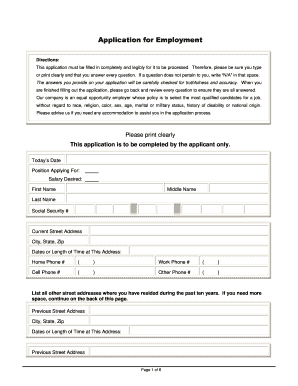
Utilizing a visual example of a filled-out Application for Employment can greatly assist applicants in understanding how to complete each section effectively. A comprehensive breakdown of the sections can guide users in accurately detailing their information, promoting a high standard for submissions. Applicants are encouraged to reference these samples as a guideline while using pdfFiller to create their applications.
How to fill out the Employment Application
-
1.Access the Application for Employment form on pdfFiller by searching for its name in the search bar or navigating through the employment forms section.
-
2.Once opened, carefully review the form layout, which includes various sections for personal information, job history, education, and references.
-
3.Before filling in the form, gather required documents such as your resume, previous employment records, and educational certificates to accurately complete each section.
-
4.Start by entering personal details, including your name, address, and contact information, in the appropriate fields provided on the form.
-
5.For employment history, detail each job you've held, including position titles, companies' names, dates of employment, and responsibilities. Utilize the text fields to provide comprehensive but concise information.
-
6.Continue with the education section by listing your educational background, starting with the most recent. Include details such as the institution, degree obtained, and dates attended.
-
7.If applicable, fill out the sections about military service and references by providing the requested information in the provided fields.
-
8.Review the certification statement at the end of the form, ensuring that all information you provided is complete and accurate.
-
9.Sign the form electronically in the designated space using pdfFiller's signature tool, ensuring your name is clear and corresponds with the details previously provided.
-
10.Finally, save your completed application. You can either download it as a PDF or submit it directly via email from pdfFiller’s interface.

Who is eligible to fill out the Application for Employment?
Any individual seeking employment in California can complete the Application for Employment. It is designed for job applicants to provide relevant personal, educational, and work history details to potential employers.
What supporting documents are required when submitting the application?
While not technically required, it is advisable to have your resume, prior job descriptions, educational records, and references handy to ensure accurate completion of the Application for Employment.
How should I submit the completed application?
You can submit the completed Application for Employment through pdfFiller by downloading it as a PDF or directly emailing the form to the employer, depending on their submission preferences.
Are there specific deadlines for submitting this form?
Deadlines vary by employer and job posting. Always check with the employer for specific submission timelines or any application cutoffs related to job openings.
What common mistakes should I avoid while filling out this form?
Avoid leaving any sections blank and ensure all information is accurate. Double-check for any typos or errors in your contact information and previous job details, as these can affect your application.
What happens after I submit my application?
After submission, employers typically review the applications and may contact candidates for interviews. Processing times can vary, so be patient and check in with the employer if you do not hear back in a reasonable timeframe.
Can I edit my application after submitting it?
Once submitted, editing may depend on the employer's policies. If you realize a mistake after submission, it’s best to contact the employer to explain the situation and see if you can resubmit your application.
Related Forms


Get the latest insights from our blog


If you believe that this page should be taken down, please follow our DMCA take down process
here
.
This form may include fields for payment information. Data entered in these fields is not covered by PCI DSS compliance.