
Last updated on
Oct 31, 2026

TX MMS Dance Team Tryouts Teacher Evaluation Form 2013-2026 free printable template
pdfFiller is not affiliated with any government organization

Fill out
Complete the form online in a simple drag-and-drop editor.

eSign
Add your legally binding signature or send the form for signing.

Share
Share the form via a link, letting anyone fill it out from any device.

Export
Download, print, email, or move the form to your cloud storage.
Why pdfFiller is the best tool for your documents and forms


End-to-end document management
From editing and signing to collaboration and tracking, pdfFiller has everything you need to get your documents done quickly and efficiently.
Accessible from anywhere
pdfFiller is fully cloud-based. This means you can edit, sign, and share documents from anywhere using your computer, smartphone, or tablet.
Secure and compliant
pdfFiller lets you securely manage documents following global laws like ESIGN, CCPA, and GDPR. It's also HIPAA and SOC 2 compliant.
What is TX MMS Dance Team Tryouts Teacher Evaluation Form
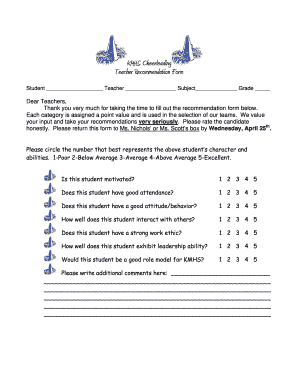
The MMS Dance Team Tryouts Teacher Evaluation Form is a document used by teachers to assess students' behavior, attitude, and performance during dance team tryouts.
pdfFiller scores top ratings on review platforms




Found the forms that I needed and that were only available in paper in my area. So great to be able to fill them out online, check the information for accuracy and print when everything is in order. :)
PDFfiller makes filing taxes smooth as silk. It even supplies you with the lasted information, such as filing deadlines.
Who needs TX MMS Dance Team Tryouts Teacher Evaluation Form?
Explore how professionals across industries use pdfFiller.

TX MMS Dance Team Tryouts Teacher Evaluation Form is needed by:
-
Teachers evaluating students for dance tryouts
-
School administrators overseeing tryout processes
-
Dance coaches requiring feedback on student performance
-
Parents wanting clarity on evaluation criteria
-
Educational institutions organizing dance programs
Comprehensive Guide to TX MMS Dance Team Tryouts Teacher Evaluation Form
What is the MMS Dance Team Tryouts Teacher Evaluation Form?
The MMS Dance Team Tryouts Teacher Evaluation Form serves a crucial role in evaluating students' behaviors, attitudes, and performance during dance team tryouts. This form allows teachers to provide structured feedback that is vital for identifying student strengths and areas needing improvement. By utilizing this teacher evaluation form for dance tryouts, educators can effectively assess individual student contributions and readiness for participation.
Purpose and Benefits of the Teacher Evaluation Form for Dance Tryouts
The structured feedback provided by this evaluation form enhances the overall dance team assessment process. Not only does it streamline evaluations, but it also aids teachers in recognizing key student attributes that influence participation. Moreover, this systematic approach fosters communication regarding individual performances, leading to informed decisions throughout the tryout process.
Key Features of the MMS Dance Team Tryouts Teacher Evaluation Form
The form includes several essential fields to improve usability. Teachers are required to input the student name, teacher name, and specific evaluation criteria. One of the standout elements is the rating scale, which allows for nuanced assessments, complemented by a section for comments to elaborate on observations. This array of features ensures that critical student feedback is captured accurately.
Who Needs the MMS Dance Team Tryouts Teacher Evaluation Form?
The primary users of the MMS Dance Team Tryouts Teacher Evaluation Form are educators and school administrators involved in the dance program. Teachers benefit by having a standardized method to evaluate students, while school administrators can use the aggregated feedback for program assessments. Each group gains valuable insights that enhance the quality of evaluations and support the growth of the dance team.
How to Fill Out the MMS Dance Team Tryouts Teacher Evaluation Form Online
Filling out the MMS Dance Team Tryouts Teacher Evaluation Form online is straightforward. Follow these steps for accurate completion:
-
Access the form through the designated platform.
-
Enter the required details, including student and teacher names.
-
Carefully evaluate each criterion and select the appropriate rating.
-
Provide clear, constructive comments in the designated section.
-
Review the completed form for accuracy before submission.
Submission Methods for the Teacher Evaluation Form
Teachers have multiple methods for submitting the completed MMS Dance Team Tryouts Teacher Evaluation Form. The primary options include emailing the form or using online submission tools provided by the school. It is essential to note submission deadlines to ensure timely processing and evaluation.
Common Errors and How to Avoid Them
When filling out the evaluation form, teachers often encounter several common pitfalls. These include:
-
Leaving required fields blank, which can lead to incomplete evaluations.
-
Forgetting to submit the form by the deadline.
-
Failing to provide specific comments that support ratings.
To prevent these issues, double-check the completed form for accuracy and completeness prior to submission.
Security and Compliance for the MMS Dance Team Tryouts Teacher Evaluation Form
Ensuring the security and compliance of the MMS Dance Team Tryouts Teacher Evaluation Form is paramount. The platform employs robust security measures to protect sensitive student information. Additionally, all submissions adhere to HIPAA and GDPR regulations, guaranteeing the privacy and data protection required when handling educational evaluations.
Sample Completed MMS Dance Team Tryouts Teacher Evaluation Form
Providing a completed mock-up of the MMS Dance Team Tryouts Teacher Evaluation Form can serve as a valuable reference for teachers. This sample illustrates how to effectively fill out each section, highlighting key annotations that guide users in utilizing the form to its fullest potential.
How pdfFiller Can Help with the MMS Dance Team Tryouts Teacher Evaluation Form
pdfFiller enhances the process of completing the MMS Dance Team Tryouts Teacher Evaluation Form through its robust editing and e-signing capabilities. Users can easily modify the form, ensuring it meets specific needs while benefiting from high security standards that protect sensitive evaluations. Engaging with pdfFiller offers a smoother and more efficient experience for filling out and submitting important forms.
How to fill out the TX MMS Dance Team Tryouts Teacher Evaluation Form
-
1.To access the MMS Dance Team Tryouts Teacher Evaluation Form on pdfFiller, visit the pdfFiller website and search for the form name in the search bar.
-
2.Once you find the form, click on it to open the document in pdfFiller's editing interface.
-
3.Before starting, gather necessary information including the names of the students being evaluated, your name, the subject taught, and specific evaluation criteria for dance.
-
4.Navigate through the form by clicking on each field to enter the required details. Use checkboxes to mark observed behaviors and fill out comments in the designated text areas.
-
5.Make sure to rank each student's performance according to the scale provided within the form.
-
6.After completing the evaluation, review all entered information for accuracy and completeness. Ensure that no fields are left blank.
-
7.Finalize the form by clicking on the 'Save' button to store your changes. To submit the form, look for the 'Submit' feature, or follow any specific submission instructions provided.
-
8.You can also download the completed evaluation form for personal records by clicking on the 'Download' option and selecting your preferred format.

What are the eligibility requirements for submitting this form?
Teachers evaluating students for the MMS Dance Team tryouts are eligible to submit this form. It is designed specifically for educators overseeing the dance program.
What is the deadline for submitting the Teacher Evaluation Form?
The completed form should be returned to Caroline Morris by the specified deadline outlined in the form instructions. Please ensure timely submission to facilitate evaluations.
How do I submit the completed Teacher Evaluation Form?
The completed form can be submitted electronically via pdfFiller by using the 'Submit' feature or by saving and emailing it directly to the designated recipient, Caroline Morris.
Are there any supporting documents required with this form?
No additional supporting documents are specified for this evaluation form. Just ensure the completed evaluation is accurate and thorough to provide meaningful feedback.
What common mistakes should I avoid when completing this form?
Be sure to fill out all required fields and provide thoughtful comments. Avoid leaving boxes unchecked if applicable behaviors were observed and ensure the student's name is spelled correctly.
How long does it take to process the Teacher Evaluation Form?
Processing times may vary but typically, the evaluation results are compiled once all forms are submitted by the teachers. It is best to submit forms promptly to avoid delays.
What if I need assistance while filling out the form?
You can refer to the form instructions for guidance or contact your school's administration for any questions about the evaluation criteria or submission process.
Related Content
Related Forms

Related Catalogs
Get the latest insights from our blog


If you believe that this page should be taken down, please follow our DMCA take down process
here
.
This form may include fields for payment information. Data entered in these fields is not covered by PCI DSS compliance.