
Last updated on
Oct 2, 2026

Get the free Employee Development Training Evaluation Form
We are not affiliated with any brand or entity on this form

Fill out
Complete the form online in a simple drag-and-drop editor.

eSign
Add your legally binding signature or send the form for signing.

Share
Share the form via a link, letting anyone fill it out from any device.

Export
Download, print, email, or move the form to your cloud storage.
Why pdfFiller is the best tool for your documents and forms


End-to-end document management
From editing and signing to collaboration and tracking, pdfFiller has everything you need to get your documents done quickly and efficiently.
Accessible from anywhere
pdfFiller is fully cloud-based. This means you can edit, sign, and share documents from anywhere using your computer, smartphone, or tablet.
Secure and compliant
pdfFiller lets you securely manage documents following global laws like ESIGN, CCPA, and GDPR. It's also HIPAA and SOC 2 compliant.
What is Training Evaluation Form
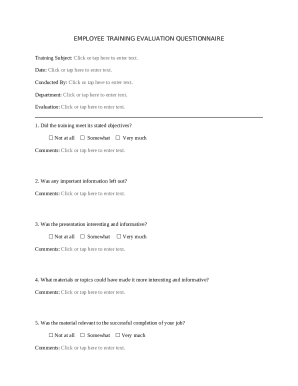
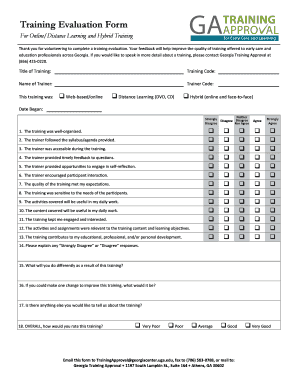
The Employee Development Training Evaluation Form is a performance review document used by employers to evaluate training sessions attended by employees.
pdfFiller scores top ratings on review platforms




Who needs Training Evaluation Form?
Explore how professionals across industries use pdfFiller.

Training Evaluation Form is needed by:
-
HR professionals assessing employee training feedback
-
Managers looking for insights on training effectiveness
-
Employees seeking to provide detailed evaluations of training
-
Training coordinators collecting feedback for program improvement
-
Organizations investing in professional development strategies
Comprehensive Guide to Training Evaluation Form
What is the Employee Development Training Evaluation Form?
The Employee Development Training Evaluation Form is a vital tool for assessing employee training sessions. It serves as a structured method for gathering insights that reflect the effectiveness of these sessions. Evaluating training impact is essential, as it allows organizations to ensure that their professional development efforts yield the desired outcomes.
This form features key fields that include the date, title, presenter, and type of training. Such elements not only facilitate accurate record-keeping but also enhance the clarity of feedback provided.
Purpose and Benefits of the Employee Development Training Evaluation Form
The Employee Development Training Evaluation Form is essential for both organizations and employees for several reasons. Collecting feedback on training sessions helps identify areas of strength and opportunities for improvement, fostering a culture of continuous professional development.
Additionally, utilizing this form promotes employee engagement in training programs by encouraging active participation. Engaged employees are more likely to contribute insightful feedback that further enhances the quality of training sessions.
Key Features of the Employee Development Training Evaluation Form
This evaluation form is designed with user-friendliness in mind. It includes fillable fields and checkboxes that simplify the process of completion, allowing users to provide structured feedback efficiently.
Clear instructions are provided to help users understand how to complete the form effectively. There are also dedicated sections for additional comments and suggestions, enabling employees to express their thoughts thoroughly.
Who Needs the Employee Development Training Evaluation Form?
The Employee Development Training Evaluation Form is suitable for various stakeholders within an organization. It is particularly useful for HR managers, training coordinators, and the employees who partake in training programs.
Departments can leverage the insights gathered from these evaluations to ensure compliance with training standards while seeking continuous improvement in their programs. Organizations with ongoing training initiatives can benefit greatly from using this form consistently.
How to Fill Out the Employee Development Training Evaluation Form Online (Step-by-Step)
Filling out the Employee Development Training Evaluation Form online is a straightforward process. Follow these steps for optimal completion:
-
Access the form and enter the date of training in the designated field.
-
Provide the title and name of the presenter in the corresponding sections.
-
Use the drop-down boxes to rate various aspects of the training on a scale of one to five.
-
Add any additional comments or suggestions for future training sessions.
-
Review all responses for accuracy before submission.
Providing constructive feedback is crucial, as it enhances the overall quality of future training initiatives.
Common Errors and How to Avoid Them
When completing the Employee Development Training Evaluation Form, users may encounter common pitfalls. Missing critical fields, such as the date and name of the training, can lead to incomplete data.
Vague comments can also diminish the value of the feedback. To avoid these issues, users should provide detailed and thoughtful responses where applicable. It is advisable to double-check all information before final submission, ensuring accuracy and completeness.
How to Submit the Employee Development Training Evaluation Form
Submitting the Employee Development Training Evaluation Form can be done through various methods tailored to individual preferences. Options typically include online submission or sending via email.
Organizations often set specific deadlines for submitting evaluations following training sessions. Users should be aware of these timelines to ensure their feedback is considered valid and useful.
Security and Compliance for the Employee Development Training Evaluation Form
When handling the Employee Development Training Evaluation Form, organizations must prioritize data security and compliance. Ensuring data protection and privacy is key in safeguarding sensitive employee information.
pdfFiller implements robust security measures, including 256-bit encryption and SOC 2 Type II compliance, to maintain confidentiality in evaluation responses. Understanding these protocols can help organizations build trust and accountability in their training evaluation processes.
How pdfFiller Enhances Your Experience with the Employee Development Training Evaluation Form
pdfFiller significantly improves the user experience by offering comprehensive tools for managing the Employee Development Training Evaluation Form. Users can easily fill, eSign, and edit the form directly through the platform.
Leveraging pdfFiller’s features allows organizations to streamline their training evaluations efficiently. The convenience of this platform enhances the overall process from completion to submission.
Maximize the Value of Your Training Evaluation Form
To fully capitalize on the Employee Development Training Evaluation Form, organizations should regularly evaluate their employee training programs. This practice not only identifies areas for improvement but also integrates valuable feedback into future training sessions.
Encouraging employees to share honest feedback fosters a culture of transparency and continuous improvement, ultimately enhancing the effectiveness of development initiatives.
How to fill out the Training Evaluation Form
-
1.Access the Employee Development Training Evaluation Form on pdfFiller by visiting their website and searching for the form name in the search bar.
-
2.Once the form is located, click on it to open in the pdfFiller editor where you'll find various fillable fields and checkboxes.
-
3.Before starting the completion process, gather necessary information such as the date of training, title of the training, name of the presenter, and type of training attended.
-
4.Begin filling in the form by entering the date of training in the designated area and providing the title of the training session accurately.
-
5.In the fields provided, rate various aspects of the training using the drop-down boxes on a scale of 1-5, based on your experience.
-
6.Utilize the comments section to provide any additional feedback or suggestions for future training sessions.
-
7.Once all fields are completed and you've entered your personal information, review the form thoroughly to ensure all information is correct and complete.
-
8.To finalize your submission, locate the save option in pdfFiller, allowing you to download a copy of the completed form for your records.
-
9.You can also choose to submit the form directly to your HR department or training coordinator through the provided submission options.

Who is eligible to fill out the Employee Development Training Evaluation Form?
Any employee who has attended a training session can fill out the Employee Development Training Evaluation Form to provide feedback and insights on the effectiveness of the training.
Is there a deadline for submitting the training evaluation form?
There is typically no strict deadline; however, it's advisable to submit the form promptly after the training to ensure your feedback is fresh and relevant.
How should I submit the completed training evaluation form?
After completing the form, you can save it on pdfFiller and either download it for your records or submit it directly to your HR department or training coordinator via the platform.
What information do I need to complete the form?
You will need details such as the date of training, title of the training, name of the presenter, and your ratings on various aspects of the training, along with any comments or suggestions.
What common mistakes should I avoid when filling out the evaluation form?
Ensure that all required fields are completed, avoid vague comments, and make sure to review your ratings for accuracy before submitting the form.
How long does it take to process the feedback from the evaluation form?
Processing times can vary but generally, feedback is reviewed by HR or training coordinators within a few days to a week after submission.
Can I edit my responses after submitting the evaluation form?
Once submitted, you typically cannot edit your responses. It's important to review everything thoroughly before submission to ensure accuracy.
Related Forms



Related Catalogs
Get the latest insights from our blog


If you believe that this page should be taken down, please follow our DMCA take down process
here
.
This form may include fields for payment information. Data entered in these fields is not covered by PCI DSS compliance.