
Last updated on
Nov 9, 2026

Seacoast Accountability QB Consulting Client Intake free printable template
pdfFiller is not affiliated with any government organization

Fill out
Complete the form online in a simple drag-and-drop editor.

eSign
Add your legally binding signature or send the form for signing.

Share
Share the form via a link, letting anyone fill it out from any device.

Export
Download, print, email, or move the form to your cloud storage.
Why pdfFiller is the best tool for your documents and forms


End-to-end document management
From editing and signing to collaboration and tracking, pdfFiller has everything you need to get your documents done quickly and efficiently.
Accessible from anywhere
pdfFiller is fully cloud-based. This means you can edit, sign, and share documents from anywhere using your computer, smartphone, or tablet.
Secure and compliant
pdfFiller lets you securely manage documents following global laws like ESIGN, CCPA, and GDPR. It's also HIPAA and SOC 2 compliant.
What is Seacoast Accountability QB Consulting Client Intake
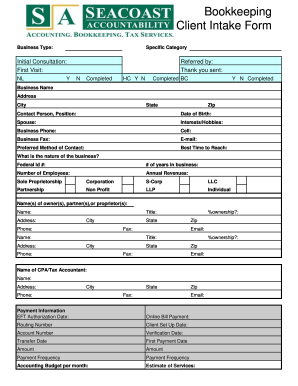
The QB Consulting Client Intake Form is a service agreement used by QB Consulting to collect essential information from new clients regarding their business and accounting needs.
pdfFiller scores top ratings on review platforms




Who needs Seacoast Accountability QB Consulting Client Intake?
Explore how professionals across industries use pdfFiller.

Seacoast Accountability QB Consulting Client Intake is needed by:
-
New clients seeking accounting services
-
Business owners requiring consulting
-
Individuals wanting to understand financial practices
-
Companies needing tailored accounting solutions
-
Entrepreneurs organizing their financial information
Comprehensive Guide to Seacoast Accountability QB Consulting Client Intake
What is the QB Consulting Client Intake Form?
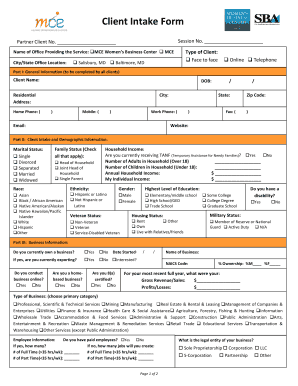
The QB Consulting Client Intake Form serves as a critical tool for gathering essential information from clients seeking accounting services. This form plays a significant role in ensuring that new clients provide vital details about their business and accounting preferences. Key fields in the form include business type, contact information, and relevant financial data, all of which are necessary for tailored accounting solutions.
Purpose and Benefits of the QB Consulting Client Intake Form
This form is essential for both clients and consultants, as it streamlines the onboarding process for accounting services. By effectively collecting detailed client information, the form allows for the customization of accounting solutions that meet specific needs. Clients are encouraged to provide accurate and comprehensive details to facilitate effective service delivery.
Key Features of the QB Consulting Client Intake Form
The QB Consulting Client Intake Form features a user-friendly design that makes it easy to complete. It includes blank fields and checkboxes to accommodate various types of input. The form is equipped with clear instructions to assist users during the filling process. Additionally, robust security measures are implemented to ensure the protection of client information.
Who Needs the QB Consulting Client Intake Form?
This form is applicable to a wide array of businesses and clients seeking accounting services. It is particularly important for sole proprietors, LLCs, and corporations that require an assessment of their accounting service needs. Certain scenarios trigger the necessity for this form, enabling consultants to tailor their services appropriately.
How to Fill Out the QB Consulting Client Intake Form Online (Step-by-Step)
Filling out the QB Consulting Client Intake Form online can be accomplished through a few straightforward steps. Below are the instructions:
-
Access the form from the designated platform.
-
Complete the contact information section with accurate details.
-
Input financial requirements as prompted in the specified fields.
-
Detail your accounting practices in the designated area.
-
Double-check all entries to avoid common errors before submission.
How to Submit the QB Consulting Client Intake Form
The submission process for the QB Consulting Client Intake Form offers multiple options for clients. Completed forms can be submitted online or via email. After submission, clients will receive confirmation and tracking information regarding the status of their submission. Timely submission is crucial for setting up effective accounting services.
Security and Compliance for the QB Consulting Client Intake Form
Users can be assured of the security of their information when filling out the QB Consulting Client Intake Form. Security measures include 256-bit encryption, complying with standards such as SOC 2 Type II, HIPAA, and GDPR. These protocols emphasize the importance of data privacy and the careful handling of sensitive information.
Sample or Example of a Completed QB Consulting Client Intake Form
To assist users, a visual example of a completed QB Consulting Client Intake Form is provided. This filled-out version serves as a guide, highlighting key sections of the form and explaining the significance of the provided information. Clients are encouraged to refer to this example while completing their own forms to ensure thoroughness.
Getting Started with pdfFiller to Complete Your QB Consulting Client Intake Form
pdfFiller offers a seamless experience for users looking to complete their QB Consulting Client Intake Form. Users can easily access the form through the platform, benefiting from pdfFiller's capabilities, including editing and filling forms. Additional features such as eSigning and document sharing further enhance the user experience.
Essential Reminders for Using the QB Consulting Client Intake Form
When using the QB Consulting Client Intake Form, it's important to review all provided information before submission. Accuracy and completeness are vital to prevent delays in service delivery. Clients are also encouraged to reach out for assistance if they encounter any issues during the completion process.
How to fill out the Seacoast Accountability QB Consulting Client Intake
-
1.Access the QB Consulting Client Intake Form on pdfFiller by visiting their website and searching for the form name in the search bar.
-
2.Once you find the form, click on it to open it in the pdfFiller interface for editing.
-
3.Review the form and gather necessary information beforehand, such as your business type, contact details, and any relevant financial data.
-
4.Navigate through the form by clicking on each blank field and entering your information directly into the provided sections.
-
5.Use checkboxes where applicable to select options that correspond to your accounting practices and service preferences.
-
6.After completing all fields and ensuring accuracy, take a moment to review your entries for any errors or omissions.
-
7.Once satisfied with the completed form, you can save your progress or choose to download a final version in your preferred format.
-
8.If required, submit the form directly through pdfFiller to QB Consulting for processing.

Who should fill out the QB Consulting Client Intake Form?
The form should be completed by new clients who are seeking accounting services from QB Consulting. It is essential for capturing information about the client’s business and financial needs.
Is there a deadline for submitting this form?
While the form does not have a specified deadline, it is recommended to submit it as soon as possible to ensure timely processing of your accounting needs.
What types of information are needed to complete the form?
You'll need to provide your business type, contact information, financial data, and details about your specific accounting practices to complete the form.
How can I submit the completed form?
Once you have finished filling out the form on pdfFiller, you can submit it directly through the platform, email it to QB Consulting, or download it for personal records.
What are common mistakes to avoid when filling out the form?
Common mistakes include leaving fields blank, entering inaccurate information, or neglecting to review the form for errors. Always double-check your entries before submission.
How long will it take to process my form once submitted?
Processing times can vary, but typically, you should expect a response within a week after submission. Check with QB Consulting for specific timelines.
Do I need to notarize the QB Consulting Client Intake Form?
No, notarization is not required for this form. It is primarily a client intake document for gathering information.
Related Forms




Related Catalogs
Get the latest insights from our blog


If you believe that this page should be taken down, please follow our DMCA take down process
here
.
This form may include fields for payment information. Data entered in these fields is not covered by PCI DSS compliance.