
Last updated on
Oct 23, 2026

Get the free Diagnostic Imaging Appointment Form
We are not affiliated with any brand or entity on this form

Fill out
Complete the form online in a simple drag-and-drop editor.

eSign
Add your legally binding signature or send the form for signing.

Share
Share the form via a link, letting anyone fill it out from any device.

Export
Download, print, email, or move the form to your cloud storage.
Why pdfFiller is the best tool for your documents and forms


End-to-end document management
From editing and signing to collaboration and tracking, pdfFiller has everything you need to get your documents done quickly and efficiently.
Accessible from anywhere
pdfFiller is fully cloud-based. This means you can edit, sign, and share documents from anywhere using your computer, smartphone, or tablet.
Secure and compliant
pdfFiller lets you securely manage documents following global laws like ESIGN, CCPA, and GDPR. It's also HIPAA and SOC 2 compliant.
What is Diagnostic Imaging Form
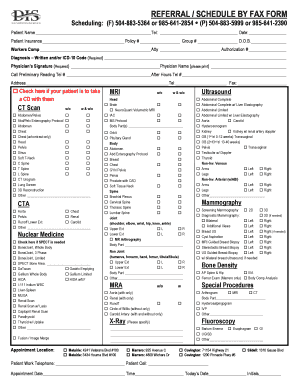
The Diagnostic Imaging Appointment Form is a medical document used by patients to schedule and provide necessary information for diagnostic imaging exams.
pdfFiller scores top ratings on review platforms




Who needs Diagnostic Imaging Form?
Explore how professionals across industries use pdfFiller.

Diagnostic Imaging Form is needed by:
-
Patients seeking diagnostic imaging services
-
Referring physicians needing to authorize exams
-
Health insurance providers assessing coverage
-
Administrative staff coordinating appointments
-
Healthcare facilities managing patient information
Comprehensive Guide to Diagnostic Imaging Form
What is the Diagnostic Imaging Appointment Form?
The Diagnostic Imaging Appointment Form serves as a crucial tool for scheduling diagnostic imaging exams in Connecticut. This medical imaging form is essential for both healthcare providers and patients to ensure a smooth appointment process. Key information required by the form includes the patient's personal details, exam type, and insurance information, all necessary for efficient care delivery.
In the context of healthcare services, the form streamlines communication between patients and medical facilities, facilitating a straightforward process for booking essential medical imaging services.
Why Use the Diagnostic Imaging Appointment Form?
Utilizing the Diagnostic Imaging Appointment Form offers several notable benefits for both patients and physicians. It enhances the efficiency of appointment scheduling and allows for effective information collection prior to the exam. This medical imaging form plays a vital role in preparing patients for diagnostic procedures by outlining necessary pre-exam guidelines.
Moreover, the requirement for the referring physician's signature ensures clear communication about the patient's needs, which can significantly improve the quality of care received.
Key Features of the Diagnostic Imaging Appointment Form
The Diagnostic Imaging Appointment Form includes significant components that ensure comprehensive data collection. Users will find fields such as "Appointment Date," "Patient’s Name," and "Exam," which are essential for processing requests accurately.
-
Users can easily select exam types via checkboxes, facilitating quicker entries.
-
The clinical information section is critical for providing necessary details for accurate diagnoses.
These elements are designed to support both patients and healthcare professionals during the diagnostic imaging process in Connecticut, enhancing overall care quality.
Who Needs the Diagnostic Imaging Appointment Form?
The Diagnostic Imaging Appointment Form is necessary for various stakeholders within the healthcare process. Patients seeking diagnostic imaging must complete this form accurately to ensure their needs are met, while referring physicians play a critical role in endorsing the patient's request.
Completeness of the form is vital, as it minimizes potential delays in scheduling. Specific requirements may vary based on the type of diagnostic imaging being requested, making it essential for all involved parties to adhere to the guidelines provided.
How to Fill Out the Diagnostic Imaging Appointment Form Online
Completing the Diagnostic Imaging Appointment Form online is straightforward. Here are steps to guide users through the process:
-
Access the form on pdfFiller and select the desired fields for entry.
-
Provide essential information such as the patient’s name, date of birth, and the specific exam being requested.
-
Ensure all required fields are filled to avoid common errors like omissions.
By utilizing the fillable features available in pdfFiller, users can enhance their experience and simplify the completion of the form.
Submitting the Diagnostic Imaging Appointment Form
Once the Diagnostic Imaging Appointment Form is completed, it must be submitted through specified channels. The form can typically be submitted online or in-person, depending on the facility's preferences.
-
Be aware of any deadlines associated with submission to ensure timely processing.
-
Confirmation processes will vary, but users can expect to receive acknowledgment of their submission shortly after.
Security and Compliance Considerations
When filling out the Diagnostic Imaging Appointment Form, it is crucial to consider security and compliance aspects. Handling sensitive information requires robust data protection measures. pdfFiller adheres to HIPAA and GDPR regulations, ensuring that all information is managed securely.
The platform employs 256-bit encryption, providing additional assurances for the protection of personal and medical data, which is paramount in healthcare settings.
Completing Your Diagnostic Imaging Experience
Utilizing pdfFiller for your form needs greatly enhances the diagnostic imaging experience. With features designed for ease of use, pdfFiller allows for seamless editing and management of forms.
-
Take advantage of additional functionalities like eSigning and sharing options to streamline processes.
-
Embrace the comprehensive benefits that pdfFiller offers for this and other medical forms.
How to fill out the Diagnostic Imaging Form
-
1.Begin by accessing pdfFiller and searching for 'Diagnostic Imaging Appointment Form'. Find and open the form in the platform.
-
2.Familiarize yourself with the layout. You'll see fillable fields for patient information, exam type, and insurance details.
-
3.Gather all necessary information including your full name, date of birth, the type of exam required, and any relevant clinical information before you start filling the form.
-
4.Begin filling out the 'Appointment Date' and 'Patient’s Name' fields. Ensure your details are accurate.
-
5.Proceed to enter your date of birth in the 'D.O.B.' field. This information is crucial for your appointment.
-
6.Select the type of exam required from the available checkboxes. This step ensures you receive the correct diagnostic imaging.
-
7.Fill in your clinical information, insurance details, and, if applicable, the Pre-Auth# and Diagnosis/ICD-9 Code.
-
8.Request the referring physician to review the form and sign their printed name and signature in the designated fields.
-
9.After completing all fields, review the form carefully for any mistakes or missing information.
-
10.Once satisfied with the details, save your completed form by clicking on the 'Save' button. You can also download it in your preferred format.
-
11.For submission, either print the form out or use pdfFiller's submit feature to send it directly to the healthcare provider.

Who needs to sign the Diagnostic Imaging Appointment Form?
Both the patient and the referring physician are required to sign the form. This is essential for authorizing the diagnostic imaging appointment and ensuring all necessary information is documented.
What information do I need to complete the form?
Gather your personal details such as name and date of birth, the specific exam type required, clinical information, insurance details, and the signature of your referring physician before starting to fill out the form.
How do I submit the completed form?
You can submit the completed Diagnostic Imaging Appointment Form by printing it out and delivering it to your healthcare provider or using pdfFiller to electronically submit the form directly through their platform.
Are there deadlines for submitting this form?
While specific deadlines may vary by provider, it is recommended to submit the form at least a few days in advance of your scheduled appointment to ensure all necessary arrangements are made.
What common mistakes should I avoid when completing the form?
Check for accuracy in all personal and clinical information. Ensure all required signatures are obtained, and avoid leaving any fields incomplete to prevent delays in processing your appointment.
Is notarization required for this form?
No, the Diagnostic Imaging Appointment Form does not require notarization. However, both patient and referring physician signatures are mandatory for validation.
What should I do if I encounter issues filling the form on pdfFiller?
If you experience issues while using pdfFiller, check their support section for troubleshooting tips, or contact their customer service for assistance with your specific concerns.
Related Forms





Get the latest insights from our blog


If you believe that this page should be taken down, please follow our DMCA take down process
here
.
This form may include fields for payment information. Data entered in these fields is not covered by PCI DSS compliance.