
Last updated on
Nov 9, 2026
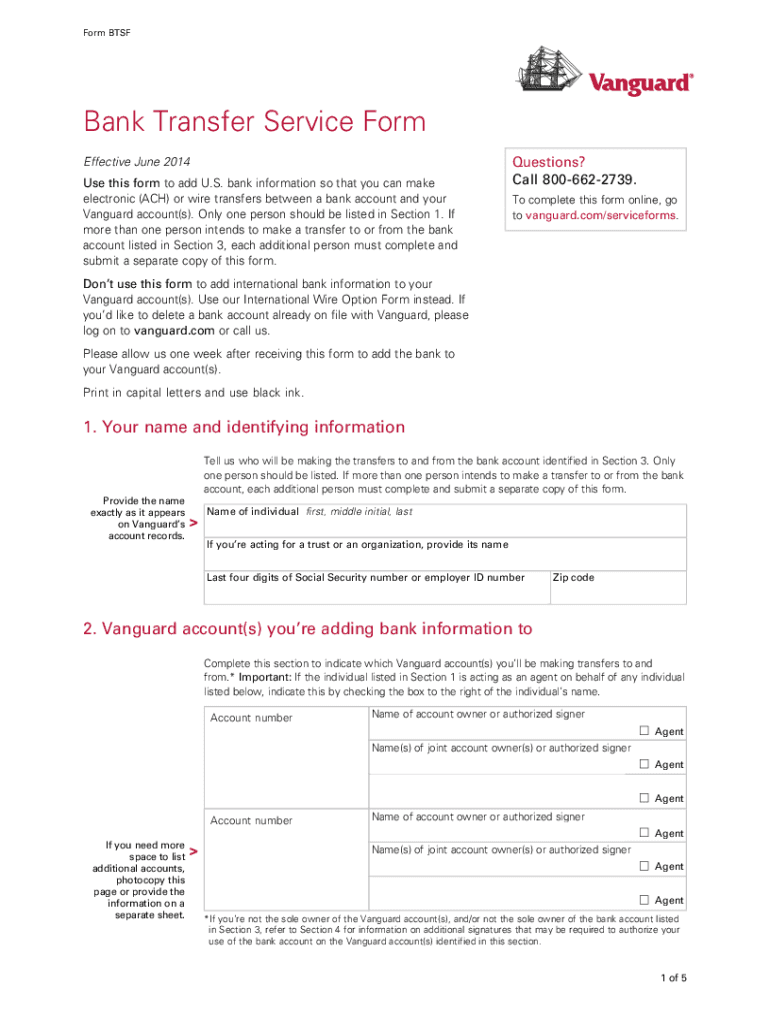
Vanguard BTSF 2014 free printable template
pdfFiller is not affiliated with any government organization

Fill out
Complete the form online in a simple drag-and-drop editor.

eSign
Add your legally binding signature or send the form for signing.

Share
Share the form via a link, letting anyone fill it out from any device.

Export
Download, print, email, or move the form to your cloud storage.
Why pdfFiller is the best tool for your documents and forms


End-to-end document management
From editing and signing to collaboration and tracking, pdfFiller has everything you need to get your documents done quickly and efficiently.
Accessible from anywhere
pdfFiller is fully cloud-based. This means you can edit, sign, and share documents from anywhere using your computer, smartphone, or tablet.
Secure and compliant
pdfFiller lets you securely manage documents following global laws like ESIGN, CCPA, and GDPR. It's also HIPAA and SOC 2 compliant.
What is Vanguard BTSF
The Bank Transfer Service Form is a service agreement used by Vanguard account holders to add U.S. bank information for electronic (ACH) or wire transfers to their Vanguard accounts.
pdfFiller scores top ratings on review platforms




It is a good program.. wish I could change the font size
Makes my life easier to fill in the blanks for very important issues I am dealing with !!
Who needs Vanguard BTSF?
Explore how professionals across industries use pdfFiller.

Vanguard BTSF is needed by:
-
Vanguard account owners seeking to manage bank transfers.
-
Bank account owners looking to establish electronic transfers.
-
Financial professionals assisting clients with account transfers.
-
Individuals needing to update bank information for transfers.
-
Small business owners managing funds between accounts.
Comprehensive Guide to Vanguard BTSF
What is the Bank Transfer Service Form?
The Bank Transfer Service Form is essential for Vanguard account holders who need to add bank information for electronic (ACH) or wire transfers. This form facilitates transactions between an external bank account and Vanguard accounts, allowing users to manage their investments more efficiently. By completing this form, account holders can ensure secure and authorized transactions by providing the necessary bank details.
Purpose and Benefits of the Bank Transfer Service Form
This form serves to enhance the transfer process by collecting crucial bank details from users, thereby streamlining their transactions. Users benefit from a secure framework that ensures proper authorization for each transfer. It is designed not only to facilitate transfers but also to protect users during the process, making it an indispensable tool for anyone looking to manage their Vanguard accounts.
Who Needs the Bank Transfer Service Form?
The primary users of the Bank Transfer Service Form are Vanguard account owners and bank account owners interested in linking their financial accounts. Individuals wishing to manage their investments through Vanguard must verify that they meet the eligibility criteria for completing this form. This includes having an active Vanguard account and a U.S. bank account to ensure proper integration.
Key Features of the Bank Transfer Service Form
The Bank Transfer Service Form comes with several key features that facilitate its use:
-
Detailed instructions on accurately completing the form.
-
Multiple blank fields designed for user input.
-
Checklists to ensure all necessary sections are filled out.
These features are aimed at helping users navigate the form easily and prevent any errors during submission.
Step-by-Step Guide to Filling Out the Bank Transfer Service Form Online
To fill out the Bank Transfer Service Form online, follow these steps:
-
Access the form on the Vanguard website or through your account.
-
Begin by filling out your personal information and bank details.
-
Provide necessary signatures where indicated.
-
Review each section for accuracy before submission.
This structured approach ensures that all essential information is captured, minimizing the risk of delay in processing your request.
Common Mistakes and How to Avoid Them
While filling out the Bank Transfer Service Form, users often encounter a few common mistakes. It's crucial to be aware of these pitfalls:
-
Omitting required fields, which can lead to delays.
-
Inaccurately entering bank details, resulting in processing issues.
-
Failing to review the form for errors prior to submission.
Taking the time to double-check completed entries can greatly improve the submission experience and expedite processing times.
How to Sign and Submit the Bank Transfer Service Form
Signing and submitting the Bank Transfer Service Form can be done in several ways. Users have the option to utilize digital signatures or traditional wet signatures, depending on their preference. After signing, ensure the form is submitted via the designated channels outlined on the form to confirm it reaches Vanguard successfully.
What Happens After You Submit the Bank Transfer Service Form?
Upon submission, users can expect a confirmation process that notifies them of the status of their application. Tracking your submission is important to ensure that the form has been processed correctly. Users should pay attention to any follow-up communications from Vanguard regarding the next steps in their transfer process.
Protecting Your Information: Security and Compliance
Security is paramount when submitting the Bank Transfer Service Form. pdfFiller employs robust security measures, such as encryption, to secure sensitive information. Compliance with data protection regulations, including HIPAA and GDPR, helps ensure that user data is handled with the utmost care, allowing for a secure submission experience.
Get Started with pdfFiller Today
pdfFiller offers a user-friendly platform for managing all aspects of your form submissions. With capabilities like editing, filling, eSigning, and submitting forms online, users can efficiently manage their bank transfer requests while enjoying high levels of security. The platform simplifies the process, ensuring that form completion and management are straightforward and accessible.
How to fill out the Vanguard BTSF
-
1.Access the Bank Transfer Service Form on pdfFiller by visiting their website and searching for the form by name.
-
2.Open the form in the pdfFiller interface to begin filling it out.
-
3.Before starting, gather your personal information, including Vanguard account numbers and bank account details.
-
4.Utilize the text fields provided to enter your personal information clearly, ensuring accuracy with your name, address, and bank details.
-
5.Use the checkboxes to specify the intended Vanguard accounts for each transfer.
-
6.Review the instructions included in the form, such as 'Print in capital letters and use black ink' to ensure compliance.
-
7.After completing all fields, carefully review the entire form to verify all information is accurate and complete.
-
8.Finalize the form by signing in the designated areas as required by both the Vanguard account and bank account owner roles.
-
9.Once finalized, you can save the form directly on pdfFiller or download it for submission.
-
10.Submit the completed form as per your preference or Vanguard's submission guidelines for processing.

Who is eligible to use the Bank Transfer Service Form?
Any individual who is a Vanguard account holder and wishes to link their U.S. bank information for electronic transfers is eligible to use this form.
What should I do if I make a mistake on the form?
If you notice an error after filling out the form, it is best to start over with a new form to ensure all information is accurate before submission.
How do I submit the completed form?
After completing the Bank Transfer Service Form, you can submit it online through your Vanguard account, or print and mail it according to the guidelines provided by Vanguard.
Is notarization required for this form?
No, notarization is not required for the Bank Transfer Service Form according to the current metadata.
What information do I need to fill out the form?
You will need your personal identification, Vanguard account numbers, and bank account information, including account number and routing number.
Can I use this form for international transfers?
This form is specifically designed for U.S. bank information only and may not be suitable for international transfers. Please consult Vanguard for international transfer options.
How long does it take for my transfer request to process?
Processing times for transfers via this form can vary, but typically, electronic transfers may take 1-3 business days to complete. Always check with Vanguard for the most accurate timelines.
Vanguard BTSF Form Versions
Related Forms





Related Catalogs
Get the latest insights from our blog


If you believe that this page should be taken down, please follow our DMCA take down process
here
.
This form may include fields for payment information. Data entered in these fields is not covered by PCI DSS compliance.