
Last updated on
Oct 19, 2026

Canada North Grenville Learning Centre Child Care Registration Form 2007-2026 free printable tem...
We are not affiliated with any brand or entity on this form

Fill out
Complete the form online in a simple drag-and-drop editor.

eSign
Add your legally binding signature or send the form for signing.

Share
Share the form via a link, letting anyone fill it out from any device.

Export
Download, print, email, or move the form to your cloud storage.
Why pdfFiller is the best tool for your documents and forms


End-to-end document management
From editing and signing to collaboration and tracking, pdfFiller has everything you need to get your documents done quickly and efficiently.
Accessible from anywhere
pdfFiller is fully cloud-based. This means you can edit, sign, and share documents from anywhere using your computer, smartphone, or tablet.
Secure and compliant
pdfFiller lets you securely manage documents following global laws like ESIGN, CCPA, and GDPR. It's also HIPAA and SOC 2 compliant.
What is Canada North Grenville Learning Centre Child Care Registration Form
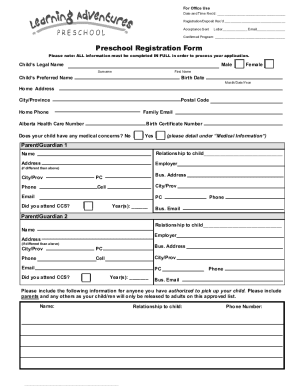
The Child Care Registration Form is a personal document used by North Grenville Co-operative Pre-School and Learning Centre to gather essential information about children and their guardians for preschool enrollment.
pdfFiller scores top ratings on review platforms




Who needs Canada North Grenville Learning Centre Child Care Registration Form?
Explore how professionals across industries use pdfFiller.

Canada North Grenville Learning Centre Child Care Registration Form is needed by:
-
Parents or guardians enrolling their children in preschool
-
Child care providers requiring registration information
-
Local education authorities overseeing preschool enrollment
-
Social service agencies assisting families with child care
-
Early childhood educators managing intake forms
-
Community organizations focused on child welfare
Comprehensive Guide to Canada North Grenville Learning Centre Child Care Registration Form
What is the Child Care Registration Form?
The Child Care Registration Form is essential for gathering specific information about children enrolling in child care programs, particularly at the North Grenville Co-operative Pre-School and Learning Centre. This form serves as a critical tool for parents and guardians in Ontario, allowing them to provide necessary details for their children's care.
This Ontario child care form not only facilitates registration but also ensures that caregivers have relevant and comprehensive information to provide optimal care for each child.
Purpose and Benefits of the Child Care Registration Form
The primary purpose of the Child Care Registration Form is to streamline the organization of child care needs. By completing this form, users can efficiently communicate their expectations and requirements to caregivers.
Having accurate and comprehensive information readily available allows facilities to plan effectively and cater to each child’s unique needs. Key benefits include the management of emergency contacts and authorization details, ensuring a smooth continuation of care when parents are unavailable.
Key Features of the Child Care Registration Form
The Child Care Registration Form includes several important fields such as the child's name, birth date, and address. It also requires information on emergency contacts, which is crucial for safe care.
-
Options for selecting desired child care days
-
Identifying authorized individuals for child pick-up
-
Availability of fillable fields for improved efficiency
Who Needs the Child Care Registration Form?
This form is designed for a wide demographic which includes parents, guardians, and care providers. Those who intend to enroll a child in preschool or any child care facility in Ontario should utilize the Child Care Registration Form.
It’s essential that the information provided is accurate, as it directly affects the child care services offered by facilities. Ensuring thorough entries on the form can lead to a seamless registration process.
How to Fill Out the Child Care Registration Form Online (Step-by-Step)
Filling out the Child Care Registration Form online is a straightforward process. Here’s a step-by-step guide:
-
Access the form via the designated platform.
-
Enter the child’s name, birth date, and address.
-
Fill in emergency contact information.
-
Select preferred child care days and authorized pickup individuals.
-
Utilize pdfFiller’s features, like eSigning, to finalize the form.
Before submission, always check for common errors to ensure accuracy and completeness.
Submission Methods and Important Details
Once the Child Care Registration Form is filled, users have various submission methods available. These include:
-
Online submission through the designated platform
-
In-person delivery to the child care facility
-
Postal mail to the facility’s address
It's essential to be aware of any potential fees, deadlines, and processing times associated with these submissions. Tracking submissions and receiving confirmations is also crucial to ensure successful registration.
Security and Compliance When Using the Child Care Registration Form
Using the Child Care Registration Form during the registration process requires a focus on data security. pdfFiller employs encryption techniques to protect sensitive information, ensuring compliance with privacy regulations like HIPAA and GDPR.
It’s imperative for users to be mindful of privacy concerns when filling out child care forms, reaffirming the importance of secure handling of personal and sensitive data.
What Happens After You Submit the Child Care Registration Form?
Once the registration form is submitted, users can expect a confirmation of submission. Processing times may vary, so it's important to keep track of the submission status.
If any issues arise post-submission, guidance on how to check the application status should be readily available to resolve concerns efficiently.
How to Correct or Amend the Child Care Registration Form
If incorrect information has been submitted on the Child Care Registration Form, steps must be taken to amend it. Users should follow these procedures:
-
Contact the child care facility to inform them of the mistake.
-
Request the necessary amendments to the submitted form.
-
Resend the corrected information as required.
Common reasons for form rejections often relate to incomplete information or inaccuracies, so being thorough can help mitigate these issues.
Manage Your Child Care Registration Form with pdfFiller
Leveraging pdfFiller for managing your Child Care Registration Form can enhance your experience significantly. Not only does it streamline the online form filling process, but it also includes various features such as eSigning and the option to save and share documents.
By creating an account on pdfFiller, users can easily manage their forms, ensuring efficient and secure handling of important documents.
How to fill out the Canada North Grenville Learning Centre Child Care Registration Form
-
1.To access the Child Care Registration Form, visit pdfFiller’s website and search for the form by name.
-
2.Once located, click on the form to open it in the pdfFiller editing interface.
-
3.Review the fields included in the form to understand what information is needed. Gather necessary details such as your child's name, birth date, address, and emergency contact details before starting.
-
4.Begin filling in the form by selecting the appropriate fields for your child’s information. Use the text boxes to input their name and birth date accurately.
-
5.Continue by providing your address and any additional details requested in the specified sections.
-
6.For days required for child care, utilize the checkboxes to select all applicable days that your child will need care.
-
7.When you reach the section for authorized pick-up individuals, ensure you list everyone who is permitted to pick up your child, taking care to note any restrictions as well.
-
8.After filling in all required fields, review the form thoroughly to check for accuracy and completeness.
-
9.Once you are satisfied that all information is correctly entered, save your edits to ensure your progress.
-
10.Choose the download option to save the form as a PDF or submit it directly through pdfFiller's integrated submission features.

Who is eligible to fill out the Child Care Registration Form?
The Child Care Registration Form is intended for parents or guardians of children who are enrolling in the North Grenville Co-operative Pre-School. Any guardian responsible for child care decisions can complete this form.
What information do I need to complete the form?
Before starting the Child Care Registration Form, gather your child's name, date of birth, home address, emergency contacts, and details of individuals authorized to pick up your child. This will streamline the filling process.
How can I submit the completed form?
You can submit the completed Child Care Registration Form directly through pdfFiller by using the submission feature. Alternatively, you can download the filled form and submit it via email or in person to the preschool.
Are there any common mistakes to avoid when filling out the form?
Common mistakes include forgetting to fill in all required fields, providing incorrect birth dates, or neglecting to list all authorized pick-up individuals. Always double-check before submission.
Is there a deadline for submitting the registration form?
It is essential to check with the North Grenville Co-operative Pre-School for specific registration deadlines. Typically, early submission is advised to secure a spot for your child.
What happens after I submit my form?
After submitting your Child Care Registration Form, the preschool will review the information provided. They will contact you if additional details are required or to confirm your child's enrollment.
Do I need to notarize the Child Care Registration Form?
No, the Child Care Registration Form does not require notarization. It is a straightforward application form used primarily for gathering information related to child care.
Related Forms






Related Catalogs
Get the latest insights from our blog



If you believe that this page should be taken down, please follow our DMCA take down process
here
.
This form may include fields for payment information. Data entered in these fields is not covered by PCI DSS compliance.