
Last updated on
Nov 6, 2026

ZA Self Insurance Reserve Public Liability Claim Form - Ethekwini Municipality 2012-2026 free pr...
We are not affiliated with any brand or entity on this form

Fill out
Complete the form online in a simple drag-and-drop editor.

eSign
Add your legally binding signature or send the form for signing.

Share
Share the form via a link, letting anyone fill it out from any device.

Export
Download, print, email, or move the form to your cloud storage.
Why pdfFiller is the best tool for your documents and forms


End-to-end document management
From editing and signing to collaboration and tracking, pdfFiller has everything you need to get your documents done quickly and efficiently.
Accessible from anywhere
pdfFiller is fully cloud-based. This means you can edit, sign, and share documents from anywhere using your computer, smartphone, or tablet.
Secure and compliant
pdfFiller lets you securely manage documents following global laws like ESIGN, CCPA, and GDPR. It's also HIPAA and SOC 2 compliant.
What is ZA Self Insurance Reserve Public Liability Claim Form - Ethekwini Municipality
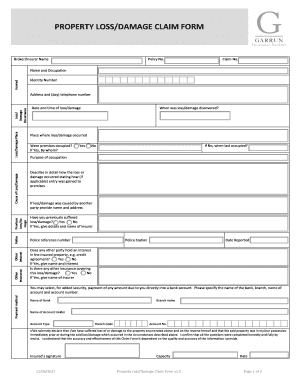
The Public Liability Claim Form is a legal document used by individuals in KwaZulu-Natal, South Africa, to file claims against the eThekwini Municipality for accidents or incidents.
pdfFiller scores top ratings on review platforms




I have been using PDFfiller for about a month now and it has served as a valuable part of what I do. My client's have found the new documents easy to open, download, or sign.
Very good
Very good, it is a very helpfull page, very good
Who needs ZA Self Insurance Reserve Public Liability Claim Form - Ethekwini Municipality?
Explore how professionals across industries use pdfFiller.

ZA Self Insurance Reserve Public Liability Claim Form - Ethekwini Municipality is needed by:
-
Individuals involved in accidents within eThekwini Municipality
-
Residents of KwaZulu-Natal seeking compensation
-
Claimants needing to report municipal liability incidents
-
Witnesses looking to provide evidence for a claim
-
Legal representatives assisting clients with claims
-
Anyone requiring reimbursement for damages by the municipality
Comprehensive Guide to ZA Self Insurance Reserve Public Liability Claim Form - Ethekwini Municipality
What is the Public Liability Claim Form?
The Public Liability Claim Form is a vital document for individuals in KwaZulu-Natal seeking compensation for accidents involving the eThekwini Municipality. It serves as a formal submission to report incidents and initiate claims against the municipality. This form can be utilized by anyone who has experienced an accident or incident within the jurisdiction of KwaZulu-Natal, allowing victims to seek redress effectively.
Why Use the Public Liability Claim Form?
Using the Public Liability Claim Form is essential for claimants as it provides a structured way to seek protection and compensation. This process is supported by the legal framework governing municipal liability, ensuring that victims of accidents have recourse to appropriate remedies. Additionally, filling out the form via pdfFiller simplifies the process, making it user-friendly and efficient.
Who Needs the Public Liability Claim Form?
The Public Liability Claim Form is intended for individuals who have been injured or adversely affected by accidents within the municipality. Eligible claimants include victims of incidents such as slips, trips, or falls. It is important to note that witnesses can play a significant role in supporting claims by providing testimonies and documentation, which strengthens the case for compensation.
Eligibility Criteria for Filing a Public Liability Claim
To file a Public Liability Claim, individuals must meet specific eligibility criteria set by the eThekwini Municipality. Conditions that typically qualify for claims include incidents that occur on municipal property or as a result of municipal negligence. Furthermore, there are strict timelines within which claims must be submitted following an incident, making it crucial for claimants to act promptly.
How to Fill Out the Public Liability Claim Form Online
Filling out the Public Liability Claim Form online is straightforward with pdfFiller. Follow these steps:
-
Access the form through pdfFiller.
-
Complete essential fields such as claimant details, specifics of the accident, and witness information.
-
Review your entries using the provided checklist to ensure all information is accurate.
By utilizing pdfFiller, users can submit their claims efficiently and accurately.
Required Documents and Supporting Materials
When submitting the Public Liability Claim Form, specific documents must accompany it for effective processing. These include:
-
Copies of identification documents.
-
Proof of any damages incurred, such as medical reports or repair quotes.
-
Affidavits that support the claim narrative.
Each document plays a crucial role in substantiating the claim, enhancing the likelihood of a favorable outcome. It is advisable to organize these documents meticulously before submission.
Submission Methods for the Public Liability Claim Form
There are multiple ways to submit the Public Liability Claim Form once completed. Claimants can choose from the following submission methods:
-
Online submission through pdfFiller.
-
Mailing the completed form to the municipal office.
-
In-person delivery at designated municipal locations.
Claimants should be aware of any associated submission fees and the important deadlines for filing their claims.
What Happens After You Submit the Public Liability Claim Form?
Upon submission of the Public Liability Claim Form, claimants will receive confirmation of their claim’s receipt. Claim tracking options may be available, allowing individuals to monitor the status of their claims. In the event of a claim rejection, claimants should be prepared to understand the next steps and possible actions, as well as typical timelines for determinations regarding their claims.
Protection of Your Data with pdfFiller
pdfFiller prioritizes the security of user data when filling out the Public Liability Claim Form. The platform employs 256-bit encryption to safeguard sensitive information. Additionally, it complies with relevant regulations such as HIPAA and GDPR, ensuring that your data remains protected throughout the claim-filing process.
Maximizing Your Claim Success with pdfFiller
Utilizing pdfFiller for completing your Public Liability Claim Form enhances the chances of a successful submission. This platform offers numerous features, including eSigning and document management, to streamline the filing experience. Users are encouraged to take advantage of these benefits and get started on their claims efficiently, ensuring a smooth process from start to finish.
How to fill out the ZA Self Insurance Reserve Public Liability Claim Form - Ethekwini Municipality
-
1.To access the Public Liability Claim Form, visit pdfFiller's website and search for the form name or browse in the Government Forms section.
-
2.Once you find the form, click on it to open it in the pdfFiller editor.
-
3.Before filling out the form, ensure you have all necessary information handy, including your full name, ID number, and details of the incident.
-
4.Using pdfFiller’s interface, navigate to each field to enter your information. Click on the blank fields to type in your responses and use the checkbox options as needed.
-
5.Make sure to provide a thorough description of the accident, include the names of any witnesses, and clearly document your claims for damages.
-
6.Attach any required supporting documents such as a copy of your ID, evidence of damages, quotations, and a sworn affidavit using the upload feature within the form.
-
7.Review your completed form carefully, double-checking all entered information and ensuring you have signed where indicated.
-
8.Once you are satisfied with the form's contents, proceed to save your work. You can download a copy of the completed form for your records.
-
9.Finally, submit the form as instructed, which may involve emailing it to the municipality or delivering a hard copy in person.

Who is eligible to submit the Public Liability Claim Form?
Eligibility for the Public Liability Claim Form typically includes individuals who have been involved in accidents or incidents within the eThekwini Municipality that caused them damages or injuries.
What documents are required to submit this claim?
To submit the Public Liability Claim Form, you will need to attach a copy of your ID, details of the accident, witness information, proof of damages, and sometimes a sworn affidavit.
How can I submit the Public Liability Claim Form?
You can submit the completed form by either delivering it in person to the eThekwini Municipality’s claim office or emailing it to the designated claims department as outlined in the submission guidelines.
What are common mistakes to avoid when filling out the form?
Common mistakes include failing to sign the form, omitting required details, or forgetting to attach necessary documentation. Always double-check your entries before submitting.
Are there any deadlines to be aware of for submitting this claim?
Typically, government forms like the Public Liability Claim Form have specific submission deadlines related to the incident event date. It’s important to check with local regulations for exact timeframes.
How long does it take for claims to be processed?
Processing times for the Public Liability Claim Form can vary. Generally, it may take several weeks to months, depending on the complexity of the claim and the municipality's workload.
Is notarization required for this form?
No, notarization is not required for the Public Liability Claim Form. However, you must sign the form to validate your claim submission.
Related Content
Related Forms





Get the latest insights from our blog


If you believe that this page should be taken down, please follow our DMCA take down process
here
.
This form may include fields for payment information. Data entered in these fields is not covered by PCI DSS compliance.