
Last updated on
Nov 9, 2026

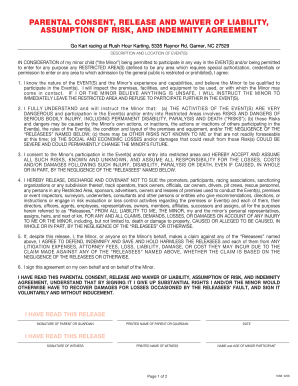
MN Prokart Indoor Racing Form 1068 2006-2026 free printable template
pdfFiller is not affiliated with any government organization

Fill out
Complete the form online in a simple drag-and-drop editor.

eSign
Add your legally binding signature or send the form for signing.

Share
Share the form via a link, letting anyone fill it out from any device.

Export
Download, print, email, or move the form to your cloud storage.
Why pdfFiller is the best tool for your documents and forms


End-to-end document management
From editing and signing to collaboration and tracking, pdfFiller has everything you need to get your documents done quickly and efficiently.
Accessible from anywhere
pdfFiller is fully cloud-based. This means you can edit, sign, and share documents from anywhere using your computer, smartphone, or tablet.
Secure and compliant
pdfFiller lets you securely manage documents following global laws like ESIGN, CCPA, and GDPR. It's also HIPAA and SOC 2 compliant.
What is MN Prokart Indoor Racing Form 1068
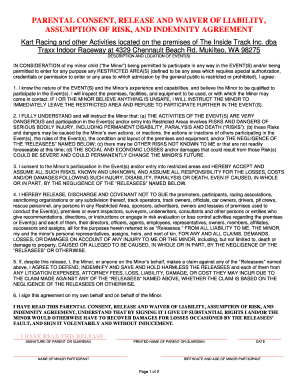
The Parental Consent and Waiver of Liability is a legal document used by parents or guardians to grant permission for a minor to participate in potentially dangerous events while waiving liability for injuries or damages.
pdfFiller scores top ratings on review platforms




Who needs MN Prokart Indoor Racing Form 1068?
Explore how professionals across industries use pdfFiller.

MN Prokart Indoor Racing Form 1068 is needed by:
-
Parents or guardians of minors participating in events
-
Event organizers requiring parental consent for minors
-
Legal representatives handling family law matters
-
Schools or educational institutions organizing activities for students
-
Youth sports clubs or organizations facilitating events for minors
Comprehensive Guide to MN Prokart Indoor Racing Form 1068
What is the Parental Consent and Waiver of Liability?
The Parental Consent and Waiver of Liability form is a critical document for event participation, particularly for minors. It serves to inform parents or guardians about the inherent risks associated with certain activities, ensuring they understand their child's potential exposure to danger. This form also plays a vital role in legal terms, as it acknowledges the acceptance of risks and waives liability for any injuries that may occur to the minor participant.
Through this document, organizers can protect themselves while granting necessary permissions for minors to engage in activities, thus highlighting the document's importance in legal frameworks.
Purpose and Benefits of the Parental Consent and Waiver of Liability
The primary purpose of this form is to grant permission for minors to take part in events while acknowledging any associated risks. By using this form, both organizers and parents are safeguarded, as it clearly states the potential dangers involved, which can prevent misunderstandings or disputes over injuries or accidents.
Advantages of the Parental Consent and Waiver of Liability include facilitating a smoother event experience, eliminating uncertainties about responsibility, and strengthening the legal standing for both parties should an incident arise.
Key Features of the Parental Consent and Waiver of Liability
This document comprises several essential components that must be duly filled out and signed. Key features include:
-
Required signatures from the Parent or Guardian, Witness, and Minor Participant.
-
Multiple fillable fields that guide users through essential information like names and dates.
-
Clarity in the responsibilities and acknowledgments required from all involved parties.
Understanding these features ensures that all parties comply fully with legal requirements and minimize risks.
Who Needs the Parental Consent and Waiver of Liability?
It is crucial for several individuals to complete this form when organizing events. Specifically, the roles include:
-
Parent or Guardian: Must sign to consent for the minor.
-
Witness: Required to confirm the validity of the signatures.
-
Minor Participant: Must acknowledge participation and awareness of risks.
Situations necessitating this form typically include sports activities, summer camps, or any event where potential physical challenges arise. This documentation provides robust protection for everyone involved.
How to Fill Out the Parental Consent and Waiver of Liability Online
Filling out the form accurately is crucial for validity. To ensure correct completion, follow these steps:
-
Start by entering the name and age of the minor participant.
-
Provide the Parent or Guardian's printed name and signature.
-
Have the Witness sign and print their name as well.
-
Review each fillable field for accuracy before submission.
Taking these precautions helps avoid any potential issues with the form processing.
How to Sign the Parental Consent and Waiver of Liability
Understanding the signing process is essential for making the document legally binding. Users must choose between digital signatures and wet signatures:
-
Digital signatures offer convenience but must meet verification requirements.
-
Wet signatures necessitate physical signing, often requiring a witness for legality.
Ensuring that all parties sign the document helps maintain its legal validity and protects their interests.
Common Errors and How to Avoid Them with the Parental Consent and Waiver of Liability
When completing the form, individuals often encounter issues that can lead to rejection. Common errors include:
-
Missing signatures from any of the required parties.
-
Omissions in the fillable fields that convey critical information.
Adopting best practices, such as double-checking all entries and ensuring all signatures are present, can minimize errors during the online filling process.
Security and Compliance When Using the Parental Consent and Waiver of Liability
Ensuring the security of sensitive information is paramount when handling legal documents. pdfFiller employs advanced security measures, including:
-
256-bit encryption to protect user data.
-
Compliance with HIPAA and GDPR regulations for privacy.
By prioritizing security, pdfFiller guarantees that user data and document integrity are upheld throughout the form completion process.
Where to Submit the Parental Consent and Waiver of Liability
Submission of the completed form may take place through various channels, depending on the organizer's requirements. Options include:
-
In-person submissions to event coordinators or legal representatives.
-
Online submissions via designated platforms or email.
Submit the forms timely to avoid potential issues, as deadlines may vary and late submissions could have consequences impacting event participation.
Experience the Benefits of pdfFiller for Your Parental Consent and Waiver of Liability Needs
Utilizing pdfFiller for completing the Parental Consent and Waiver of Liability offers numerous advantages. The platform simplifies the editing, signing, and sharing of legal forms, making the process accessible and efficient for users.
Many users have found that pdfFiller enhances their form-filling experience significantly, leading to smoother engagement in legal matters.
How to fill out the MN Prokart Indoor Racing Form 1068
-
1.Access pdfFiller and log into your account or create one if necessary.
-
2.Search for 'Parental Consent and Waiver of Liability' in the templates section and select it to open.
-
3.Begin by gathering the necessary information, including the names of the parent or guardian, minor participant, and witnesses.
-
4.Utilize the fillable fields in pdfFiller's interface to enter the required information in the designated sections.
-
5.Fill out the 'SIGNATURE OF PARENT OR GUARDIAN' and 'PRINTED NAME OF PARENT OR GUARDIAN' areas carefully.
-
6.Proceed to enter the date of signing in the appropriate field.
-
7.Next, locate the 'SIGNATURE OF WITNESS' section and ensure the witness completes the required fields.
-
8.Collect the names and ages of the minor participant and have them sign in the 'SIGNATURE OF MINOR PARTICIPANT' field.
-
9.After completing all required fields, review the form to ensure all information is correct and all signatures are present.
-
10.Finalize the form by saving it within pdfFiller, choosing to download it as a PDF, or submitting it directly through the platform.

Who is eligible to sign this form?
The Parental Consent and Waiver of Liability form must be signed by a parent or legal guardian, a witness, and the minor participant themselves to be valid.
Is there a deadline for submitting this form?
It is advisable to submit the Parental Consent and Waiver of Liability form as soon as possible before the scheduled event to ensure all necessary permissions are documented.
How can I submit the completed form?
Once completed, you can submit the form through pdfFiller by downloading it or sending it directly to the event organizer via email or their preferred submission method.
Are there any supporting documents required?
Typically, no additional documents are required unless specified by the event organizer; however, verifying your identity as a parent or guardian may be necessary.
What common mistakes should I avoid?
Ensure all signatures are included, the information is accurate, and no fields are left blank to prevent delays in processing the form.
How long does it take to process this form?
Processing times for the Parental Consent and Waiver of Liability form may vary; however, if submitted properly, it’s often immediate for event participation.
What should I do if I need to make changes after signing?
If changes are necessary after the form has been signed, you will need to void the original form and complete a new one with the correct information.
Related Forms



Get the latest insights from our blog


If you believe that this page should be taken down, please follow our DMCA take down process
here
.
This form may include fields for payment information. Data entered in these fields is not covered by PCI DSS compliance.