
Last updated on
Nov 10, 2026
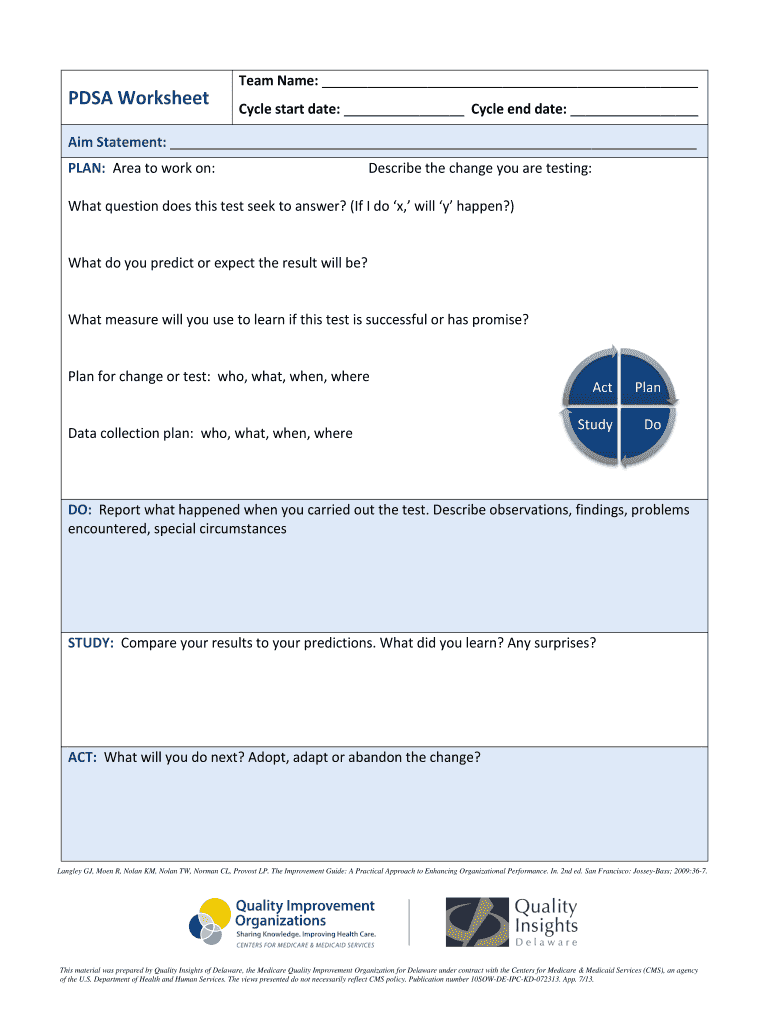
DE PDSA Worksheet 2013-2026 free printable template
pdfFiller is not affiliated with any government organization

Fill out
Complete the form online in a simple drag-and-drop editor.

eSign
Add your legally binding signature or send the form for signing.

Share
Share the form via a link, letting anyone fill it out from any device.

Export
Download, print, email, or move the form to your cloud storage.
Why pdfFiller is the best tool for your documents and forms


End-to-end document management
From editing and signing to collaboration and tracking, pdfFiller has everything you need to get your documents done quickly and efficiently.
Accessible from anywhere
pdfFiller is fully cloud-based. This means you can edit, sign, and share documents from anywhere using your computer, smartphone, or tablet.
Secure and compliant
pdfFiller lets you securely manage documents following global laws like ESIGN, CCPA, and GDPR. It's also HIPAA and SOC 2 compliant.
What is DE PDSA Worksheet
The PDSA Worksheet is a healthcare form used by medical teams to plan, implement, and evaluate changes in healthcare processes.
pdfFiller scores top ratings on review platforms




Who needs DE PDSA Worksheet?
Explore how professionals across industries use pdfFiller.

DE PDSA Worksheet is needed by:
-
Healthcare professionals seeking to improve processes
-
Quality improvement teams in hospitals
-
Medical administrators planning process changes
-
Research teams evaluating healthcare interventions
-
Healthcare educators teaching quality improvement
Comprehensive Guide to DE PDSA Worksheet
What is the PDSA Worksheet?
The PDSA Worksheet is a crucial tool in healthcare aimed at facilitating process improvement through systematic changes. It is directly related to the Plan-Do-Study-Act cycle, which serves as a framework for continuous improvement. This worksheet assists healthcare teams in planning, implementing, and evaluating changes by providing a structured format for tracking experiments and analyzing results.
By using the PDSA Worksheet, healthcare teams can effectively support their initiatives for testing and analyzing changes to enhance patient care and operational efficiency.
Purpose and Benefits of the PDSA Worksheet
Healthcare teams should utilize the PDSA Worksheet to foster a culture of continuous improvement. The structure of this worksheet promotes efficiency by allowing teams to document processes clearly, making it easier to identify areas for enhancement. One of its key benefits is the emphasis on data-driven decisions, which can lead to better patient outcomes.
Several examples illustrate these benefits; for instance, hospitals that have implemented the PDSA Worksheet have reported measurable improvements in patient wait times and overall satisfaction.
Key Features of the PDSA Worksheet
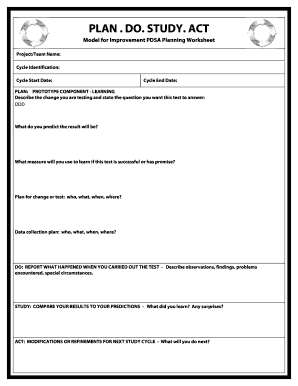
The PDSA Worksheet includes crucial sections that aid in the documentation of the improvement process. Key components of this worksheet follow:
-
Team Name
-
Cycle Start Date
-
Aim Statement
-
Instructions for data collection and reporting
-
Customizable fields to adapt to specific team needs
This fillable format not only makes it user-friendly but also customizable to fit the unique contexts of different healthcare organizations.
Who Needs the PDSA Worksheet?
The PDSA Worksheet serves a broad spectrum of users in the healthcare sector. Various healthcare professionals, including administrators, nurses, and quality improvement specialists, can benefit immensely from utilizing this worksheet.
It is beneficial in various settings such as hospitals, outpatient clinics, and nursing homes. Interdisciplinary teams can collaborate effectively by leveraging this tool to track their progress and enhance overall patient care.
How to Fill Out the PDSA Worksheet Online
Filling out the PDSA Worksheet online using pdfFiller is a straightforward process. Begin by accessing the PDSA Worksheet template on the platform. Follow these steps for successful completion:
-
Log into your pdfFiller account or create a new one.
-
Locate the PDSA Worksheet and open it for editing.
-
Fill in each section, ensuring that all fields are completed accurately.
-
Review your entries before finalizing the document.
Effective data collection and thorough completion are essential, therefore, take your time to ensure all information is correct.
Common Errors and How to Avoid Them
While completing the PDSA Worksheet, users often encounter several common pitfalls. Notably, inaccuracies may arise from incomplete fields or misinterpretation of instructions. Users should be aware of the following mistakes:
-
Failing to document all relevant data
-
Ignoring the specific instructions provided in the worksheet
-
Submitting the worksheet without a thorough review
To avoid these errors, review all entries carefully and consult with team members as needed to ensure accuracy.
Submitting Your PDSA Worksheet
Once the PDSA Worksheet is completed, you must submit it following the established procedures. Various submission methods are available:
-
Digital submission via email or an online portal
-
Paper submission if required by your organization
Meticulously adhere to submission deadlines and ensure compliance with security protocols, especially when sensitive information is included.
How pdfFiller Supports Your Use of the PDSA Worksheet
pdfFiller enhances the utility of the PDSA Worksheet by offering features designed for efficiency. Users can benefit from capabilities such as eSigning, secure document management, and easy sharing options. Additionally, the platform is compliant with HIPAA and privacy regulations, ensuring the protection of sensitive health information.
Utilizing pdfFiller simplifies the process of creating fillable forms, making it a valuable resource for healthcare teams.
Engage with pdfFiller to Enhance Your PDSA Process
To streamline the completion of the PDSA Worksheet, consider utilizing the myriad tools available through pdfFiller. User-friendly features are tailored to improve workflow and facilitate collaboration among team members. Moreover, strong security measures protect sensitive health information, reinforcing the platform's commitment to privacy and compliance.
How to fill out the DE PDSA Worksheet
-
1.Start by visiting pdfFiller and logging into your account or creating a new one if you don't have one.
-
2.Use the search bar to locate the PDSA Worksheet template by entering its name or relevant keywords.
-
3.Once you find the form, click on it to open in the pdfFiller editor.
-
4.Familiarize yourself with the layout of the form, ensuring you can identify each section that needs to be completed.
-
5.Before filling out the form, gather necessary information such as your team name, cycle dates, and aim statement to ensure accuracy.
-
6.Begin completing the form by clicking on each field and entering your information. You can use the highlight tool to make important data stand out.
-
7.Refer to the instructions provided within the form on how to collect data and report results effectively.
-
8.After completing the required sections, take a moment to review all entries for any errors or omissions.
-
9.Once you are satisfied with the information provided, save your progress frequently by clicking the save icon.
-
10.Choose to download the completed form or submit it directly through pdfFiller based on your needs.

Who should use the PDSA Worksheet?
The PDSA Worksheet is designed for healthcare professionals, quality improvement teams, and medical administrators who are looking to plan and evaluate changes in healthcare processes.
What information do I need before filling out the form?
Before starting, gather necessary information such as the team name, cycle start and end dates, and the aim statement to ensure you can complete the PDSA Worksheet accurately.
Can I save my progress while completing the form?
Yes, pdfFiller allows you to save your progress at any time while completing the PDSA Worksheet. Simply click the save icon to ensure your information is not lost.
How do I submit the completed PDSA Worksheet?
You can submit the completed PDSA Worksheet directly through pdfFiller by following the on-screen instructions. Alternatively, download it for submission via email or physical delivery.
What are common mistakes to avoid when using the PDSA Worksheet?
Common mistakes include leaving fields blank, not reviewing the form for accuracy, and failing to follow the data collection instructions provided in the document.
Are there any fees associated with using pdfFiller?
While pdfFiller offers a free trial, accessing premium features or downloading forms may incur fees. Visit pdfFiller's pricing page for detailed information.
How is the PDSA Worksheet useful for quality improvement?
The PDSA Worksheet aids healthcare teams in systematically planning and evaluating changes using the PDSA cycle, promoting continuous quality improvement in healthcare settings.
Related Forms




Get the latest insights from our blog


If you believe that this page should be taken down, please follow our DMCA take down process
here
.
This form may include fields for payment information. Data entered in these fields is not covered by PCI DSS compliance.