
Last updated on
Nov 9, 2026

UK HMRC SPP1 2008 free printable template
We are not affiliated with any brand or entity on this form

Fill out
Complete the form online in a simple drag-and-drop editor.

eSign
Add your legally binding signature or send the form for signing.

Share
Share the form via a link, letting anyone fill it out from any device.

Export
Download, print, email, or move the form to your cloud storage.
Why pdfFiller is the best tool for your documents and forms


End-to-end document management
From editing and signing to collaboration and tracking, pdfFiller has everything you need to get your documents done quickly and efficiently.
Accessible from anywhere
pdfFiller is fully cloud-based. This means you can edit, sign, and share documents from anywhere using your computer, smartphone, or tablet.
Secure and compliant
pdfFiller lets you securely manage documents following global laws like ESIGN, CCPA, and GDPR. It's also HIPAA and SOC 2 compliant.
What is UK HMRC SPP1
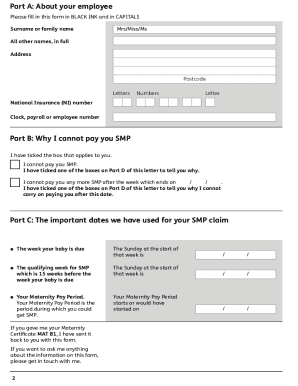
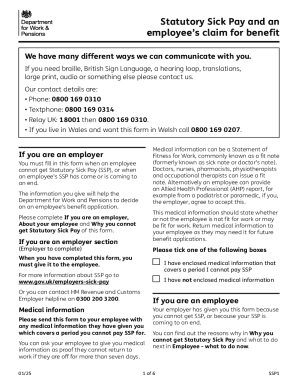
The UK Statutory Paternity Pay Notice is a government form used by employers to inform employees of Statutory Paternity Pay eligibility and provide reasons for non-payment.
pdfFiller scores top ratings on review platforms




Who needs UK HMRC SPP1?
Explore how professionals across industries use pdfFiller.

UK HMRC SPP1 is needed by:
-
Employers needing to issue a SPP Notice
-
HR personnel managing employee benefits
-
Employees inquiring about SPP entitlement
-
Tax advisors assisting clients with SPP
-
Payroll departments processing employee payments
Comprehensive Guide to UK HMRC SPP1
What is the UK Statutory Paternity Pay Notice?
The UK Statutory Paternity Pay Notice serves as a critical government form for employers and employees regarding Statutory Paternity Pay (SPP). This notice explicitly defines the specifics of SPP, outlining why employees might not receive payment. It is essential for maintaining compliance with government regulations and informs employees of their rights concerning SPP non-payment.
The notice plays a vital role in keeping employees informed, ensuring transparency about the SPP process, and clarifying any uncertainties throughout the employment relationship.
Purpose and Benefits of the UK Statutory Paternity Pay Notice
Employers must understand the necessity of the UK Statutory Paternity Pay Notice, as it facilitates clear communication regarding SPP eligibility. This form helps prevent disputes between employers and employees by ensuring that the reasons for non-payment are transparently shared.
Using this form contributes to legal compliance and upholds employee rights. By adhering to the benefits of the SPP notice, employers can foster a positive workplace culture and reduce misunderstandings.
Who Needs the UK Statutory Paternity Pay Notice?
Employers are required to provide the UK Statutory Paternity Pay Notice to employees who are denied SPP. Various work scenarios may prompt the need for this form, particularly in situations where an employee’s entitlement is unclear.
Prompt notification is crucial for maintaining good relationships, ensuring that employees remain informed and engaged in their employment matters.
Eligibility Criteria for the UK Statutory Paternity Pay
Understanding the eligibility criteria for Statutory Paternity Pay is integral for employers when completing the UK Statutory Paternity Pay Notice. Common criteria include employment length, earnings, and the relationship to the child.
Specific groups may either qualify or be ineligible for benefits, making it essential for employers to be cognizant of these factors to accurately complete the notice.
How to Fill Out the UK Statutory Paternity Pay Notice (Step-by-Step)
Follow these steps to accurately fill out the UK Statutory Paternity Pay Notice:
-
Enter the employee’s surname or family name.
-
Provide the employee’s address in full.
-
Include the National Insurance number and postcode.
-
Tick the appropriate checkbox to indicate the reasons for non-payment.
-
Ensure the employer’s signature is included at the end of the form.
Double-checking the form’s contents is crucial to prevent errors that may affect processing.
Common Errors and How to Avoid Them
Employers often encounter common errors when completing the UK Statutory Paternity Pay Notice. These may include inaccuracies in employee details, such as misspellings or incorrect National Insurance numbers, as well as missing signatures.
To avoid these mistakes, consider the following tips:
-
Review the completed form thoroughly before submission.
-
Utilize validation checks to ensure accuracy of all inputted information.
Submission Methods for the UK Statutory Paternity Pay Notice
The UK Statutory Paternity Pay Notice can be submitted through various methods, depending on employer preference. Common submission options include electronic submission or mailing the completed form.
It is essential to track the submission to ensure it has been received and processed correctly.
How pdfFiller Can Help with the UK Statutory Paternity Pay Notice
pdfFiller offers a comprehensive solution for managing the UK Statutory Paternity Pay Notice effectively. Key features include the ability to create, edit, and fill out the notice seamlessly online.
The benefits of eSigning and secure document storage ensure that sensitive employee information is protected throughout the process.
Final Steps After Submission of the UK Statutory Paternity Pay Notice
After submitting the UK Statutory Paternity Pay Notice, employers should be aware of several important follow-up actions. It is crucial to confirm the submission and track its status for reference.
Employers may need to correct or amend the notice if inaccuracies are detected. Maintaining thorough records of all submitted documents is essential for future inquiries or audits.
Engage with pdfFiller Today!
Utilizing pdfFiller for your document management needs, particularly for the UK Statutory Paternity Pay Notice, enhances the submission process significantly. With cloud access, you can manage your forms without the need for downloads, ensuring convenience and security in handling sensitive documents.
How to fill out the UK HMRC SPP1
-
1.Access pdfFiller and log in or create an account if you don't have one.
-
2.Use the search bar to find the 'UK Statutory Paternity Pay Notice' form.
-
3.Once found, click on the form to open it in pdfFiller's editor.
-
4.Review the form and identify the required fields to fill out.
-
5.Gather necessary information such as the employee’s surname, address, National Insurance number, and postcode.
-
6.Begin by clicking on the first fillable field and input the employee's surname or family name.
-
7.Proceed to the next fields in the order provided, filling in the employee's address and National Insurance number.
-
8.Complete the postcode field carefully to ensure accuracy.
-
9.Scroll to the section where you give the reason for non-payment and select the appropriate checkbox.
-
10.Once all fields are filled, read through the form to ensure accuracy and completeness.
-
11.Sign the form electronically in the designated section, ensuring you follow any instructions for signatures.
-
12.After completing the form, utilize pdfFiller’s review options to double-check entered information.
-
13.Save the document within your pdfFiller account to retain a copy.
-
14.Choose 'Download' to save a copy to your device, or use the 'Submit' option to send it directly if required.

Who is eligible for Statutory Paternity Pay?
Employees are eligible for Statutory Paternity Pay if they meet certain criteria such as having worked for their employer for a specific period and providing proper notice of intent. Always check current regulations or consult HR for specific eligibility details.
What are the deadlines for submitting the SPP Notice?
The Statutory Paternity Pay Notice should be submitted as soon as possible, ideally within the first week after the employee becomes eligible. Timely submission ensures there are no delays in payment.
How do I submit the completed SPP Notice?
You can submit the completed SPP Notice electronically through your payroll system or print it out and send it via post. Make sure to follow any specific submission processes defined by your company or HR department.
What supporting documents are required with the SPP Notice?
Typically, no additional documents are needed when submitting the Statutory Paternity Pay Notice. However, it’s advisable to keep related records or evidence of eligibility to support your claims if necessary.
What are common mistakes to avoid when completing the form?
Common mistakes include missing required fields, incorrect personal information, and failing to provide a clear reason for non-payment. Always double-check details to avoid these issues.
What are typical processing times for the SPP Notice?
Processing times can vary, but typically, once submitted, it should be processed in the next payroll cycle. To avoid delays, ensure the notice is filled out correctly and submitted promptly.
Can an employee dispute a decision made in the SPP Notice?
Yes, the form includes instructions for disputing a decision regarding Statutory Paternity Pay. Employees should follow the outlined procedures to formally raise their concerns.
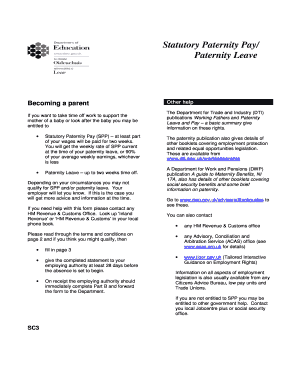
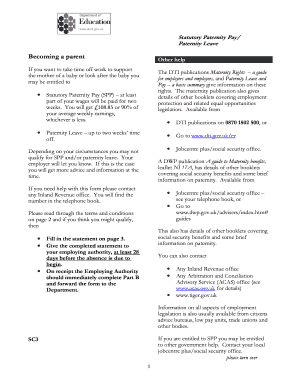
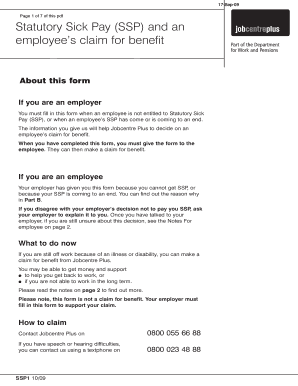
UK HMRC SPP1 Form Versions
Related Forms




Related Catalogs
Get the latest insights from our blog



If you believe that this page should be taken down, please follow our DMCA take down process
here
.
This form may include fields for payment information. Data entered in these fields is not covered by PCI DSS compliance.