
Last updated on
Oct 31, 2026

Steve Kravitz Physical formrapy HIPAA free printable template
pdfFiller is not affiliated with any government organization

Fill out
Complete the form online in a simple drag-and-drop editor.

eSign
Add your legally binding signature or send the form for signing.

Share
Share the form via a link, letting anyone fill it out from any device.

Export
Download, print, email, or move the form to your cloud storage.
Why pdfFiller is the best tool for your documents and forms


End-to-end document management
From editing and signing to collaboration and tracking, pdfFiller has everything you need to get your documents done quickly and efficiently.
Accessible from anywhere
pdfFiller is fully cloud-based. This means you can edit, sign, and share documents from anywhere using your computer, smartphone, or tablet.
Secure and compliant
pdfFiller lets you securely manage documents following global laws like ESIGN, CCPA, and GDPR. It's also HIPAA and SOC 2 compliant.
What is Steve Kravitz Physical formrapy HIPAA
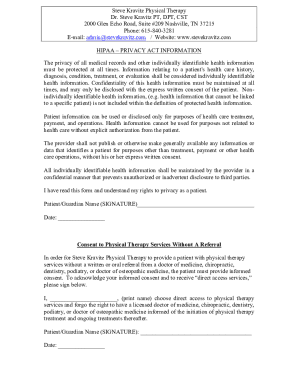
The HIPAA Privacy Act Information Form is a patient consent form used by healthcare providers to inform patients about the privacy of their medical records and the conditions for disclosing their information.
pdfFiller scores top ratings on review platforms




Who needs Steve Kravitz Physical formrapy HIPAA?
Explore how professionals across industries use pdfFiller.

Steve Kravitz Physical formrapy HIPAA is needed by:
-
Patients seeking to understand their privacy rights
-
Guardians completing forms on behalf of patients
-
Healthcare providers requiring patient consent
-
Legal representatives involved in healthcare
-
Medical institutions adhering to HIPAA regulations
Comprehensive Guide to Steve Kravitz Physical formrapy HIPAA
What is the HIPAA Privacy Act Information Form?
The HIPAA Privacy Act Information Form is vital for protecting healthcare privacy. This form is designed to inform patients about their privacy rights regarding medical records and individually identifiable health information. By outlining how patient information can be used or disclosed, it emphasizes the critical need for express written consent when such information is collected for non-healthcare-related purposes. Its significance lies in establishing a secure framework that supports both patients and healthcare providers in maintaining confidentiality.
Purpose and Importance of the HIPAA Privacy Act Information Form
The primary purpose of the HIPAA Privacy Act Information Form is to safeguard the privacy of medical records and uphold patient rights. Patients must be aware of their rights related to their health information, which includes the ability to control how their data is used. This form also emphasizes the necessity of obtaining written consent before sharing medical information for purposes beyond direct healthcare services, reinforcing trust between providers and patients.
Key Features of the HIPAA Privacy Act Information Form
This form contains essential fillable fields such as 'Patient/Guardian Name (PRINT)', 'Patient/Guardian Name (SIGNATURE)', and 'Date' to capture necessary information accurately. Users must pay special attention to signed consent acknowledgment, which serves as a crucial part of the document. Instructions accompanying each field ensure clarity and guide users in completing the form correctly.
Who Needs to Use the HIPAA Privacy Act Information Form?
The HIPAA Privacy Act Information Form is essential for patients and guardians involved in medical care or health services. Anyone eligible to receive healthcare or acting on behalf of a patient should fill out this form. Common scenarios necessitating this document include instances of engaging with healthcare providers or dealing with health insurance matters.
How to Fill Out the HIPAA Privacy Act Information Form Online
Filling out the HIPAA Privacy Act Information Form online can be completed efficiently by following these steps:
-
Access the form using pdfFiller.
-
Fill in each required field, including 'signature' and 'date'.
-
Review all entries for completeness and accuracy.
-
Confirm your understanding of the privacy rights outlined in the form.
-
Submit the form as directed.
Reviewing and validating the completed form before submission ensures that nothing is missed and that all information is accurate.
Submission Methods for the HIPAA Privacy Act Information Form
Submitting the HIPAA Privacy Act Information Form can be done through various methods:
-
Digital submission options such as eSigning or directly sharing through email.
-
Traditional methods, which include printing the form and mailing it to the relevant party.
Choosing the right submission method depends on user preference and the recipient's requirements.
Security and Compliance in Handling the HIPAA Privacy Act Information Form
pdfFiller employs robust security measures to protect sensitive information associated with the HIPAA Privacy Act Information Form. The platform utilizes 256-bit encryption and adheres to both HIPAA and GDPR compliance standards, ensuring that healthcare documents remain secure. This commitment to data protection is essential for maintaining confidentiality and trust when handling personal health information.
Common Errors to Avoid When Completing the HIPAA Privacy Act Information Form
When filling out the HIPAA Privacy Act Information Form, users should be diligent to avoid the following common mistakes:
-
Missing signatures, which can render the form invalid.
-
Incorrect or incomplete dates, leading to processing delays.
-
Omitting required fields that are necessary for verification.
By paying close attention to these details, users can significantly reduce the likelihood of errors and ensure a smoother process.
Examples and Samples of a Completed HIPAA Privacy Act Information Form
Providing a visual or descriptive example of a filled-out HIPAA Privacy Act Information Form aids in understanding the document's sections and their purposes. Utilizing a sample form can illustrate correct completion techniques, which helps prevent common errors and misunderstandings related to the required fields and consent acknowledgment.
Maximize Your HIPAA Privacy Act Form Experience with pdfFiller
Users can enhance their experience with the HIPAA Privacy Act Information Form by leveraging pdfFiller's powerful features. The platform allows for efficient form filling, editing, and eSigning, ensuring that processes are streamlined. Its ease of access and strong security features make it a trusted choice for handling sensitive documents, empowering users to complete their forms confidently.
How to fill out the Steve Kravitz Physical formrapy HIPAA
-
1.To complete the HIPAA Privacy Act Information Form on pdfFiller, first access the platform and search for the specific form using the provided search bar, or navigate to the appropriate healthcare forms section.
-
2.Once you locate the form, click on it to open it in the pdfFiller editor. Familiarize yourself with the interface by looking at the fillable fields and toolbar options available.
-
3.Before starting, gather all necessary information such as the patient's name, guardian details (if applicable), and any relevant dates. This data will be needed to complete the form accurately.
-
4.Begin filling in the required fields, starting with 'Patient/Guardian Name (PRINT)'. Use the typing tool from the toolbar to easily enter information in each fillable field.
-
5.Continue to fill out the 'Patient/Guardian Name (SIGNATURE)' field, ensuring that the correct party signs to acknowledge their understanding of the privacy rights. Use the signature feature in pdfFiller for digital signatures.
-
6.Fill in the 'Date' field last, making sure it reflects the date of completion, which is crucial for the validity of the form.
-
7.After entering all information, carefully review the completed form for any errors or missed fields. Utilize pdfFiller’s review tools to check your work before finalizing.
-
8.Once satisfied with the form, you can save it for your records. Choose the option to download or submit the form directly through pdfFiller, depending on your needs or the submission requirements.

Who is eligible to complete the HIPAA Privacy Act Information Form?
Any patient or their legal guardian can complete the HIPAA Privacy Act Information Form. It ensures that individuals are informed about their privacy rights regarding medical records and consent for information disclosure.
How do I submit the completed HIPAA Privacy Act Information Form?
The completed form can be submitted directly through the healthcare provider’s office or via online submission platforms like pdfFiller. Always refer to your provider’s specific submission guidelines.
What supporting documents do I need to provide with the form?
Typically, you do not need to provide additional documents with the HIPAA Privacy Act Information Form, but you may need to provide identification or proof of guardianship if applicable.
Are there any common mistakes to avoid when filling out this form?
Ensure that all required fields are filled out completely and accurately. Double-check for typos, incorrect signatures, or omitted information to prevent delays in processing.
What is the processing time for the HIPAA Privacy Act Information Form?
Processing times may vary based on the healthcare provider's office policies. It's advisable to inquire with the provider upon submission to understand their specific timeline.
Related Forms




Get the latest insights from our blog


If you believe that this page should be taken down, please follow our DMCA take down process
here
.
This form may include fields for payment information. Data entered in these fields is not covered by PCI DSS compliance.