
Last updated on
Nov 7, 2026

MD Baltimore City Public School Office Referral Form 2011-2026 free printable template
pdfFiller is not affiliated with any government organization

Fill out
Complete the form online in a simple drag-and-drop editor.

eSign
Add your legally binding signature or send the form for signing.

Share
Share the form via a link, letting anyone fill it out from any device.

Export
Download, print, email, or move the form to your cloud storage.
Why pdfFiller is the best tool for your documents and forms


End-to-end document management
From editing and signing to collaboration and tracking, pdfFiller has everything you need to get your documents done quickly and efficiently.
Accessible from anywhere
pdfFiller is fully cloud-based. This means you can edit, sign, and share documents from anywhere using your computer, smartphone, or tablet.
Secure and compliant
pdfFiller lets you securely manage documents following global laws like ESIGN, CCPA, and GDPR. It's also HIPAA and SOC 2 compliant.
What is MD Baltimore City Public School Office Referral Form
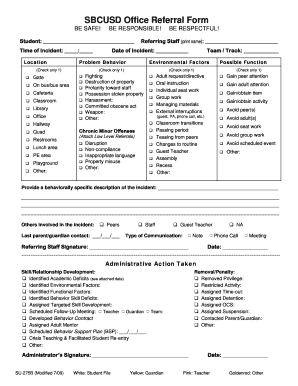
The Baltimore City Public Schools Office Referral Form is an education document used by school staff to document student behavior incidents and interventions taken.
pdfFiller scores top ratings on review platforms




Who needs MD Baltimore City Public School Office Referral Form?
Explore how professionals across industries use pdfFiller.

MD Baltimore City Public School Office Referral Form is needed by:
-
Teachers documenting behavior incidents
-
School administrators handling referrals
-
Counselors conducting student behavior evaluations
-
Parents involved in student behavioral discussions
-
School support staff managing student conduct
Comprehensive Guide to MD Baltimore City Public School Office Referral Form
What is the Baltimore City Public Schools Office Referral Form?
The Baltimore City Public Schools Office Referral Form serves a crucial role in documenting student behavior incidents and the interventions applied. Its primary purpose is to provide a standardized method for educators and administrators to log occurrences involving student misconduct.
This form comprises key sections, including student information and incident details, which provide a comprehensive overview of the situation. Accurate documentation helps ensure that necessary steps are taken to improve classroom management and student behavior.
Purpose and Benefits of the Baltimore City Public Schools Office Referral Form
The significance of the Baltimore City Public Schools Office Referral Form lies in its ability to effectively manage student behavior. By utilizing this form, educators can systematically document incidents and the corresponding interventions, fostering a more structured classroom environment.
Moreover, maintaining precise records contributes to continuous improvement in classroom management strategies. This leads to enhanced student engagement and an overall better learning atmosphere.
Key Features of the Baltimore City Public Schools Office Referral Form
This form presents several user-friendly features designed to facilitate its completion:
-
Fillable fields that allow for quick input of information
-
Checkboxes for standard incident types, simplifying the reporting process
-
Clear sections dedicated to behavior descriptions and interventions taken
-
Signature requirements from both the referring personnel and the administrator
These elements work together to ensure that users can efficiently complete the form while accurately conveying the necessary information.
Eligibility Criteria for Using the Baltimore City Public Schools Office Referral Form
The Baltimore City Public Schools Office Referral Form is intended for use by specific roles within the educational system. Those eligible to complete and submit the form include school administrators and referring personnel.
Guidelines specific to the Maryland educational system govern the appropriate use of the form, ensuring that it fulfills its intended purpose in documenting student behavior.
How to Fill Out the Baltimore City Public Schools Office Referral Form Online
Completing the Baltimore City Public Schools Office Referral Form online via pdfFiller is straightforward and efficient. Follow these steps for accurate completion:
-
Access the form through your browser.
-
Enter the required student information in the designated fields.
-
Provide details about the incident, including dates and descriptions of the behavior.
-
Utilize checkboxes for any repeated behaviors or applicable incident types.
-
Review the completed form for any common errors, such as incomplete sections.
-
Sign the form electronically and submit it according to your chosen method.
This streamlining process ensures that users can submit the form without unnecessary complications.
Submission Methods and Tips for the Baltimore City Public Schools Office Referral Form
There are various methods for submitting the Baltimore City Public Schools Office Referral Form:
-
Online submission through pdfFiller
-
In-person delivery to an administrative office
-
Emailing the completed form when applicable
To ensure successful submission, users should follow these tips:
-
Double-check all fields for accuracy and completeness
-
Keep a copy of the submitted form for your records
-
Track the status of the form after submission, if possible
What to Do After Submitting the Baltimore City Public Schools Office Referral Form
After submitting the Baltimore City Public Schools Office Referral Form, anticipate potential outcomes that may arise, such as a school response or follow-up actions concerning the reported incident.
If there is a need to correct or amend the form after submission, users should consult school policies related to form updates, which outline the necessary steps to make revisions.
Security and Compliance of the Baltimore City Public Schools Office Referral Form
Ensuring the security of sensitive student information is a top priority in handling the Baltimore City Public Schools Office Referral Form. pdfFiller employs advanced security features, including 256-bit encryption, to protect data submitted through the platform.
Compliance with regulations such as HIPAA and GDPR also applies, guaranteeing that educational documents are maintained under stringent privacy and data protection standards.
Engaging with pdfFiller for the Baltimore City Public Schools Office Referral Form
Utilizing pdfFiller for the Baltimore City Public Schools Office Referral Form enables users to benefit from various features, such as editing, eSigning, and secure sharing of documents. These capabilities enhance convenience and streamline the overall process of form management.
The cloud-based PDF editor not only simplifies form filling but also ensures that users can manage their documents efficiently from any browser, removing the need for additional downloads.
Final Thoughts on the Baltimore City Public Schools Office Referral Form
Being proactive in managing student behavior through proper documentation is vital. The Baltimore City Public Schools Office Referral Form facilitates this process, allowing educators to record incidents effectively.
Through pdfFiller, users experience a simplified form filling and submission process, enhancing the overall administrative workflow in schools.
How to fill out the MD Baltimore City Public School Office Referral Form
-
1.To access the Baltimore City Public Schools Office Referral Form on pdfFiller, begin by visiting the pdfFiller website and using the search bar to locate the form by its name.
-
2.Once you find the form, click to open it, and the fillable interface will appear on your screen.
-
3.Before starting your completion, ensure you have all necessary information ready, such as the student's details, incident particulars, and behavior descriptors.
-
4.Navigate through the form by clicking on the required fields, and start filling them out. Use the provided checkboxes and text areas to detail the incident and interventions appropriately.
-
5.Fill in the sections that request information about the referred student's identity and the nature of the incident, being as detailed as possible.
-
6.If a field is unclear, refer to the instructions included within the form itself for guidance.
-
7.After completing the form, carefully review each section to confirm accuracy and completeness.
-
8.Double-check whether you have provided signatures where required by clicking on the signature lines to insert your signature electronically.
-
9.Once you’ve finalized the form, choose the option to save or download it by navigating to the top-right corner of the interface.
-
10.Finally, decide on your submission method; you can submit directly through pdfFiller if applicable or follow instructions to print and send it physically if required.

Who is eligible to use the Baltimore City Public Schools Office Referral Form?
The form is intended for use by teachers, administrators, and school staff who need to document student behavior incidents and interventions.
Are there any deadlines for submitting the form?
While there may not be specific deadlines, it's recommended to submit the form as soon as possible after an incident occurs to ensure accurate documentation and timely intervention.
How can I submit the completed Office Referral Form?
You can submit the form electronically through pdfFiller or print it out and hand it in to the relevant school office based on your school's submission protocols.
What supporting documents are required when submitting this form?
Typically, no supporting documents are required, but additional notes from teachers or records of previous incidents may be helpful for context.
What are common mistakes to avoid when completing this form?
Common mistakes include leaving fields blank, not providing detailed descriptions of the behavior incident, and failing to obtain necessary signatures.
How long does it take to process the referral form once submitted?
Processing times may vary, but it's usually reviewed within a week. Contact the school office for specific timelines.
What specific concerns should I keep in mind while filling out the form?
Make sure to provide clear details of the incident and the context to ensure proper understanding and follow-up by the administration.
Related Forms






Get the latest insights from our blog


If you believe that this page should be taken down, please follow our DMCA take down process
here
.
This form may include fields for payment information. Data entered in these fields is not covered by PCI DSS compliance.