
Last updated on
Nov 12, 2026

Get the free Costume Information Sheet
We are not affiliated with any brand or entity on this form

Fill out
Complete the form online in a simple drag-and-drop editor.

eSign
Add your legally binding signature or send the form for signing.

Share
Share the form via a link, letting anyone fill it out from any device.

Export
Download, print, email, or move the form to your cloud storage.
Why pdfFiller is the best tool for your documents and forms


End-to-end document management
From editing and signing to collaboration and tracking, pdfFiller has everything you need to get your documents done quickly and efficiently.
Accessible from anywhere
pdfFiller is fully cloud-based. This means you can edit, sign, and share documents from anywhere using your computer, smartphone, or tablet.
Secure and compliant
pdfFiller lets you securely manage documents following global laws like ESIGN, CCPA, and GDPR. It's also HIPAA and SOC 2 compliant.
What is Costume Info
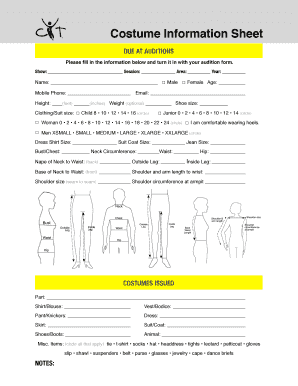
The Costume Information Sheet is a document used by Journey Theater to collect essential measurements and information from participants auditioning for a production.
pdfFiller scores top ratings on review platforms




Who needs Costume Info?
Explore how professionals across industries use pdfFiller.

Costume Info is needed by:
-
Parents of auditioning participants
-
Theater production coordinators
-
Auditioning actors and actresses
-
Costume designers
-
Theater volunteers
Comprehensive Guide to Costume Info
What is the Costume Information Sheet?
The Costume Information Sheet serves a vital function for participants in Journey Theater auditions. This essential form is designed to collect important details, including measurements and parental consent, helping to streamline the audition process. By providing accurate data through this theater costume form, participants ensure that all necessary information is readily available for costume preparation.
This form is pivotal in establishing a clear understanding of each participant's needs and preferences regarding their costumes. Participants can expect a smoother experience during auditions when this information is appropriately documented.
Purpose and Benefits of the Costume Information Sheet
The Costume Information Sheet offers several benefits for both parents and young participants. Accurate measurements and comprehensive information collection are crucial for effective costume creation. Having precise data helps the costume team fit each participant correctly, enhancing their performance during auditions.
Parental consent included in the form not only ensures that guardians are involved in the process but also demonstrates their willingness to assist with costume-related tasks. Overall, the use of this form contributes to a more efficient and organized audition experience.
Key Features of the Costume Information Sheet
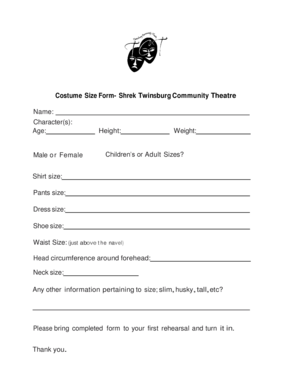
The Costume Information Sheet contains several key components essential for its effectiveness. Required fields include name, age, height, and weight, which are crucial for accurately tailoring costumes to fit each participant.
-
The format is fillable, making it easy for users to complete digitally.
-
A signature line is included for parental confirmation and consent, ensuring legal requirements are met.
These features collectively enhance the usability of the theater costume form, making it user-friendly for all involved.
Who Needs to Complete the Costume Information Sheet?
This form must be filled out by the parents of children auditioning for Journey Theater. The inclusion of key details from parents is essential in understanding and meeting the needs of young performers.
Eligibility criteria may apply based on age or participation level, highlighting the significant role of parents in facilitating a successful audition process. Their involvement is not only necessary but also encourages a collaborative spirit in preparing for performances.
How to Fill Out the Costume Information Sheet Online
Filling out the Costume Information Sheet online is a straightforward process using pdfFiller's tools. Users can start by accessing the form within the platform, where they can digitally enter required information.
-
Open the Costume Information Sheet in pdfFiller.
-
Complete each field with accurate measurements and personal details.
-
Ensure parental consent is signed digitally.
-
Review all provided data for accuracy before submitting.
This step-by-step guide helps ensure that entries are complete and correct, facilitating a smooth submission process.
Submission Methods for the Costume Information Sheet
Once the Costume Information Sheet is filled out, there are various options available for submission. Users can choose to submit the form online through pdfFiller, print it for mail, or send it via email.
It is important to adhere to any submission deadlines outlined by the audition process. Additionally, ensure that any additional materials required alongside the form are included to avoid delays.
Common Errors and How to Avoid Them
When completing the Costume Information Sheet, users often encounter common mistakes that could hinder submission success. These can include missing fields or incorrect measurements.
-
Double-check all entries for completeness.
-
Ensure that consent is explicitly signed and dated.
Before submission, reviewing the entire form can help minimize errors and facilitate a smoother audition process.
Security and Compliance with the Costume Information Sheet
Using pdfFiller to complete and submit the Costume Information Sheet assures users of stringent security measures. The platform employs 256-bit encryption, ensures data compliance, and protects sensitive information during submission.
Privacy concerns regarding personal details are taken seriously, providing peace of mind to users about how their data is managed throughout the process.
After Submission: What to Expect
After submitting the Costume Information Sheet, users can anticipate clear guidance on subsequent actions. They may receive updates regarding their submission status or any further requirements linked to the audition process.
Staying informed about these steps helps participants remain engaged and prepared for the next phase of their audition journey.
Make Your Process Easier with pdfFiller
Utilizing pdfFiller simplifies the entire experience of completing the Costume Information Sheet. The platform offers convenient online tools for filling out and signing forms, significantly reducing the time spent on documentation.
These features not only streamline document management but also assist in the timely submission of necessary materials for auditions. Starting the process early ensures that participants can participate seamlessly.
How to fill out the Costume Info
-
1.Access pdfFiller and search for the Costume Information Sheet template to open it.
-
2.Begin by gathering all necessary information, including the auditioning participant's name, age, height, weight, and body measurements.
-
3.Navigate through the form's fillable fields. Click on each field to enter the required information accurately.
-
4.Carefully fill out each section including checkboxes that indicate parental willingness to participate in costume-making.
-
5.Once all fields are complete, review the entire form to ensure there are no missing entries or errors.
-
6.Locate the signature line meant for the parent and use pdfFiller's electronic signature feature to sign the document.
-
7.After reviewing, save your completed form using pdfFiller’s save feature to ensure no information is lost.
-
8.You can download a copy of the filled sheet or submit it directly to the designated email or portal as per the guiding instructions.

Who needs to fill out the Costume Information Sheet?
The Costume Information Sheet should be filled out by parents of auditioning participants who wish to provide the necessary measurements and consent for costume design.
What information is required on the form?
The form requires personal details such as participant's name, age, height, weight, and various body measurements, along with parental consent for participation in costume-making activities.
Is there a deadline for submitting the form?
While specific deadlines may vary by production, it is advisable to submit the Costume Information Sheet along with the audition materials as soon as possible to ensure timely processing.
How can I submit the Costume Information Sheet?
You can submit the Costume Information Sheet directly through pdfFiller by following submission guidelines provided or by downloading it and emailing it to the appropriate contact.
Are electronic signatures accepted on the form?
Yes, electronic signatures are accepted on the Costume Information Sheet. You can use pdfFiller’s electronic signature feature to sign the document for convenience.
What should I do if I make a mistake on the form?
If you make a mistake, you can easily correct it by clicking on the relevant field in pdfFiller and entering the correct information. Ensure to review the form again before final submission.
Who should be contacted for further questions about the form?
For specific questions regarding the Costume Information Sheet, you should contact Journey Theater directly via their official communication channels for accurate and detailed assistance.
Related Forms




Related Catalogs
Get the latest insights from our blog


If you believe that this page should be taken down, please follow our DMCA take down process
here
.
This form may include fields for payment information. Data entered in these fields is not covered by PCI DSS compliance.