
Last updated on
Nov 9, 2026

CA Scholarship Federation CSF Semester Membership Application 2010 free printable template
pdfFiller is not affiliated with any government organization

Fill out
Complete the form online in a simple drag-and-drop editor.

eSign
Add your legally binding signature or send the form for signing.

Share
Share the form via a link, letting anyone fill it out from any device.

Export
Download, print, email, or move the form to your cloud storage.
Why pdfFiller is the best tool for your documents and forms


End-to-end document management
From editing and signing to collaboration and tracking, pdfFiller has everything you need to get your documents done quickly and efficiently.
Accessible from anywhere
pdfFiller is fully cloud-based. This means you can edit, sign, and share documents from anywhere using your computer, smartphone, or tablet.
Secure and compliant
pdfFiller lets you securely manage documents following global laws like ESIGN, CCPA, and GDPR. It's also HIPAA and SOC 2 compliant.
What is CA Scholarship Federation CSF Semester Membership Application
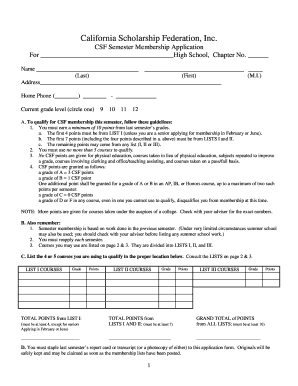
The CSF Semester Membership Application is a scholarship application form used by high school students in California to apply for membership in the California Scholarship Federation.
pdfFiller scores top ratings on review platforms




Who needs CA Scholarship Federation CSF Semester Membership Application?
Explore how professionals across industries use pdfFiller.

CA Scholarship Federation CSF Semester Membership Application is needed by:
-
High school students in California applying for CSF membership
-
Parents assisting students with scholarship applications
-
School counselors guiding students on scholarship options
-
Educational institutions promoting student scholarship programs
-
Non-profit organizations supporting students in need
Comprehensive Guide to CA Scholarship Federation CSF Semester Membership Application
What is the CSF Semester Membership Application?
The CSF Semester Membership Application is a crucial form for high school students in California seeking membership in the California Scholarship Federation. This application plays a significant role in the process of applying for CSF membership, which can open doors to various scholarships and recognition for students. Understanding the importance of this application is vital for students looking to enhance their academic profiles and future opportunities.
Purpose and Benefits of the CSF Semester Membership Application
Completing the CSF Semester Membership Application brings numerous advantages. Applying for CSF membership not only provides eligibility for scholarships but also grants students recognition for their academic achievements. Membership is based on a point criteria system that evaluates students’ performance across their courses, highlighting their hard work and dedication. Long-term benefits of joining the CSF extend beyond immediate rewards, potentially positively impacting college admissions and career paths.
Who Needs the CSF Semester Membership Application?
This application is designed for high school students who meet specific eligibility criteria. Students from grades 9 through 12 can apply once they complete a qualifying semester, typically the most recent semester where they have maintained the required grades. It is essential for students to know when they should submit their application to maximize their chances of acceptance into the CSF.
Required Documents and Supporting Materials
To successfully complete the CSF Semester Membership Application, specific documents must be included. Applicants should gather:
-
A copy of their report card or transcript from the previous semester.
-
Any additional materials requested by their school or local CSF chapter.
Providing accurate information and ensuring that all supporting documents are organized will streamline the application process.
How to Fill Out the CSF Semester Membership Application Online
Filling out the CSF Semester Membership Application online using pdfFiller can be a straightforward process. Follow these steps to complete the form:
-
Access the CSF Semester Membership Application through pdfFiller.
-
Edit the form by filling in the required fields, including your name, address, and grade level.
-
Carefully list your courses and corresponding grades, ensuring accuracy.
Before submitting, review the application to avoid common mistakes like incorrect information in any fields.
Digital Signature Requirements for the CSF Semester Membership Application
When submitting the CSF Semester Membership Application, understanding the signature requirements is essential. There are key differences between digital signatures and wet signatures. Digital signatures provide a secure method for online submissions, and applicants can eSign their forms directly through pdfFiller. Following the instructions for eSigning is crucial to ensure that submissions are processed correctly.
Where to Submit the CSF Semester Membership Application?
Submitting the CSF Semester Membership Application can be done through various methods. Applicants can either submit their forms online or in person at their respective schools or local CSF chapters. It is important to be aware of deadlines and the processing times for application approvals to ensure timely recognition of membership.
What Happens After You Submit the CSF Semester Membership Application?
Once the CSF Semester Membership Application is submitted, applicants can expect a follow-up process. Students should track their application status and may receive information regarding approval or any necessary actions. Understanding common rejection reasons, such as incomplete documentation, can help applicants address issues and resubmit applications if needed.
Privacy and Data Protection when Using the CSF Semester Membership Application
Privacy and data protection are paramount when handling the CSF Semester Membership Application. pdfFiller employs robust security protocols compliant with regulations such as HIPAA and GDPR to safeguard user information. Students should be aware of guidelines concerning document retention and privacy to protect their sensitive data during the application process.
Make Filling Out the CSF Semester Membership Application Easy with pdfFiller
Using pdfFiller can simplify the process of completing the CSF Semester Membership Application. The platform offers features that streamline form filling, enabling users to edit text, eSign documents, and manage their applications efficiently. By utilizing a cloud-based platform for document management, students can enhance their application experience.
How to fill out the CA Scholarship Federation CSF Semester Membership Application
-
1.To start, access the CSF Semester Membership Application on pdfFiller by searching for it in the platform's document library or using a direct link from your school or CSF website.
-
2.Once opened, familiarize yourself with the form's layout, including fields for personal information, course listings, and grading criteria.
-
3.Before you begin filling in the form, gather necessary documents such as your report card or transcript reflecting the most recent semester's grades.
-
4.Begin completing the form by entering your name, address, phone number, and email in the designated fields. Ensure all personal data is accurate.
-
5.Next, indicate your current grade level by selecting the appropriate checkbox provided for that section of the application.
-
6.Proceed to the course listing section; here, input the course names and corresponding grades in the provided tables. Be sure to correctly adhere to the point criteria mentioned in the application guidelines.
-
7.After completing all required fields, review the entire form meticulously for any errors or missing information. Pay special attention to your course grades and personal information.
-
8.Once you are satisfied with your entries, save your progress on pdfFiller periodically to prevent any data loss.
-
9.Finally, download the completed application and ensure you attach your report card or transcript. Follow your school’s or CSF's instructions for submission methods, whether online or by mail.
-
10.If you choose to submit the form electronically, use the save and submit feature on pdfFiller to ensure your application is sent directly to the appropriate CSF review office.

Who is eligible to apply for the CSF Semester Membership?
High school students in California are eligible to apply for the CSF Semester Membership by meeting the required course and grade point criteria outlined in the application.
What documents do I need to submit with the CSF application?
You need to attach your report card or transcript from the previous semester to your CSF Semester Membership Application to verify your academic performance.
What are the deadlines for submitting the CSF application?
Specific deadlines for the CSF Semester Membership application vary by school and district. Please check with your school or local CSF chapter for the exact submission dates.
How should I submit the completed CSF application?
You can submit the completed CSF Semester Membership Application either electronically through pdfFiller or by printing it and mailing it to your local CSF chapter as per their submission guidelines.
What common mistakes should I avoid when filling out the CSF application?
Common mistakes include omitting necessary information, failing to attach required documents, and incorrect course grade listings. Always review your application thoroughly before submission.
How long will it take to process my CSF application?
Processing times for the CSF Semester Membership Application can vary. Typically, it may take a few weeks for applications to be reviewed and notifications to be sent out.
Can I edit my CSF application after submission?
Once submitted, changes to your CSF Semester Membership Application cannot be made. Ensure that all information is correct before final submission.
CA Scholarship Federation CSF Semester Membership Application Form Versions
Related Forms





Related Catalogs
Get the latest insights from our blog


If you believe that this page should be taken down, please follow our DMCA take down process
here
.
This form may include fields for payment information. Data entered in these fields is not covered by PCI DSS compliance.