
Last updated on
Oct 31, 2026

Sky Ranch Health History Form 2013-2026 free printable template
We are not affiliated with any brand or entity on this form

Fill out
Complete the form online in a simple drag-and-drop editor.

eSign
Add your legally binding signature or send the form for signing.

Share
Share the form via a link, letting anyone fill it out from any device.

Export
Download, print, email, or move the form to your cloud storage.
Why pdfFiller is the best tool for your documents and forms


End-to-end document management
From editing and signing to collaboration and tracking, pdfFiller has everything you need to get your documents done quickly and efficiently.
Accessible from anywhere
pdfFiller is fully cloud-based. This means you can edit, sign, and share documents from anywhere using your computer, smartphone, or tablet.
Secure and compliant
pdfFiller lets you securely manage documents following global laws like ESIGN, CCPA, and GDPR. It's also HIPAA and SOC 2 compliant.
What is Sky Ranch Health History Form
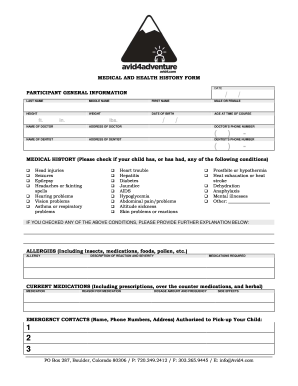
The Health History Form is a medical document used by parents or guardians to provide essential health information about a student or camper.
pdfFiller scores top ratings on review platforms




Who needs Sky Ranch Health History Form?
Explore how professionals across industries use pdfFiller.

Sky Ranch Health History Form is needed by:
-
Parents or guardians of students and campers
-
School administrators requiring health information
-
Camp coordinators seeking emergency contact details
-
Healthcare providers involved in student care
-
Sports coaches needing medical consent
-
Event organizers for educational activities
Comprehensive Guide to Sky Ranch Health History Form
What is the Health History Form?
The Health History Form is a vital document used to gather comprehensive health information about a student or camper. This medical history form ensures that parents or guardians provide crucial details, which may include allergies, past medical conditions, and current medications, facilitating the safe management of health risks in various environments. The form is typically filled out by a parent or guardian, who plays a critical role in ensuring the accuracy of the information submitted.
Purpose and Benefits of the Health History Form
Accurate health information is paramount for the safety of students and campers. The health information form not only aids schools and camps in managing potential health risks but also includes several authorizations related to healthcare and treatment. By making this information readily available, the form promotes proactive health management, ensuring that proper care can be provided when necessary.
Who Needs the Health History Form?
This form is primarily required from parents or guardians of students and campers. It is mandatory in specific situations such as school enrollment or camp registration and is also beneficial for other contexts, including extracurricular activities. Thus, understanding the necessity of this student health form can help facilitate a safer environment for all involved.
How to Fill Out the Health History Form Online (Step-by-Step)
Filling out the health history form online is a straightforward process. Here are the steps to follow:
-
Access the form through the designated website.
-
Complete each field carefully, focusing on sections such as allergies and medications.
-
Review your entries to verify accuracy before submission.
By ensuring each section is filled out correctly, users can effectively minimize potential issues and enhance the reliability of the information provided.
Review and Validation Checklist for the Health History Form
To ensure the form is submitted accurately, refer to this checklist:
-
Verify that all fields are completed.
-
Check for necessary signatures and authorizations.
-
Confirm that contact information for emergencies is accurate.
Paying attention to these key elements can prevent common errors and facilitate smoother processing of the form.
How to eSign the Health History Form
When it comes to signing the health history form, the electronic signature offers several advantages over traditional wet signatures. Here’s how to eSign securely:
-
Choose the option to eSign on the pdfFiller platform.
-
Follow the prompts to create your digital signature.
-
Ensure compliance with necessary security measures during this process.
Implementing these steps can help maintain the integrity of your signature and safeguard your sensitive information.
Submitting the Health History Form: Methods and Guidelines
Once the health history form is completed, submission can be handled in several ways. The methods include:
-
Online submission through the designated platform.
-
Physical submission to the relevant school or camp office.
Be sure to note any specific instructions regarding where to send the form and be aware of possible processing times for confirmation of receipt.
Why Choose pdfFiller for Your Health History Form?
pdfFiller enhances your experience with the health history form by offering robust features such as editing, signing, and secure document management. With state-of-the-art security measures, including 256-bit encryption, users can trust that their information is well-protected. Many testimonials highlight how pdfFiller streamlines the process of managing health forms, making it the go-to choice for parents and guardians.
What Happens After You Submit the Health History Form?
After submitting the health history form, you'll typically await confirmation from the school or camp. If corrections are needed, there are options available to amend the information. It’s also advisable to keep a copy of the submitted form for your records, ensuring you have access to the information that has been provided.
Get Started with Your Health History Form Today!
Don't wait any longer to prioritize your child's health and safety. Begin filling out the health history form online with pdfFiller, where ease of use and secure handling of sensitive documents come together to provide a seamless experience.
How to fill out the Sky Ranch Health History Form
-
1.Access the Health History Form on pdfFiller by searching for it in the website's search bar. Select the form from the results to open it.
-
2.Once the form loads, familiarize yourself with the layout, including the blank fields and checkboxes. Ensure your browser's PDF viewer settings are optimized for clarity.
-
3.Gather all necessary information before starting, including details about allergies, medical history, current medications, and emergency contacts. This will streamline the filling process.
-
4.Begin filling out the form by clicking into the fields. Type in the required information or use checkboxes for options, ensuring accuracy in every section.
-
5.As you complete each part of the form, refer to the instructions provided to ensure all required information is included. Check for any specific notes related to signature and consent fields.
-
6.After completing the form, review all entered information carefully. Double-check for spelling errors, incorrect details, or incomplete sections.
-
7.To finalize the form on pdfFiller, ensure all required fields are filled, then click the save button. You can download a copy for your records or submit it directly through the platform.

Who is required to complete the Health History Form?
The Health History Form must be completed by a parent or guardian of the student or camper. It ensures that accurate health information is provided for the child's safety and well-being.
What information should I collect before filling out the form?
Before starting the form, gather relevant health information, including any allergies, medical history, current medications, and emergency contacts. This will make the process more efficient.
Can the form be submitted digitally?
Yes, you can submit the Health History Form digitally using pdfFiller. Ensure you fill out the form completely and save your changes before submitting it through the platform.
Is there a deadline to submit the Health History Form?
Deadlines might vary by school or camp. It is crucial to check with the specific institution for submission timelines to ensure your child's health record is on file before activities begin.
What should I do if I make a mistake on the form?
If you make a mistake while filling out the Health History Form, simply click on the field to edit it. Review the entire form thoroughly after editing to avoid additional errors.
Do I need to notarize the Health History Form?
No, the Health History Form does not require notarization. It must simply be completed by the parent or guardian for the health information to be valid.
How can I ensure my child’s information is accurate on the form?
To ensure accuracy, verify all information against medical records or contact healthcare providers regarding your child's health status before you fill out the Health History Form.
Related Forms



Get the latest insights from our blog


If you believe that this page should be taken down, please follow our DMCA take down process
here
.
This form may include fields for payment information. Data entered in these fields is not covered by PCI DSS compliance.