
Last updated on
Oct 19, 2026

Charleston Southern University Student Immunization Record 2015 free printable template
pdfFiller is not affiliated with any government organization

Fill out
Complete the form online in a simple drag-and-drop editor.

eSign
Add your legally binding signature or send the form for signing.

Share
Share the form via a link, letting anyone fill it out from any device.

Export
Download, print, email, or move the form to your cloud storage.
Why pdfFiller is the best tool for your documents and forms


End-to-end document management
From editing and signing to collaboration and tracking, pdfFiller has everything you need to get your documents done quickly and efficiently.
Accessible from anywhere
pdfFiller is fully cloud-based. This means you can edit, sign, and share documents from anywhere using your computer, smartphone, or tablet.
Secure and compliant
pdfFiller lets you securely manage documents following global laws like ESIGN, CCPA, and GDPR. It's also HIPAA and SOC 2 compliant.
What is Charleston Southern University Student Immunization Record
The Charleston Southern University Immunization Form is a medical consent document used by students to document required immunizations for residence hall assignment.
pdfFiller scores top ratings on review platforms




Who needs Charleston Southern University Student Immunization Record?
Explore how professionals across industries use pdfFiller.

Charleston Southern University Student Immunization Record is needed by:
-
Current students at Charleston Southern University
-
Health care providers documenting student immunizations
-
University administration overseeing student health compliance
-
Parents or guardians managing student health documents
-
Housing officials requiring immunization proof for residency
Comprehensive Guide to Charleston Southern University Student Immunization Record
What is the Charleston Southern University Immunization Form?
The Charleston Southern University Immunization Form is a crucial document required for students to document their immunizations. This student immunization form ensures that all vaccination records are up-to-date and comply with university protocols, particularly for those living in residence halls. The primary purpose of this form is to facilitate the residence hall assignment process by confirming students meet necessary health standards.
Purpose and Benefits of the Charleston Southern University Immunization Form
Documenting immunizations is essential for both student health and adherence to university policy. The Charleston Southern University Immunization Form helps protect the health of the entire campus community by ensuring that students are vaccinated against common infectious diseases. Benefits of completing this form include expedited housing assignments and meeting residence hall immunization requirements, which streamline compliance efforts with university health regulations.
Key Features of the Charleston Southern University Immunization Form
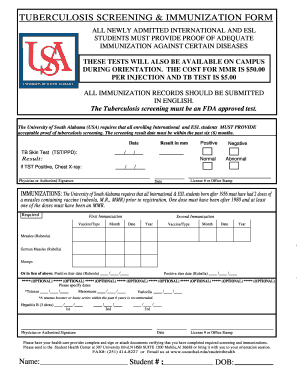
The Charleston Southern University Immunization Form encompasses several key features to ensure thorough documentation of student health. Specific immunizations covered include:
-
Hepatitis B
-
Tuberculosis
-
MMR (Measles, Mumps, Rubella)
-
Tetanus-Diphtheria
-
Polio
-
Varicella
-
Meningococcal
Students are required to have the form signed by a healthcare provider and must fill in specific fields detailing the dates and results of their immunizations. It acts as a medical consent form for students and is essential for those seeking residence in university housing.
Who Needs to Complete the Charleston Southern University Immunization Form?
The Charleston Southern University Immunization Form must be completed by all students entering residence halls. This requirement ensures that incoming students meet the South Carolina immunization requirements. Additionally, other individuals, such as students participating in specific programs or activities, may also need to submit related forms to maintain compliance with university health policies.
How to Fill Out the Charleston Southern University Immunization Form Online (Step-by-Step)
Filling out the Charleston Southern University Immunization Form online is straightforward. Follow these steps to complete the form:
-
Access the online form through the designated platform.
-
Fill in your personal information, including name and date of birth.
-
Provide details of immunizations received, including dates.
-
Secure a signature from your healthcare provider in the appropriate section.
-
Review your entries carefully to ensure all information is accurate.
-
Submit the form electronically as outlined on the site.
Be sure to have any necessary documents, such as prior vaccination records, handy to facilitate the completion process and avoid common errors.
Submission Methods for the Charleston Southern University Immunization Form
Once the Charleston Southern University Immunization Form is completed, students have various submission methods available. Students can submit the form digitally through the university's designated platform or via secure electronic mail where applicable. Adhering to submission deadlines is crucial to ensure compliance with university health regulations, so be aware of specific due dates for the form.
Security and Compliance When Submitting the Charleston Southern University Immunization Form
Handling sensitive health data requires stringent security measures. When submitting the Charleston Southern University Immunization Form, pdfFiller employs advanced 256-bit encryption and complies with HIPAA and GDPR regulations to protect personal information. Adhering to state and federal laws concerning medical records ensures that students' privacy and data protection are prioritized throughout the process.
Verify and Confirm Submission of the Charleston Southern University Immunization Form
After submission, students can track the status of their Charleston Southern University Immunization Form. Confirmation processes typically include receiving an acknowledgment email from the institution. If issues arise regarding the submission, students should contact the health services department for assistance to resolve what might have caused potential rejection.
Utilizing pdfFiller for Your Charleston Southern University Immunization Form
pdfFiller provides essential tools for users looking to edit, fill, and eSign the Charleston Southern University Immunization Form. Utilizing this cloud-based platform simplifies the form-filling experience, allowing easy access and editing from any device without the need for downloads. The convenience and security features offered by pdfFiller make it an ideal choice for managing important documents efficiently.
Sample of a Completed Charleston Southern University Immunization Form
To assist students, a visual or descriptive sample of a completed Charleston Southern University Immunization Form provides clear guidance. Key sections include accurately filled immunization dates, healthcare provider signatures, and the correct sequence of entries. Referencing a sample helps ensure that students correctly complete their forms and meet all submission requirements.
How to fill out the Charleston Southern University Student Immunization Record
-
1.Access the Charleston Southern University Immunization Form on pdfFiller by searching for it directly on the platform or using a link provided by your university.
-
2.Open the form and familiarize yourself with its layout, including sections for each required immunization.
-
3.Before starting, gather necessary information, including immunization dates, healthcare provider details, and any test results.
-
4.Use pdfFiller's fillable fields to input information accurately for each required immunization such as Hepatitis B and Tuberculosis screening.
-
5.Carefully follow the instructions provided within the form to ensure all sections are completed, including signature lines for healthcare providers.
-
6.After filling in all necessary fields, review your information for any errors or omissions before finalizing the form.
-
7.Once confirmed, use pdfFiller’s options to save, download, or submit the completed form directly to the appropriate university office.

Who needs to fill out the Charleston Southern University Immunization Form?
The form must be completed by all current students at Charleston Southern University who are planning to reside in campus housing. Healthcare providers must also sign it to validate student immunizations.
Are there specific deadlines for submitting this immunization form?
Yes, students should check with the university's health services for specific submission deadlines to ensure compliance with residence hall requirements.
What submission methods are accepted for this form?
Completed forms can typically be submitted through the university’s health services office in person, via email, or using an online submission portal as outlined by the university.
What supporting documents are needed when submitting the immunization form?
Students may need to provide additional documentation of previous immunizations or lab test results along with the completed form as required by the university's health department.
What are common mistakes to avoid when filling out this form?
Common mistakes include forgetting to sign the form, leaving blank sections, or not providing accurate immunization dates. Always double-check your entries before submission.
How long does it take to process the immunization form?
Processing times can vary, but students should expect processing to take a few days to a week. It's advisable to submit well in advance of any deadlines.
What should I do if I have questions about the immunization requirements?
For questions regarding immunization requirements, students should contact the university's health services or consult their official website for guidance.
Charleston Southern University Student Immunization Record Form Versions
Related Forms




Get the latest insights from our blog


If you believe that this page should be taken down, please follow our DMCA take down process
here
.
This form may include fields for payment information. Data entered in these fields is not covered by PCI DSS compliance.