
Last updated on
Oct 21, 2026
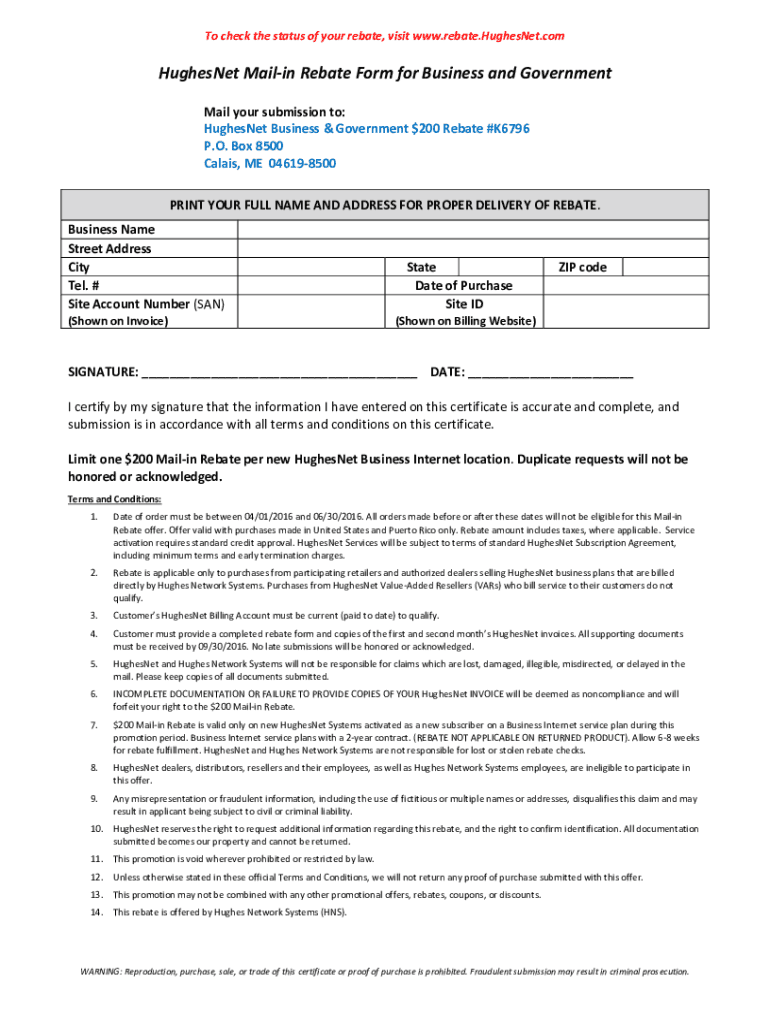
HughesNet Mail-in Rebate Form for Business and Government 2016-2026 free printable template
We are not affiliated with any brand or entity on this form

Fill out
Complete the form online in a simple drag-and-drop editor.

eSign
Add your legally binding signature or send the form for signing.

Share
Share the form via a link, letting anyone fill it out from any device.

Export
Download, print, email, or move the form to your cloud storage.
Why pdfFiller is the best tool for your documents and forms


End-to-end document management
From editing and signing to collaboration and tracking, pdfFiller has everything you need to get your documents done quickly and efficiently.
Accessible from anywhere
pdfFiller is fully cloud-based. This means you can edit, sign, and share documents from anywhere using your computer, smartphone, or tablet.
Secure and compliant
pdfFiller lets you securely manage documents following global laws like ESIGN, CCPA, and GDPR. It's also HIPAA and SOC 2 compliant.
What is HughesNet Mail-in Rebate Form for Business and Government
The HughesNet Business Rebate Form is a financial document used by business owners to claim a $200 mail-in rebate upon purchasing or leasing a new HughesNet satellite system and activating a new business internet service plan.
pdfFiller scores top ratings on review platforms




Who needs HughesNet Mail-in Rebate Form for Business and Government?
Explore how professionals across industries use pdfFiller.

HughesNet Mail-in Rebate Form for Business and Government is needed by:
-
Business owners seeking internet service rebates
-
Government agencies applying for HughesNet services
-
Individuals purchasing HughesNet satellite systems
-
Financial analysts handling expense reports
-
Sales representatives discussing rebates with clients
-
Accountants preparing business expenses
-
Marketing professionals promoting HughesNet services
Comprehensive Guide to HughesNet Mail-in Rebate Form for Business and Government
What is the HughesNet Business Rebate Form?
The HughesNet Business Rebate Form serves as a crucial document for businesses and government agencies claiming a rebate of $200 upon acquiring a new HughesNet satellite system and activating a business internet service plan. Timely and accurate submission of this form is essential for ensuring eligibility and receiving the rebate.
Eligible participants must complete specific fields, including business name and account number, while adhering to submission deadlines. Understanding the requirements and significance of the form enhances the chances of successfully obtaining the rebate.
Why Should Businesses Use the HughesNet Business Rebate Form?
Selecting the HughesNet Business Rebate Form is beneficial for several reasons. Firstly, the rebate can significantly decrease initial setup costs, making it more accessible for new customers to adopt HughesNet internet services.
Moreover, existing customers upgrading to newer plans also qualify for this $200 rebate, further encouraging continuous service improvement and user satisfaction. Claiming this rebate not only alleviates financial burdens but also fosters loyalty to HughesNet services.
Who is Eligible to Use the HughesNet Business Rebate Form?
Eligibility for the HughesNet Business Rebate includes various business types, such as small businesses and government agencies. To qualify, entities must ensure all criteria are met, including the timing of their purchase and adherence to submission deadlines.
Claims must be submitted within specified timeframes, ensuring that eligible purchases made are acknowledged and processed accordingly. Understanding these requirements is crucial for a smooth rebate claim process.
How to Fill Out the HughesNet Business Rebate Form (Step-by-Step)
To accurately complete the HughesNet Business Rebate Form, follow these detailed steps:
-
Enter your Business Name in the designated field.
-
Provide your Street Address, City, State, and ZIP code.
-
Include your telephone number and Date of Purchase.
-
Fill in the Site Account Number (SAN) and Site ID.
-
Sign and date the form to certify the accuracy of the provided information.
Ensuring all required fields are completed with accurate information is vital for successful submission and processing of the rebate claim.
Submission and Filing Guidelines for the HughesNet Business Rebate Form
When ready to submit the completed HughesNet Business Rebate Form, follow these guidelines:
-
Attach copies of the first two HughesNet invoices as proof of purchase.
-
Choose your preferred submission method: via mail or online using pdfFiller.
-
Observe key dates for purchase and submission to guarantee eligibility for the rebate.
Being meticulous during the submission process helps prevent delays and ensures your rebate claim is processed efficiently.
Common Mistakes to Avoid When Submitting the HughesNet Business Rebate Form
Avoiding common pitfalls can enhance your rebate claim experience. Here are some frequent errors to be aware of:
-
Submitting incomplete or inaccurate information in your form.
-
Failing to double-check all attached documents before you send them.
-
Not retaining copies of submitted documents, which may be needed for future reference.
By adhering to these tips, you can significantly improve the chances of a smooth rebate processing experience.
How pdfFiller Simplifies the HughesNet Business Rebate Form Process
Utilizing pdfFiller for submitting the HughesNet Business Rebate Form offers numerous advantages. The platform allows users to edit, eSign, and securely manage their documents without unnecessary downloads.
With its fillable fields, pdfFiller streamlines the form-filling experience, ensuring compliance with regulations necessary for handling sensitive documents. The security features provided by pdfFiller enhance user confidence during submissions.
Next Steps After Submitting the HughesNet Business Rebate Form
After submitting your HughesNet Business Rebate Form, take the following steps to stay informed:
-
Track the status of your rebate claim to remain updated on processing timelines.
-
Confirm processing and check for any errors that might arise post-submission.
-
Prepare to correct any mistakes if needed, recalling that quick action may prevent further issues.
Being proactive can help ensure a hassle-free experience in receiving your rebate.
Looking Ahead: Keeping Your HughesNet Business Internet Service
After receiving your rebate, consider the following to maintain your HughesNet services:
-
Explore renewal options to stay eligible for potential future rebates.
-
Stay informed about new offers or service plans that HughesNet may roll out.
-
Utilize pdfFiller for future forms and documentation needs to streamline your processes.
Remaining engaged with HughesNet ensures your business benefits from uninterrupted internet services and continuous savings opportunities.
How to fill out the HughesNet Mail-in Rebate Form for Business and Government
-
1.To access the HughesNet Business Rebate Form on pdfFiller, visit the pdfFiller website and use the search bar to find the form by its name.
-
2.Once you find the form, click on it to open it in the pdfFiller interface where you can start editing.
-
3.Before filling out the form, gather necessary information such as your business name, address, phone number, purchase date, and invoice copies.
-
4.Begin completing the form by filling in the required fields marked clearly, ensuring all information is accurate.
-
5.Use the hover-over tooltips in pdfFiller for helpful hints on each field, aiding in the correct compilation of your details.
-
6.After entering all information, review the form thoroughly to check for any omissions or errors that could lead to issues during submission.
-
7.Finalize the form by signing electronically in the designated signature field and entering the date as required.
-
8.Once completed, save your work on pdfFiller, and choose to download the document as a PDF or submit directly through the provided options.

Who is eligible to use the HughesNet Business Rebate Form?
Any business owner or government agency that purchases or leases a new HughesNet satellite system and activates a new HughesNet Business Internet service plan is eligible to use this form.
What is the deadline for submitting the rebate form?
All submissions for the HughesNet Business Rebate Form must be received by September 30, 2016, along with relevant invoices dated within the promotion period.
What supporting documents are needed for the rebate claim?
Along with the completed rebate form, you must submit copies of the first two invoices from HughesNet as proof of purchase or lease for the satellite system and service plan.
What common mistakes should I avoid when completing the form?
Ensure all required fields are filled out accurately, particularly the business name and purchase details. Also, remember to sign the form and keep copies of your submitted documents.
How will I know the status of my rebate claim?
You should follow up with HughesNet customer service for your rebate status. They can provide information on processing times and any necessary steps you may need to take.
Can the form be submitted electronically?
Yes, the HughesNet Business Rebate Form can be submitted electronically through pdfFiller, where you can complete the form and directly submit it.
What are the processing times for the rebate once submitted?
Typically, processing times for rebates can vary, but you should expect a response or update within 4-6 weeks after submission. Check with HughesNet for specific timelines.
Related Forms





Related Catalogs
Get the latest insights from our blog


If you believe that this page should be taken down, please follow our DMCA take down process
here
.
This form may include fields for payment information. Data entered in these fields is not covered by PCI DSS compliance.