
Last updated on
Oct 31, 2026
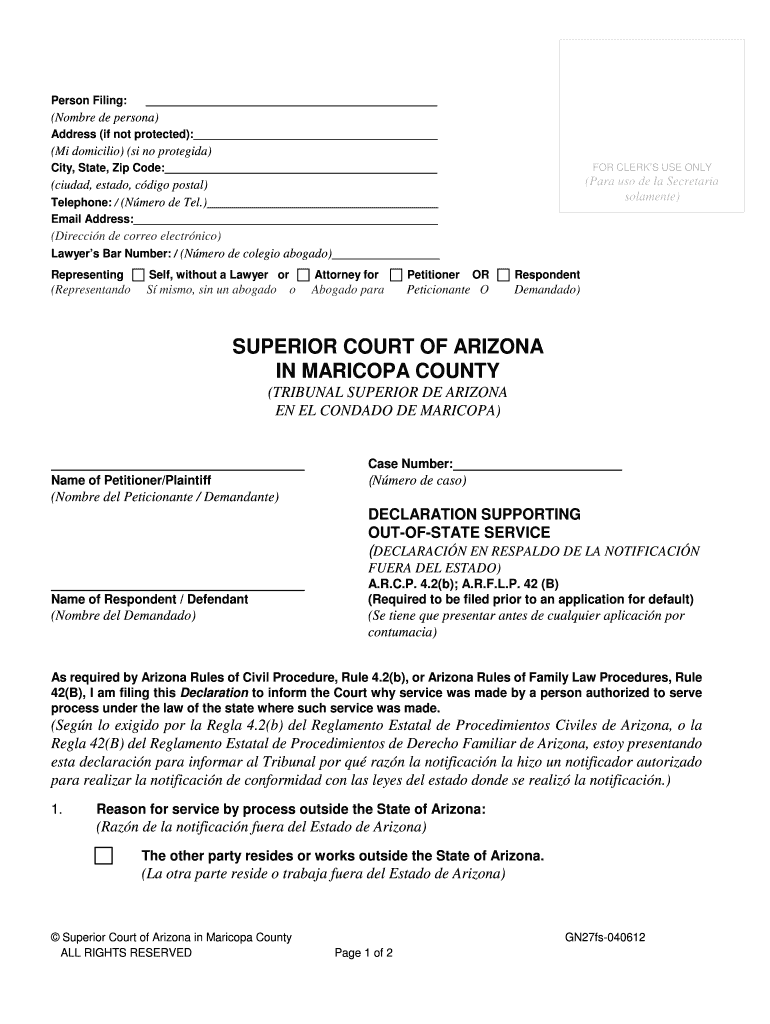
Get the free Arizona Out-of-State Service Declaration
We are not affiliated with any brand or entity on this form

Fill out
Complete the form online in a simple drag-and-drop editor.

eSign
Add your legally binding signature or send the form for signing.

Share
Share the form via a link, letting anyone fill it out from any device.

Export
Download, print, email, or move the form to your cloud storage.
Why pdfFiller is the best tool for your documents and forms


End-to-end document management
From editing and signing to collaboration and tracking, pdfFiller has everything you need to get your documents done quickly and efficiently.
Accessible from anywhere
pdfFiller is fully cloud-based. This means you can edit, sign, and share documents from anywhere using your computer, smartphone, or tablet.
Secure and compliant
pdfFiller lets you securely manage documents following global laws like ESIGN, CCPA, and GDPR. It's also HIPAA and SOC 2 compliant.
What is Arizona Out-of-State Service Declaration
The Arizona Out-of-State Service Declaration is a legal document used by filers to inform the court of an out-of-state service of process.
pdfFiller scores top ratings on review platforms




Who needs Arizona Out-of-State Service Declaration?
Explore how professionals across industries use pdfFiller.

Arizona Out-of-State Service Declaration is needed by:
-
Individuals filing legal documents in Arizona.
-
Attorneys representing clients in court.
-
Parties involved in out-of-state legal matters.
-
People serving court documents from another state.
-
Residents of Maricopa County needing to declare service.
Comprehensive Guide to Arizona Out-of-State Service Declaration
What is the Arizona Out-of-State Service Declaration?
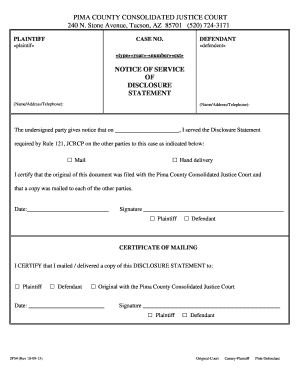
The Arizona Out-of-State Service Declaration is a legal document filed in Arizona's Superior Court, designed to notify the court regarding out-of-state service of process. This crucial form provides essential details such as the filer's personal information and includes affidavits from individuals authorized to serve the process.
As a requirement, the declaration must reflect accurate personal information and the reasons for the out-of-state service, ensuring compliance with Arizona's legal processes.
Purpose and Benefits of the Arizona Out-of-State Service Declaration
This form is vital for effective communication with the court about legal matters involving out-of-state parties. It streamlines the process of filing declarations, thereby enhancing compliance with Arizona's legal requirements.
Utilizing the Arizona Out-of-State Service Declaration offers several benefits:
-
Ensures clear notification about the out-of-state service of process.
-
Facilitates prompt legal proceedings.
-
Helps avoid complications associated with improper service notifications.
Who Needs the Arizona Out-of-State Service Declaration?
Eligibility to file the Arizona Out-of-State Service Declaration extends primarily to defendants and plaintiffs engaged in legal actions requiring acknowledgment of out-of-state services. Situations necessitating the use of this form include most scenarios where a party must inform the court about actions taken beyond Arizona's borders.
Furthermore, it's crucial for individuals filing to correctly identify themselves, especially if they are working with legal representation.
Key Features of the Arizona Out-of-State Service Declaration
This declaration contains several key components that must be filled out accurately to ensure its validity. Critical features of the form include:
-
Personal information fields, including name, address, and contact details.
-
Specific sections that require detailing the reason for the out-of-state service.
-
Signature lines ensuring the filing is under penalty of perjury.
Additionally, the form includes checkboxes allowing individuals to indicate whether they are acting as self-representatives or through an attorney.
How to Fill Out the Arizona Out-of-State Service Declaration Online (Step-by-Step)
Filling out the Arizona Out-of-State Service Declaration can be accomplished efficiently online by following these steps:
-
Gather necessary information, including personal details and the affidavit.
-
Access the online platform and select the Arizona Out-of-State Service Declaration template.
-
Fill in the required fields, such as your name, address, and lawyer’s bar number if applicable.
-
Review the completed sections for accuracy.
-
Submit the form online to the appropriate court.
Common Errors and How to Avoid Them When Filing
Many individuals encounter pitfalls when completing the Arizona Out-of-State Service Declaration. Common mistakes include:
-
Incorrectly filling out personal or service-related information.
-
Omitting required signatures or affidavits.
-
Failing to review the entire form before submission.
To avoid such issues, it is advisable to double-check each section for completeness and accuracy to prevent delays in processing.
Where and How to Submit the Arizona Out-of-State Service Declaration
The submission of the Arizona Out-of-State Service Declaration can occur through various methods:
-
In-person filing at the appropriate Superior Court location.
-
Online submission through the Arizona court's electronic filing system.
It's important to be aware of submission deadlines and any associated fees to ensure timely processing of your declaration.
What Happens After You Submit the Declaration?
Upon submission of the Arizona Out-of-State Service Declaration, the court will undertake a review process. Filers can expect various outcomes, including acknowledgment of the declaration or a request for additional information or corrections.
Being prepared for these possibilities is essential, as individuals may need to address any rejections based on the provided information.
Utilizing pdfFiller to Complete Your Arizona Out-of-State Service Declaration
pdfFiller offers an optimal solution for completing the Arizona Out-of-State Service Declaration. The platform enhances user experience with features such as:
-
Easy-to-use interface for filling and editing forms.
-
Seamless eSigning capabilities to expedite the submission process.
-
Strong security measures ensures the safe handling of sensitive documents.
Leveraging pdfFiller’s capabilities promotes both efficiency and reliability when dealing with legal documents.
Sample Completed Arizona Out-of-State Service Declaration
A sample completed Arizona Out-of-State Service Declaration can serve as a valuable resource for filers. This example will illustrate key fields filled out correctly, providing clarity on how to complete the form.
Reviewing this sample is critical as it outlines the expected format and necessary information, guiding users to ensure proper submission.
How to fill out the Arizona Out-of-State Service Declaration
-
1.To complete the Arizona Out-of-State Service Declaration on pdfFiller, start by accessing the platform and searching for the form by its name.
-
2.Once you locate the Arizona Out-of-State Service Declaration, click on it to open in the pdfFiller interface, which allows for easy editing.
-
3.Before you begin filling out the form, gather your personal information such as your full name, address, and contact details as well as the affidavit from the person who served the papers.
-
4.Navigate through the fillable fields, including 'Person Filing', 'Address', 'City, State, Zip Code', 'Telephone', and 'Email Address', ensuring all required information is correctly inputted.
-
5.You will also need to provide the Lawyer's Bar Number if an attorney is representing you. Choose the appropriate checkboxes for self-representation or attorney representation.
-
6.After completing all sections of the form, carefully review the filled out areas for accuracy and completeness, checking that all necessary signatures are provided.
-
7.Once finalized, use pdfFiller's tools to save your document in your desired format or submit it electronically through the platform’s submission feature.

Who is eligible to file the Arizona Out-of-State Service Declaration?
Individuals involved in a legal case that requires notifying the court of service conducted out of state can file this document. It's crucial that the person filing is authorized under the law of the respective state.
What is the deadline for submitting this declaration?
There may not be a specific deadline stated for the Arizona Out-of-State Service Declaration. However, it should be filed promptly after the service has taken place to ensure compliance with court procedures.
How do I submit the Arizona Out-of-State Service Declaration?
The declaration can be submitted electronically through pdfFiller or printed and filed with the Superior Court of Arizona in Maricopa County. Make sure all fields are complete before submission.
What supporting documents are required with this form?
You must attach the affidavit from the person who served the papers along with the completed declaration. This affidavit serves as proof of service under the respective state's laws.
What are common mistakes to avoid when filling out this form?
Ensure that all personal information is accurate, that you check the appropriate representation boxes, and that you obtain the necessary affidavit from the process server. Failing to do so can delay processing.
How long does it take for the Arizona Out-of-State Service Declaration to be processed?
Processing times can vary. Typically, once submitted, it should take a few days to receive confirmation from the court. Always check with the court for specific timelines.
Can I update the declaration after submission?
Once submitted, updates to the Arizona Out-of-State Service Declaration typically require a new filing. Always consult with a legal professional for guidance on modifications.
Related Forms





Get the latest insights from our blog


If you believe that this page should be taken down, please follow our DMCA take down process
here
.
This form may include fields for payment information. Data entered in these fields is not covered by PCI DSS compliance.