
Last updated on
Oct 2, 2026

Get the free Video Recording Release Form
We are not affiliated with any brand or entity on this form

Fill out
Complete the form online in a simple drag-and-drop editor.

eSign
Add your legally binding signature or send the form for signing.

Share
Share the form via a link, letting anyone fill it out from any device.

Export
Download, print, email, or move the form to your cloud storage.
Why pdfFiller is the best tool for your documents and forms


End-to-end document management
From editing and signing to collaboration and tracking, pdfFiller has everything you need to get your documents done quickly and efficiently.
Accessible from anywhere
pdfFiller is fully cloud-based. This means you can edit, sign, and share documents from anywhere using your computer, smartphone, or tablet.
Secure and compliant
pdfFiller lets you securely manage documents following global laws like ESIGN, CCPA, and GDPR. It's also HIPAA and SOC 2 compliant.
What is Video Release Form
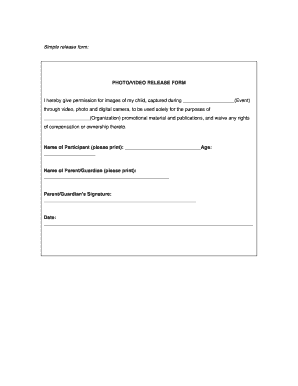
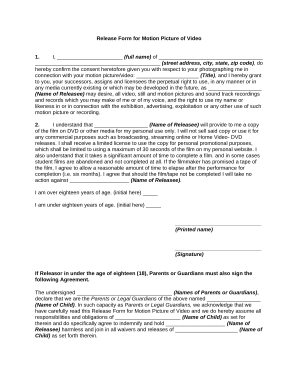
The Video Recording Release Form is a legal document used by individuals granting permission to record, photograph, and utilize media for promotional purposes.
pdfFiller scores top ratings on review platforms




Who needs Video Release Form?
Explore how professionals across industries use pdfFiller.

Video Release Form is needed by:
-
Content creators needing consent for video usage
-
Businesses producing promotional videos
-
Event organizers requiring participant approvals
-
Freelancers offering photography or videography services
-
Marketing agencies managing media projects
Comprehensive Guide to Video Release Form
What is the Video Recording Release Form?
The Video Recording Release Form is a crucial legal document that grants permission for recording media. This form authorizes individuals or organizations to record, photograph, and utilize the finished media for promotional purposes. It serves a similar function as media release forms and sound recording permissions, ensuring that consent is clearly documented to prevent future legal disputes.
Purpose and Benefits of the Video Recording Release Form
Using the Video Recording Release Form is essential for individuals and organizations involved in media production. This form provides clear consent for utilizing recorded media in various promotions, ensuring that all parties understand the intended use of the media. By implementing this form, you significantly reduce the risk of legal disputes regarding media usage.
Who Needs the Video Recording Release Form?
The Video Recording Release Form is commonly required by a variety of professionals in the media landscape. It is typically utilized by:
-
Videographers capturing footage for promotional purposes
-
Photographers needing consent for images used in media
-
Event planners who require permission for event documentation
This form is particularly important in scenarios like public events or personal projects where recorded media will be shared or promoted.
Key Features of the Video Recording Release Form
A well-structured Video Recording Release Form contains several important components. Essential fields include:
-
Signature of the undersigned
-
Printed name of the undersigned
-
Date of signing
Additionally, there are checkboxes and explicit instructions to guide users in properly completing the form, ensuring it meets legal standards for consent.
How to Fill Out the Video Recording Release Form Online
To fill out the Video Recording Release Form using pdfFiller, follow these simple steps:
-
Access the form via the pdfFiller platform.
-
Enter required information in the designated fields.
-
Review all details for accuracy to avoid common errors.
These steps will help streamline the process and ensure that the form is completed correctly.
Digital Signature versus Wet Signature Requirements
When signing the Video Recording Release Form, users can choose between digital signatures and wet signatures. Digital signatures are legally valid alternatives in many contexts, offering convenience and efficiency. However, there are situations where physical signatures may still be necessary, especially for official documents requiring notarization.
How to Submit and Deliver the Video Recording Release Form
After completing the Video Recording Release Form, it can be submitted in various ways. You can choose to submit electronically or via physical mail. When submitting the form, it is recommended to use secure methods to ensure that the signed document reaches its destination safely.
Security Measures when Using the Video Recording Release Form
Handling the Video Recording Release Form comes with privacy and security concerns. pdfFiller incorporates advanced security features, including 256-bit encryption to protect sensitive information. It is essential to store and transmit this document securely to maintain compliance and protect the rights of those involved.
What Happens After You Submit the Video Recording Release Form?
Once you submit the Video Recording Release Form, you can expect a confirmation of receipt from the receiving party. Processing timelines may vary, so it is advisable to inquire about the expected duration. If amendments or re-submissions are necessary, ensure you follow the established protocols to avoid any delays.
Experience the Ease of Using pdfFiller for Your Video Recording Release Form
Utilizing pdfFiller for your Video Recording Release Form simplifies the process of document creation and management. With its user-friendly interface, you can easily edit, fill, and eSign your forms. The platform's capabilities, including online editing features and e-signatures, enhance efficiency and streamline your form-filling experience.
How to fill out the Video Release Form
-
1.Access the Video Recording Release Form on pdfFiller by visiting the platform and searching for the form by name.
-
2.Once opened, review the form layout which includes fields for your signature, printed name, and date.
-
3.Before starting, gather the necessary personal information required to fill in the blank fields, such as your name and the date of signing.
-
4.Utilize pdfFiller's interface to click on each field and enter your information directly; ensure all required sections are completed.
-
5.If applicable, check any necessary boxes to confirm specific permissions related to the use of media.
-
6.Carefully review the entire form for completeness and accuracy, ensuring no fields are left blank unless optional.
-
7.Finalize the form by following the instructions found on pdfFiller, then click on the save or submit option as required.
-
8.To download a copy or submit it digitally, select the appropriate options, ensuring your preferences for delivery and filing are met.

Who is eligible to use the Video Recording Release Form?
Any individual or organization seeking to obtain consent for recording, photographing, or using media featuring subjects can utilize the Video Recording Release Form. This includes content creators, businesses, and event organizers.
Is there a deadline for submitting the Video Recording Release Form?
While no specific submission deadline is mentioned, it is best to complete and collect the necessary signatures promptly, especially if media production is time-sensitive. Ensure the form is signed prior to filming.
How can I submit the completed Video Recording Release Form?
After filling out the form on pdfFiller, you can submit it electronically through the platform or download it for physical submission. Review the submission guidelines for the intended use of the form.
What supporting documents are required with this form?
Typically, no additional documents are required when submitting the Video Recording Release Form. However, it may be beneficial to include identification or proof of identity if requested by the receiving party.
What common mistakes should I avoid when filling out this form?
Ensure that all required fields are filled accurately, particularly your name, signature, and date. Avoid leaving checkboxes unchecked if they apply to your situation, as this may lead to confusion.
What is the processing time for the Video Recording Release Form?
The processing time is generally immediate once the form is signed and submitted. However, if submitting through another party, confirm their review timeline to ensure proper use of media.
Are notarization or additional verification required?
No notarization is required for the Video Recording Release Form. However, ensure it is properly signed by the undersigned and comply with any specific requirements of the media producer utilizing it.
Related Forms




Related Catalogs
Get the latest insights from our blog



If you believe that this page should be taken down, please follow our DMCA take down process
here
.
This form may include fields for payment information. Data entered in these fields is not covered by PCI DSS compliance.