
Last updated on
Oct 19, 2026
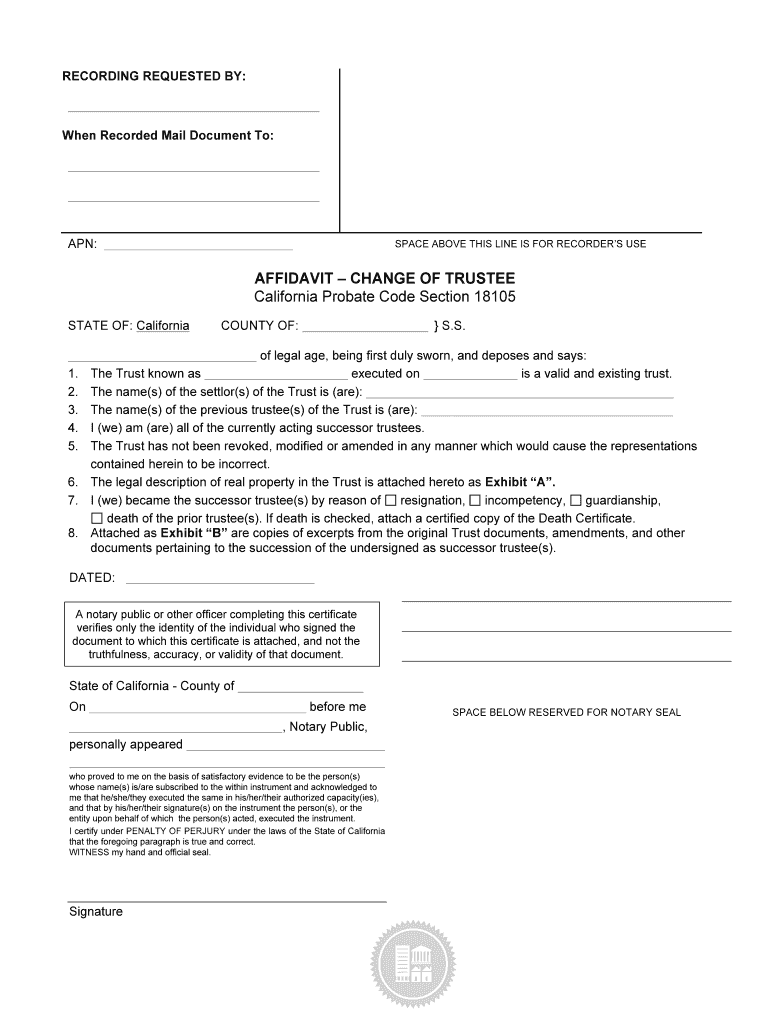
CA Affidavit - Change of Trustee free printable template
pdfFiller is not affiliated with any government organization

Fill out
Complete the form online in a simple drag-and-drop editor.

eSign
Add your legally binding signature or send the form for signing.

Share
Share the form via a link, letting anyone fill it out from any device.

Export
Download, print, email, or move the form to your cloud storage.
Why pdfFiller is the best tool for your documents and forms


End-to-end document management
From editing and signing to collaboration and tracking, pdfFiller has everything you need to get your documents done quickly and efficiently.
Accessible from anywhere
pdfFiller is fully cloud-based. This means you can edit, sign, and share documents from anywhere using your computer, smartphone, or tablet.
Secure and compliant
pdfFiller lets you securely manage documents following global laws like ESIGN, CCPA, and GDPR. It's also HIPAA and SOC 2 compliant.
What is CA Affidavit - Change of Trustee
The California Affidavit Change of Trustee is a legal document used by California residents to formally appoint a new trustee for an existing trust.
pdfFiller scores top ratings on review platforms




Who needs CA Affidavit - Change of Trustee?
Explore how professionals across industries use pdfFiller.

CA Affidavit - Change of Trustee is needed by:
-
Individuals establishing a trust in California
-
Settlers seeking to change a trustee
-
Legal professionals guiding estate planning
-
Trustees managing estates or trusts
-
Beneficiaries of a trust needing updates
-
Real estate owners involved in estate transitions
Comprehensive Guide to CA Affidavit - Change of Trustee
What is the California Affidavit Change of Trustee?
The California Affidavit Change of Trustee is a vital legal document used to officially appoint a new trustee for an existing trust. This affidavit plays a significant role in estate planning and trust management by ensuring that the responsibilities of the trustee are clearly defined and recognized. Legal requirements for this affidavit include notarization and accurate details regarding the trust and its parties involved.
Purpose and Benefits of the California Affidavit Change of Trustee
This affidavit is essential when there are changes in trust management, such as the resignation or death of the current trustee. Advantages of utilizing the California Affidavit Change of Trustee include enhanced legal clarity and the facilitation of a smooth transition of trustee responsibilities. Notarization adds an extra layer of security, confirming the authenticity of the document.
Who Needs the California Affidavit Change of Trustee?
The primary users of this affidavit include current trustees, beneficiaries, and estate planning professionals. Situations prompting a change in trustees may involve the current trustee's incapacity, desire to resign, or the need for a successor trustee. It is crucial for estate planners to understand the significance of this document in managing trust affairs effectively.
Key Features of the California Affidavit Change of Trustee
-
Fillable fields for essential trust information, such as trust names and the settlors' names.
-
Requirement for signatures and notarization to validate the document.
-
A structured format that makes it easier to complete the affidavit accurately.
How to Fill Out the California Affidavit Change of Trustee Online (Step-by-Step)
To fill out the California Affidavit Change of Trustee online, follow these steps:
-
Access the affidavit template on pdfFiller.
-
Complete specific fields, including “The Trust known as ______” and “The name(s) of the settlor(s) of the Trust is (are): ______”.
-
Utilize pdfFiller’s editing and eSigning features to finalize your document.
Notarization and Signing Requirements for the California Affidavit Change of Trustee
Notarization is a critical process that provides legal affirmation of the document's authenticity. It is important to distinguish between digital signatures and wet signatures, as each has different requirements. Ensuring compliance with these notarization rules can prevent potential legal issues in the future.
Submission Methods and Important Considerations
Completed affidavits must be submitted in accordance with local regulations. Considerations include potential filing fees and the estimated timeframes for processing. Tracking submissions is also recommended for peace of mind and verification of successful filing.
Record Retention and Security Concerns
It is essential to keep copies of the California Affidavit Change of Trustee for personal records. Users should be aware of data protection standards and compliance features offered by pdfFiller, which help ensure the security of sensitive documents.
How pdfFiller Can Simplify Your Affidavit Process
pdfFiller provides various tools to assist users in creating and managing their affidavits effectively. Features include form filling, eSigning, and secure document sharing. Success stories and testimonials are available to illustrate how pdfFiller simplifies the affidavit process for users.
Getting Started with Your California Affidavit Change of Trustee
Users are encouraged to begin the process of filling out their California Affidavit Change of Trustee using pdfFiller's accessible interface. Direct links to the affidavit and other forms streamline user access, while immediate support options are available should any questions arise.
How to fill out the CA Affidavit - Change of Trustee
-
1.Start by accessing pdfFiller's website. Use the search bar to locate the California Affidavit Change of Trustee form. Click on the form to open it in the editing interface.
-
2.Familiarize yourself with pdfFiller's tools. You can zoom in or out, and navigate through pages using the arrows for a better view of the entire form.
-
3.Before you begin filling out the form, gather necessary information such as the legal description of the real property, names of all settlors, previous trustees, and the reason for the trustee change.
-
4.Begin filling in the top section labeled 'The Trust known as ______' and continue with 'The name(s) of the settlor(s) of the Trust is (are): ______.' Make sure to fill in all required fields accurately.
-
5.Ensure that you complete all sections including the notary area. Signatures should be added in the designated areas as per the form’s requirements.
-
6.Once you have filled out the form, review each section carefully. Ensure all information is correct and complete to avoid common mistakes.
-
7.Finally, save your work in pdfFiller by clicking on the save icon. You have options to download the form as a PDF or submit it electronically through pdfFiller.

Who is eligible to use the California Affidavit Change of Trustee?
Any individual who has established a trust in California and needs to formally change the appointed trustee can use this affidavit. It’s suitable for settlors and trustees managing the trust.
What deadlines should I be aware of when using this affidavit?
There are no specific deadlines for submitting the California Affidavit Change of Trustee. However, it is advisable to update the trustee information promptly to avoid legal complications.
How do I submit the completed affidavit?
You can submit the completed California Affidavit Change of Trustee by mailing it to the relevant parties, such as the trust beneficiaries, or by recording it with the county recorder if needed.
What supporting documents are required with this form?
Typically, you will need the trust document, any prior affidavits of trustee changes, and proof of identification for notarization. Refer to your legal advisor for any additional documents.
What are common mistakes to avoid when filling out the affidavit?
Common mistakes include failing to notarize the document, leaving required fields blank, and providing incorrect legal descriptions of property. Review the form thoroughly before finalizing.
How long does it take to process an Affidavit Change of Trustee?
Processing times may vary. If recorded with the county, it typically takes a few days to weeks. Always check with the recording office for specific timelines.
Can the affidavit be edited after submission?
Once submitted or filed, changes to the affidavit require a new document or an additional amendment filing. Ensure correctness before submission to minimize editing needs.
Related Forms




Get the latest insights from our blog


If you believe that this page should be taken down, please follow our DMCA take down process
here
.
This form may include fields for payment information. Data entered in these fields is not covered by PCI DSS compliance.