
Last updated on
Oct 31, 2026

GSA Past Performance Contract/Task Order Template 2016-2026 free printable template
We are not affiliated with any brand or entity on this form

Fill out
Complete the form online in a simple drag-and-drop editor.

eSign
Add your legally binding signature or send the form for signing.

Share
Share the form via a link, letting anyone fill it out from any device.

Export
Download, print, email, or move the form to your cloud storage.
Why pdfFiller is the best tool for your documents and forms


End-to-end document management
From editing and signing to collaboration and tracking, pdfFiller has everything you need to get your documents done quickly and efficiently.
Accessible from anywhere
pdfFiller is fully cloud-based. This means you can edit, sign, and share documents from anywhere using your computer, smartphone, or tablet.
Secure and compliant
pdfFiller lets you securely manage documents following global laws like ESIGN, CCPA, and GDPR. It's also HIPAA and SOC 2 compliant.
What is GSA Past Performance Contract/Task Order Template
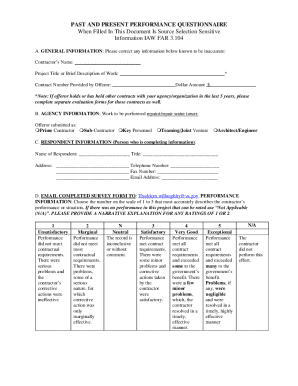
The Past Performance Contract Template is a business form used by offerors to document details about their past contracts and task orders.
pdfFiller scores top ratings on review platforms




Who needs GSA Past Performance Contract/Task Order Template?
Explore how professionals across industries use pdfFiller.

GSA Past Performance Contract/Task Order Template is needed by:
-
Business contractors submitting proposals
-
Government agencies evaluating contract proposals
-
Procurement officers reviewing contractor qualifications
-
Consultants assisting in proposal preparation
-
Organizations involved in contract management
Comprehensive Guide to GSA Past Performance Contract/Task Order Template
What is the Past Performance Contract Template?
The Past Performance Contract Template is a critical tool for offerors providing contract information as part of their proposals. This template facilitates the collection of essential details, including contractor information and descriptions of past contracts. It plays a vital role in the procurement processes, ensuring that all necessary data is organized and presented clearly.
By using the past performance contract template, offerors provide a comprehensive overview of their historical contract performance, which supports their credibility in competitive bidding situations.
Purpose and Benefits of the Past Performance Contract Template
The primary purpose of the Past Performance Contract Template is to streamline proposal submissions by effectively organizing past performance data. Including comprehensive details about previous contracts enhances an offeror's professionalism, showcasing their experience and reliability.
By utilizing this template, businesses can significantly improve their chances of proposal approval, as it helps evaluators quickly assess an offeror's qualifications and successful track record.
Key Features of the Past Performance Contract Template
This template is designed with user experience in mind, featuring blank fields, checkboxes, and specific guiding instructions to assist users in filling it out accurately. One of the distinctive features is its ability to standardize proposal submissions across agencies, thereby ensuring consistency.
-
Clear layout with sections dedicated to contractor information and contract history
-
Guidelines for ensuring all necessary details are captured
-
User-friendly design supporting effective document management
Who Needs the Past Performance Contract Template?
Various stakeholders in federal contracting need the Past Performance Contract Template, including contractors and businesses looking to procure government contracts. It is particularly essential for companies seeking to demonstrate their experience and ability to fulfill contract requirements effectively.
Different industries and sectors involved in government procurement will find this template critical for enhancing their proposal submissions and increasing the likelihood of contract awards.
How to Fill Out the Past Performance Contract Template Online (Step-by-Step)
Filling out the Past Performance Contract Template online is straightforward. Follow these steps for a successful submission:
-
Open the template in your browser using pdfFiller.
-
Fill in the contractor information accurately in the designated fields.
-
Provide detailed descriptions for each previous contract, ensuring that all fields are complete.
-
Review your entries to avoid common errors, such as incorrect dates or incomplete sections.
-
Save and export your completed template as a PDF for submission.
Utilizing pdfFiller can streamline this process, aiding in efficient form completion.
Submission Methods and Delivery for the Past Performance Contract Template
When it comes to submitting the completed Past Performance Contract Template, several options are available. You can submit digitally via email or online portals, or use print methods depending on agency requirements.
-
Digital submissions are quick and provide instant confirmation.
-
Printed submissions may require mailing time and potentially longer processing periods.
It is crucial to adhere to submission deadlines to ensure your proposal is considered. Track your submission status for peace of mind.
Common Issues and Solutions When Using the Past Performance Contract Template
Users may encounter various challenges when utilizing the Past Performance Contract Template. Common rejection reasons include incomplete information or failure to follow submission guidelines.
-
Address missing details proactively to avoid rejection.
-
Implement corrections promptly post-submission to adhere to resubmission requirements.
Keeping track of your submission status will help in resolving any issues that may arise during the procurement process.
Security and Compliance for the Past Performance Contract Template
Users can feel confident about data security when using the Past Performance Contract Template. pdfFiller employs robust security measures, including encryption and compliance with industry standards such as HIPAA and GDPR.
Users must ensure that sensitive information is handled with privacy in mind, safeguarding their data throughout the process of filling out the template.
Example of a Completed Past Performance Contract Template
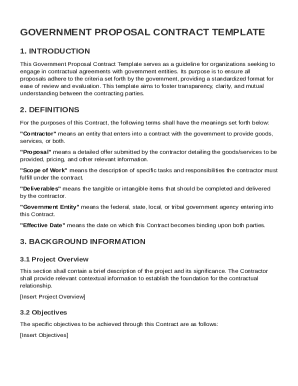
Viewing an example of a completed Past Performance Contract Template can provide valuable insight into how to fill out the form effectively. Such samples demonstrate best practices and highlight specific sections that require attention.
Referencing a completed example ensures alignment with submission requirements, making the proposal process smoother and more efficient.
Optimize Your Use of the Past Performance Contract Template with pdfFiller
To enhance your experience with the Past Performance Contract Template, consider using pdfFiller. This platform simplifies the completion and management of your document through features such as eSigning and secure document storage.
Engaging with pdfFiller offers a user-friendly interface that caters to your documentation needs, ensuring efficient and secure form filling.
How to fill out the GSA Past Performance Contract/Task Order Template
-
1.Access the Past Performance Contract Template on pdfFiller by searching for the form name in the pdfFiller tool.
-
2.Open the document to view the various sections, including contractor information and contract identification fields.
-
3.Before starting, gather essential information such as previous contract details, contractor credentials, and performance history to ensure accuracy.
-
4.Use the form’s fillable fields to provide the requested information, ensuring you input data in each relevant section clearly.
-
5.Check the boxes as instructed, making sure to answer each question and supplement your submission with any required narratives or additional documentation.
-
6.Once all fields are completed, thoroughly review the filled form for any errors or omissions, ensuring compliance with the submission guidelines.
-
7.Save your work periodically by using the 'Save' option, then finalize the document by clicking 'Download' to save it as a PDF.
-
8.Submit the completed Past Performance Contract Template through the designated submission method; follow any specific protocols provided by the requesting agency.

What information is required on the Past Performance Contract Template?
The template requires detailed information about your past contracts or task orders, including contractor details, contract references, and descriptions to provide a comprehensive overview of previous performances.
Who is eligible to use the Past Performance Contract Template?
Any business contractor or offeror seeking to submit a proposal for contracts or task orders is eligible to use the Past Performance Contract Template.
What are the submission methods for the completed form?
Typically, the completed form should be submitted as part of a proposal package, often in PDF format. Ensure you follow any specific submission instructions provided by the contracting agency.
What common mistakes should I avoid when filling out the template?
Common mistakes include leaving fields blank, providing incorrect contract references, or failing to include required documentation. Double-check all entries for accuracy and completeness before submitting.
Is notarization required for the Past Performance Contract Template?
No, notarization is not required for the Past Performance Contract Template, simplifying the submission process for contractors.
What is the processing time after submission?
Processing times can vary depending on the agency's review process and workload. Generally, expect a few weeks for evaluation, but it's best to confirm with the specific agency for precise timelines.
What supporting documents should accompany the Past Performance Contract Template?
Supporting documents may include past contract copies, performance evaluations, and any additional information specified in the proposal requirements to substantiate your contract history.
Related Forms

Related Catalogs
Get the latest insights from our blog


If you believe that this page should be taken down, please follow our DMCA take down process
here
.
This form may include fields for payment information. Data entered in these fields is not covered by PCI DSS compliance.