
Last updated on
Oct 2, 2026

Get the free Bloodborne Pathogens Training Attendance Sheet
We are not affiliated with any brand or entity on this form

Fill out
Complete the form online in a simple drag-and-drop editor.

eSign
Add your legally binding signature or send the form for signing.

Share
Share the form via a link, letting anyone fill it out from any device.

Export
Download, print, email, or move the form to your cloud storage.
Why pdfFiller is the best tool for your documents and forms


End-to-end document management
From editing and signing to collaboration and tracking, pdfFiller has everything you need to get your documents done quickly and efficiently.
Accessible from anywhere
pdfFiller is fully cloud-based. This means you can edit, sign, and share documents from anywhere using your computer, smartphone, or tablet.
Secure and compliant
pdfFiller lets you securely manage documents following global laws like ESIGN, CCPA, and GDPR. It's also HIPAA and SOC 2 compliant.
What is BBP Attendance Sheet
The Bloodborne Pathogens Training Attendance Sheet is a document used by school food employees and managers to record attendance during bloodborne pathogens training sessions.
pdfFiller scores top ratings on review platforms




Who needs BBP Attendance Sheet?
Explore how professionals across industries use pdfFiller.

BBP Attendance Sheet is needed by:
-
School food employees participating in training
-
Managers overseeing employee training sessions
-
Educational institutions in New York
-
Health and safety compliance officers
-
Human resources departments
-
Training coordinators in educational settings
Comprehensive Guide to BBP Attendance Sheet
What is the Bloodborne Pathogens Training Attendance Sheet?
The Bloodborne Pathogens Training Attendance Sheet is a crucial document designed to record attendance for training sessions focused on bloodborne pathogens. This form serves an essential role for school food employees, enabling compliance with training regulations specific to New York. Having an accurate record of attendance is vital for ensuring that all staff members are properly trained in health and safety protocols relevant to their roles.
Purpose and Benefits of the Bloodborne Pathogens Training Attendance Sheet
This form is paramount for maintaining health and safety standards within educational environments. By documenting attendance accurately, schools can uphold compliance with necessary training regulations. Furthermore, keeping an updated bloodborne pathogens training log fosters a safer workplace for employees, ensuring that they are well-equipped to handle any health risks associated with bloodborne pathogens.
Key Features of the Bloodborne Pathogens Training Attendance Sheet
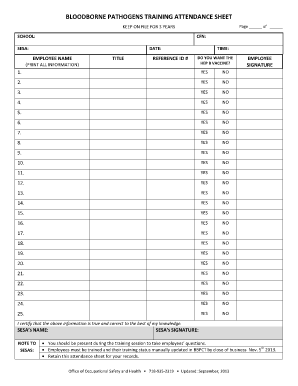
The Bloodborne Pathogens Training Attendance Sheet includes essential components such as fields for employee name, job title, reference ID, and signature lines for both employees and managers. Other important features include manager certification, which not only validates the training completion but also meets document retention requirements necessary for compliance. This precise structuring ensures that all necessary details are easily accessible and properly documented.
Who Needs the Bloodborne Pathogens Training Attendance Sheet?
The Bloodborne Pathogens Training Attendance Sheet should be filled out by both employees undergoing training and managers responsible for certifying the training. This form targets school food employees in New York, ensuring they participate in mandated training sessions to enhance workplace safety. By maintaining accurate attendance records, educational institutions can better support their staff and meet regulatory requirements.
How to Fill Out the Bloodborne Pathogens Training Attendance Sheet Online (Step-by-Step)
-
Access the Bloodborne Pathogens Training Attendance Sheet through the pdfFiller platform.
-
Fill in the required fields, such as employee name, job title, and reference ID.
-
Have the employee sign in the designated area.
-
Request the manager's certification and signature to validate the training.
-
Save and download the completed form for your records.
Digital Signature vs. Wet Signature Requirements
Both digital signatures and wet signatures have their specific applications when completing the Bloodborne Pathogens Training Attendance Sheet. Digital signatures are often preferred for their convenience and efficiency; however, wet signatures may be required in certain scenarios, particularly in compliance with legal standards in New York. It’s crucial to understand these nuances when selecting the signing method to ensure compliance with training regulations.
How to Download and Save the Bloodborne Pathogens Training Attendance Sheet PDF
To download the Bloodborne Pathogens Training Attendance Sheet PDF, follow these steps:
-
Visit the pdfFiller website and locate the form.
-
Click the download option to save the document to your device.
-
Ensure the file is saved in a secure location to protect any sensitive information.
Taking careful steps to secure the file will help maintain the confidentiality of the employee training records.
Where to Submit the Bloodborne Pathogens Training Attendance Sheet
After completing the Bloodborne Pathogens Training Attendance Sheet, it must be submitted to the appropriate school administrative office. Adhering to submission deadlines and compliance-related guidelines is essential to meet regulatory obligations surrounding employee training. Be mindful of any specific locations or processes required for submission within your educational institution.
Security and Compliance for the Bloodborne Pathogens Training Attendance Sheet
pdfFiller is committed to ensuring the security and compliance of all documents, including the Bloodborne Pathogens Training Attendance Sheet. The platform uses 256-bit encryption and adheres to regulatory standards such as HIPAA and GDPR. Protecting sensitive information while maintaining records throughout the retention period is fundamental to safeguarding employee data.
Make Your Document Management Easy with pdfFiller
Utilizing pdfFiller simplifies the process of completing, signing, and managing the Bloodborne Pathogens Training Attendance Sheet. Key features such as document editing, eSigning, and secure cloud storage streamline the workflow for users, making document management a seamless experience.
How to fill out the BBP Attendance Sheet
-
1.Begin by accessing pdfFiller in your web browser and locate the Bloodborne Pathogens Training Attendance Sheet form.
-
2.Use the search bar to type in the form's name and click on the appropriate link to open it.
-
3.Once the form is open, familiarize yourself with the layout including the employee and manager fields.
-
4.Before filling out the form, prepare the necessary information such as the employee's name, title, and reference ID.
-
5.Start by entering the employee's details in the designated fields, ensuring accuracy while typing.
-
6.Next, move to the signature fields. Each employee must sign to confirm their attendance.
-
7.For the manager's section, enter the manager's details and ensure they provide their signature and certification.
-
8.After filling in all required fields, carefully review the entire form for completeness and accuracy.
-
9.If there are any mistakes, use the editing tools provided by pdfFiller to make necessary corrections.
-
10.Once reviewed, save your progress by clicking on the 'Save' button and download a copy for your records.
-
11.Finally, submit the form electronically, or print it for physical storage if required.

Who needs to use the Bloodborne Pathogens Training Attendance Sheet?
The Bloodborne Pathogens Training Attendance Sheet is primarily for school food employees and managers involved in training sessions to ensure compliance and record attendance.
Are signatures required on this form?
Yes, both employee and manager signatures are required on the Bloodborne Pathogens Training Attendance Sheet to validate the training attendance.
How long must the attendance records be kept?
The completed Bloodborne Pathogens Training Attendance Sheet must be retained on file for a minimum of three years as per regulations.
Is there a deadline to submit the attendance sheet?
While specific deadlines may vary, it is advisable to submit the Bloodborne Pathogens Training Attendance Sheet as soon as possible after the training session concludes.
What are common mistakes to avoid when filling out this form?
Common mistakes include omitting necessary signatures, incorrect employee details, and failing to review the form before submission. Always double-check all entries.
Can I fill out the form electronically?
Absolutely! The Bloodborne Pathogens Training Attendance Sheet can be completed electronically using pdfFiller, which provides an efficient and user-friendly interface for form filling.
What should I do if I encounter problems while filling out the form?
If you experience issues, consult the help section on pdfFiller for troubleshooting, or check with your training coordinator for further assistance.
Related Forms



Related Catalogs
Get the latest insights from our blog


If you believe that this page should be taken down, please follow our DMCA take down process
here
.
This form may include fields for payment information. Data entered in these fields is not covered by PCI DSS compliance.