
Last updated on
Nov 9, 2026

Elite Limousines of Houston Credit Card Authorization free printable template
pdfFiller is not affiliated with any government organization

Fill out
Complete the form online in a simple drag-and-drop editor.

eSign
Add your legally binding signature or send the form for signing.

Share
Share the form via a link, letting anyone fill it out from any device.

Export
Download, print, email, or move the form to your cloud storage.
Why pdfFiller is the best tool for your documents and forms


End-to-end document management
From editing and signing to collaboration and tracking, pdfFiller has everything you need to get your documents done quickly and efficiently.
Accessible from anywhere
pdfFiller is fully cloud-based. This means you can edit, sign, and share documents from anywhere using your computer, smartphone, or tablet.
Secure and compliant
pdfFiller lets you securely manage documents following global laws like ESIGN, CCPA, and GDPR. It's also HIPAA and SOC 2 compliant.
What is Elite Limousines of Houston Credit Card Authorization
The Credit Card Authorization Form is a business document used by clients to authorize Elite Limousines of Houston to charge their credit card for services rendered.
pdfFiller scores top ratings on review platforms




Who needs Elite Limousines of Houston Credit Card Authorization?
Explore how professionals across industries use pdfFiller.

Elite Limousines of Houston Credit Card Authorization is needed by:
-
Clients of Elite Limousines of Houston
-
Business owners requiring payment processing
-
Financial administrators handling transactions
-
Event planners booking limousine services
-
Individuals needing transportation services
Comprehensive Guide to Elite Limousines of Houston Credit Card Authorization
What is the Credit Card Authorization Form?
The Credit Card Authorization Form serves a critical function for clients of Elite Limousines of Houston, authorizing necessary charges for goods and services. This form is designed to collect essential client details, including name, address, credit card information, and the client's signature. Ensuring that all required information is accurately provided is vital for processing payments smoothly.
Clients must fill in their credit card details and sign the document to complete the authorization process. This procedure ensures transparency and security between the cardholder and the service provider.
Purpose and Benefits of the Credit Card Authorization Form
The primary purpose of the Credit Card Authorization Form is to afford clients the convenience and security of allowing Elite Limousines to charge their credit cards directly. This form facilitates seamless transactions, ensuring that clients experience a hassle-free booking process.
Moreover, the form serves as a protective measure for both the cardholder and the business, safeguarding personal information during the transaction process. By using a credit card authorization template, clients help ensure that their payments are authorized and secure, thus enhancing their overall experience.
Key Features of the Credit Card Authorization Form
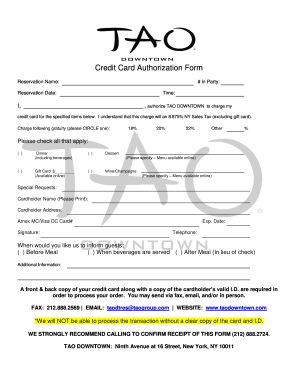
The Credit Card Authorization Form includes several key features that enhance usability and compliance. Fillable fields such as 'Client/Company Name', 'Address', 'Credit Card Number', and 'Authorized Signature' help streamline the completion process. These fields are designed for clarity and ease of use.
-
Request for a copy of the credit card's front and back.
-
Requirement for a valid driver's license to match signatures.
These security measures aim to protect sensitive information and ensure the legitimacy of the authorization.
Who Needs the Credit Card Authorization Form?
This form is predominantly utilized by businesses in Texas, particularly clients booking services from Elite Limousines. It is often necessary to complete this form in various situations, such as when making reservations or ensuring prepayments for services. By filling out the business credit card form, clients can guarantee a smooth transaction process.
How to Fill Out the Credit Card Authorization Form Online (Step-by-Step)
Filling out the Credit Card Authorization Form online is a straightforward process. Users can easily follow these steps to complete the form using pdfFiller:
-
Access the Credit Card Authorization Form through pdfFiller.
-
Enter your personal details in the fillable fields.
-
Provide your credit card information, ensuring accuracy.
-
Sign the form digitally using the eSignature feature.
-
Review the completed form for any errors before submission.
Using these steps will help ensure that all information is accurately submitted, contributing to efficient transaction handling.
Review and Validation Checklist for Your Completed Form
Before submitting the Credit Card Authorization Form, it is essential to carry out a review to ensure accuracy and completeness. Consider the following checklist to validate your form:
-
Confirm that all required fields are filled out completely.
-
Ensure that the credit card number and expiration date are correct.
-
Check that the signature matches the cardholder's name.
-
Review for any common errors, such as incomplete fields.
By following this checklist, clients can minimize the risk of rejection during processing.
How to Submit the Credit Card Authorization Form
Once the Credit Card Authorization Form is completed, clients have several options for submission. These include:
-
Digital submission via pdfFiller.
-
Faxing the completed form to the designated number.
-
Mailing a hard copy of the form to the specified address.
It is also recommended to keep a confirmation or receipt of submission for personal records to ensure smooth processing.
Security and Compliance for the Credit Card Authorization Form
When using pdfFiller to complete the Credit Card Authorization Form, clients can feel secure knowing that sophisticated security measures are in place. pdfFiller employs 256-bit encryption to protect sensitive information, complying with regulations such as HIPAA and GDPR.
Users can rest assured that their privacy is respected when filling out the form online, making it a safe choice for handling sensitive documents.
Common Reasons for Rejection or Issues with the Credit Card Authorization Form
While submitting the Credit Card Authorization Form, users may encounter common pitfalls leading to rejection. Here are some typical reasons for rejection:
-
Incomplete fields left unfilled.
-
Invalid credit card information, including expiration dates.
Identifying these potential issues beforehand can help users make necessary corrections, ensuring the smooth processing of their submissions.
Utilizing pdfFiller for Your Credit Card Authorization Form Needs
pdfFiller offers an efficient platform for managing the Credit Card Authorization Form. The user-friendly features make it easy to edit, fill, and sign documents securely. Utilize pdfFiller for its convenience, ease of use, and compatibility with eSignature capabilities.
By leveraging pdfFiller, clients can enhance their document management experience and ensure that their authorization forms are processed effectively and securely.
How to fill out the Elite Limousines of Houston Credit Card Authorization
-
1.To access the Credit Card Authorization Form on pdfFiller, visit their website and search for the form by name. Click on the appropriate link to open the document.
-
2.Once open, familiarize yourself with the layout. pdfFiller provides an intuitive interface where you can easily click on fillable fields to enter information.
-
3.Gather all necessary details before you begin filling out the form. This includes your full name, address, credit card number, the expiration date, and any security code. Ensure you also have a copy of your driver’s license handy.
-
4.Begin by filling out your name and address in the designated fields. Make sure to input accurate information to avoid processing delays.
-
5.Next, carefully enter your credit card number, expiration date, and security code. Double-check that these details are correct to prevent errors during payment processing.
-
6.After completing the credit card information, navigate to the 'Authorized Signature' field. Use your mouse or touchpad to create your signature directly on the digital form.
-
7.To finalize, review all entered information for accuracy. Ensure all fields are complete and that the signature matches the one on your driver’s license.
-
8.When satisfied, save your changes in pdfFiller. You can download the completed form or submit it directly to Elite Limousines via pdfFiller’s submission options.

Who is eligible to use the Credit Card Authorization Form?
The Credit Card Authorization Form is primarily for clients of Elite Limousines of Houston who need to authorize charges for services rendered. Ensure you are the cardholder to complete this form.
What supporting documents are needed for this form?
In addition to filling out the form, you must provide a copy of your credit card's front and back, as well as a valid driver's license to confirm your signature.
How do I submit the completed form?
You can submit the completed Credit Card Authorization Form directly through pdfFiller by utilizing the submission options provided after saving your filled form.
What common mistakes should I avoid when filling out this form?
Common mistakes include entering incorrect credit card information or failing to sign the form. Always double-check each field for accuracy before submission.
How long does it take to process the credit card authorization?
Processing times may vary, but typically, once submitted, your authorization should be processed swiftly, often within 1-2 business days, depending on the service provider's procedures.
Do I need to have the form notarized?
No, the Credit Card Authorization Form does not require notarization. Simply complete and sign it as per the instructions before submitting it.
Related Forms

Get the latest insights from our blog


If you believe that this page should be taken down, please follow our DMCA take down process
here
.
This form may include fields for payment information. Data entered in these fields is not covered by PCI DSS compliance.