
Last updated on
Oct 31, 2026

Get the free Employees' Pension Scheme 1995 Form 10C
We are not affiliated with any brand or entity on this form

Fill out
Complete the form online in a simple drag-and-drop editor.

eSign
Add your legally binding signature or send the form for signing.

Share
Share the form via a link, letting anyone fill it out from any device.

Export
Download, print, email, or move the form to your cloud storage.
Why pdfFiller is the best tool for your documents and forms


End-to-end document management
From editing and signing to collaboration and tracking, pdfFiller has everything you need to get your documents done quickly and efficiently.
Accessible from anywhere
pdfFiller is fully cloud-based. This means you can edit, sign, and share documents from anywhere using your computer, smartphone, or tablet.
Secure and compliant
pdfFiller lets you securely manage documents following global laws like ESIGN, CCPA, and GDPR. It's also HIPAA and SOC 2 compliant.
What is EPS Form 10C
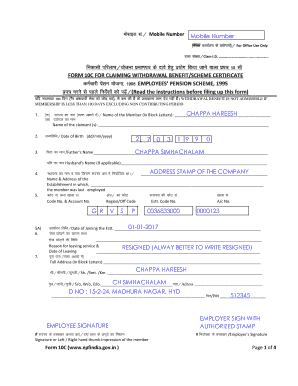
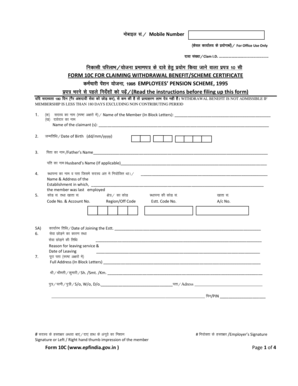
The Employees' Pension Scheme 1995 Form 10C is a tax document used by employees in India to claim withdrawal benefits or a scheme certificate under the Employees' Pension Scheme, 1995.
pdfFiller scores top ratings on review platforms




Who needs EPS Form 10C?
Explore how professionals across industries use pdfFiller.

EPS Form 10C is needed by:
-
Employees looking to withdraw their pension benefits
-
Individuals seeking a scheme certificate under EPS 1995
-
Tax professionals assisting clients with pension claims
-
Human Resources personnel managing employee pensions
-
Financial advisors guiding clients on pension options
Comprehensive Guide to EPS Form 10C
What is the Employees' Pension Scheme 1995 Form 10C?
The Employees' Pension Scheme 1995 Form 10C is a crucial document within the Employees' Pension Scheme, 1995. Its primary purpose is to facilitate employees in claiming pension withdrawal benefits or obtaining a scheme certificate after leaving their employment. By understanding the significance of this form, users can navigate the pension withdrawal process more efficiently.
Purpose and Benefits of the Employees' Pension Scheme 1995 Form 10C
Utilizing Form 10C offers several advantages that are integral to financial planning post-employment. The form enables employees to access their pension withdrawal benefits, which can provide financial security during transitional periods. Key benefits include:
-
Access to pension funds after leaving a job
-
Receipt of a scheme certificate for future employment
Who Needs the Employees' Pension Scheme 1995 Form 10C?
Form 10C is essential for employees who have left their service and wish to claim their pension benefits. Specifically, individuals who have not reached retirement age but have exited their jobs may qualify to fill out this form. Examples of situations that necessitate Form 10C include:
-
Resignation from an employer
-
Job termination
Eligibility Criteria for the Employees' Pension Scheme 1995 Form 10C
To be eligible for submitting Form 10C, certain criteria must be met. Employees typically should satisfy conditions related to age and the duration of service. For example:
-
Minimum age requirement for submission
-
Required length of employment for processing
How to Fill Out the Employees' Pension Scheme 1995 Form 10C Online (Step-by-Step)
Completing Form 10C online can streamline the process. Follow these step-by-step instructions to fill out the form digitally:
-
Access the online portal designated for Form 10C.
-
Enter your personal details, including name and contact information.
-
Fill in your employment information accurately.
-
Provide an electronic signature to validate the submission.
Common Errors and How to Avoid Them
When filling out Form 10C, users may encounter common pitfalls that can delay processing. To ensure accuracy and completeness, consider avoiding these frequent mistakes:
-
Leaving fields incomplete
-
Providing incorrect personal or employment details
Submission Methods for the Employees' Pension Scheme 1995 Form 10C
Once Form 10C is completed, users can submit it through various methods. The available submission techniques include:
-
Online submission via designated portals
-
Mailing the completed form to the appropriate address
Post-Submission: What Happens After You Submit the Employees' Pension Scheme 1995 Form 10C?
After submitting Form 10C, users should be aware of the process that follows. Typically, the next steps include:
-
Reviewing the application by the concerned authority
-
Receiving updates on the application status through notified channels
Security and Compliance for the Employees' Pension Scheme 1995 Form 10C
When handling sensitive information through Form 10C, users should feel assured about data protection. pdfFiller implements several security measures to secure documents, including:
-
256-bit encryption for data safety
-
Compliance with HIPAA and GDPR regulations
Why Choose pdfFiller for Completing the Employees' Pension Scheme 1995 Form 10C?
pdfFiller offers a range of capabilities that make completing Form 10C straightforward and secure. Users benefit from features such as:
-
User-friendly text and image editing
-
Seamless eSigning and document management capabilities
How to fill out the EPS Form 10C
-
1.Start by accessing the Employees' Pension Scheme 1995 Form 10C on pdfFiller. Use the search bar to find the appropriate document and click on it to open the form.
-
2.Once the form is open, familiarize yourself with the layout. Navigate through the sections where you'll need to enter your personal details and employment information.
-
3.Gather the necessary documents and information before filling out the form. Make sure you have your name, date of birth, employment details, and any relevant pension numbers.
-
4.Begin filling in the required fields like your name and employee ID. Utilize pdfFiller's interactive interface to click into each field and type your information directly.
-
5.Pay attention to the options available, such as checkboxes or dropdowns, and fill these out as applicable to your situation.
-
6.Review each section after you’ve completed it to ensure all fields are accurately filled. Check for any missed fields with pdfFiller’s visual guidance.
-
7.Once the form is fully completed, save your progress. Use the 'Save' option to ensure your information is not lost.
-
8.After saving your form, finalize it by checking the signature section to ensure you’ve signed, if needed.
-
9.If required, download the filled form. Click on the 'Download' button to save a copy to your device for your records.
-
10.Lastly, submit the form as per the guidelines provided by your employer or the statutory authority, whether electronically or through physical mailing.

Who is eligible to submit the Employees' Pension Scheme 1995 Form 10C?
Eligible individuals include employees who have contributed to the Employees' Pension Scheme under the EPF Act and are looking to claim their pension benefits or scheme certificates.
What is the deadline for submitting Form 10C?
While there may not be a strict deadline, it's advisable to submit Form 10C after leaving employment or upon retirement to ensure timely processing of claims.
How can I submit the Employees' Pension Scheme Form 10C?
Form 10C can typically be submitted online through the EPFO portal, or by mailing a physical copy to the relevant EPFO office. Confirm your submission method with your employer.
What documents do I need to submit along with Form 10C?
You may need to attach a copy of your identification, employment proof, and any previous pension contributions or withdrawal statements as supporting documents.
What common mistakes should I avoid while filling out Form 10C?
Ensure all personal information is accurate, double-check that you’ve signed the form where required, and avoid leaving any sections blank to prevent processing delays.
How long does it take to process Form 10C?
Processing times can vary, but typically it may take 30 to 60 days from the submission date to receive confirmation or disbursement of benefits.
Can I make corrections to Form 10C after submission?
If you realize an error after submitting, contact your EPFO office to inquire about the proper procedure for corrections or re-submitting the form.
Related Forms


Related Catalogs
Get the latest insights from our blog


If you believe that this page should be taken down, please follow our DMCA take down process
here
.
This form may include fields for payment information. Data entered in these fields is not covered by PCI DSS compliance.