
Last updated on
Nov 6, 2026

Get the free Principal Employer Certificate Form
We are not affiliated with any brand or entity on this form

Fill out
Complete the form online in a simple drag-and-drop editor.

eSign
Add your legally binding signature or send the form for signing.

Share
Share the form via a link, letting anyone fill it out from any device.

Export
Download, print, email, or move the form to your cloud storage.
Why pdfFiller is the best tool for your documents and forms


End-to-end document management
From editing and signing to collaboration and tracking, pdfFiller has everything you need to get your documents done quickly and efficiently.
Accessible from anywhere
pdfFiller is fully cloud-based. This means you can edit, sign, and share documents from anywhere using your computer, smartphone, or tablet.
Secure and compliant
pdfFiller lets you securely manage documents following global laws like ESIGN, CCPA, and GDPR. It's also HIPAA and SOC 2 compliant.
What is Principal Employer Cert
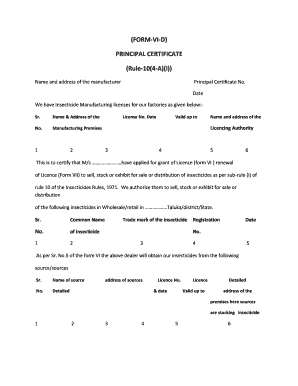
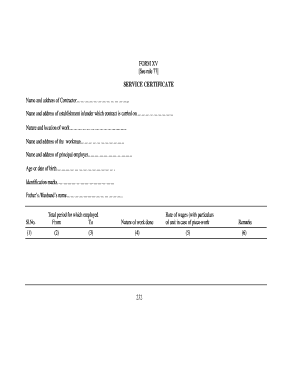
The Principal Employer Certificate Form is an employment document used by principal employers in Karnataka to certify contractor engagement in compliance with labor regulations.
pdfFiller scores top ratings on review platforms




Es muy bueno, me evita estar imprimiendo y escaneando los documentos que tengo que firma
VERY GOOD TOOL, I LIKE SO MUCH, IS A LITTLE DIFFICULT AT BEGINNING
Who needs Principal Employer Cert?
Explore how professionals across industries use pdfFiller.

Principal Employer Cert is needed by:
-
Principal employers in Karnataka
-
Contractors operating under contract labor law
-
Human resource managers overseeing labor contracts
-
Compliance officers ensuring legal adherence
-
Businesses hiring contract labor services
Comprehensive Guide to Principal Employer Cert
What is the Principal Employer Certificate Form?
The Principal Employer Certificate Form is an essential document used in Karnataka, India, to formalize the contractor engagement by a principal employer. This form certifies compliance with the Contract Labour (Regulation and Abolition) Act, 1970, and the Karnataka Rules, 1974. It plays a critical role in ensuring that both parties adhere to legal employment standards.
The form serves the following purposes:
-
Certifies the relationship between the principal employer and the contractor.
-
Facilitates legal compliance to protect employee rights.
-
Utilizes standardized information for clarity and effectiveness.
Purpose and Benefits of the Principal Employer Certificate Form
This form is vital for principal employers and contractors as it safeguards legal accountability. It ensures that all required information is formally recognized, thereby preventing disputes regarding employee engagement.
-
Validates the contractual relationship, reducing the risk of misunderstandings between parties.
-
Enhances employee protection through regulatory compliance.
Who Needs the Principal Employer Certificate Form?
The need for the Principal Employer Certificate Form primarily lies with the following parties:
-
Principal Employers hiring contractors in the state of Karnataka.
-
Contractors who require validation of their engagement with the principal employer.
This ensures that everyone involved in the contractual labor process complies with legal guidelines and regulations.
Key Features of the Principal Employer Certificate Form
Important elements of the Principal Employer Certificate Form include several critical sections, each designed to capture essential information accurately:
-
Fields for the contractor's name and details about the establishment.
-
Specific contract type and pertinent registration details.
-
The signature of the principal employer, which is required to authenticate the document.
How to Fill Out the Principal Employer Certificate Form Online
To complete the Principal Employer Certificate Form using pdfFiller, follow these step-by-step instructions:
-
Open the form in the pdfFiller platform.
-
Fill in the contractor’s name and other relevant fields.
-
Ensure you enter the establishment’s name and registration number accurately.
-
Review all fields to confirm correct information before final submission.
-
Sign the document electronically as the principal employer.
Common Errors and How to Avoid Them
When filling out the Principal Employer Certificate Form, there are several common mistakes to be aware of:
-
Inaccurate or incomplete information, especially in critical fields.
-
Omitting the principal employer's signature, which is essential for validation.
Careful review of the document before submission can prevent these errors and ensure a smooth processing experience.
Submission Methods and Delivery for the Principal Employer Certificate Form
Upon completing the Principal Employer Certificate Form, it’s important to know how and where to submit it:
-
Submit the form online through the pdfFiller platform for ease of use.
-
For offline options, consult local regulatory offices for guidance.
Processing times may vary, so consider checking for updates after submission to ensure the timely handling of your form.
Document Security and Compliance Considerations
Handling the Principal Employer Certificate Form requires adherence to security measures to safeguard sensitive information:
-
Ensure that any digital submissions are protected through secure platforms, such as pdfFiller, which complies with HIPAA and GDPR standards.
-
Utilize encryption technologies to protect personal and contract-related data.
Step Forward with pdfFiller for Effortless Form Management
Using pdfFiller enhances your experience with the Principal Employer Certificate Form. Its user-friendly online platform allows for easier form filling and management.
-
Edit, eSign, and share your completed forms quickly and efficiently.
-
Access features that streamline document handling, making the process both convenient and secure.
How to fill out the Principal Employer Cert
-
1.To begin, navigate to pdfFiller's website and log in to your account. Use the search bar to find the 'Principal Employer Certificate Form.'
-
2.Once located, click on the form to open it in the pdfFiller editor, where you will see the document displayed with various fields ready for input.
-
3.Before filling out the form, gather the required information including the contractor's name, contract type, your establishment's name, and the registration details.
-
4.Start by entering the contractor's name in the designated field, ensuring it matches the legal name as per registration documents.
-
5.Next, locate the field for the type of contract. Clearly specify the nature of the contract to avoid any compliance issues.
-
6.After inputting contract details, fill in your establishment’s name accurately. Ensure that this aligns with the registration certificate for legitimacy.
-
7.Input the registration certificate number as required; double-check this for accuracy to prevent rejection.
-
8.As you proceed, ensure all fields marked with asterisks or described as mandatory are filled out completely.
-
9.Once you fill in all necessary information, review your entries for accuracy and completeness. Utilize pdfFiller's tools to validate fields if available.
-
10.Consider signing the document before finalization. Use pdfFiller's e-sign feature to add your signature in the designated signature field.
-
11.After reviewing, you can save the amended form. Click on the 'Download' button to save it to your device or use the 'Submit' option for online submission as required.

Who is eligible to complete the Principal Employer Certificate Form?
The form can be completed by principal employers in Karnataka who are engaging contractors under the Contract Labour (Regulation and Abolition) Act. Ensure you have proper authority to sign on behalf of the employer.
What documents do I need to submit along with this form?
Typically, supporting documents include the contractor's engagement details, the establishment's registration certificate, and proof of compliance with labor laws, if applicable. Always double-check requirements with local regulations.
Is there a submission deadline for this form?
While there may not be a strict submission deadline for the Principal Employer Certificate Form, it is advisable to complete and submit it promptly to ensure compliance with labor regulations and avoid penalties.
How do I submit the Principal Employer Certificate Form?
You can submit the completed form via pdfFiller by choosing the 'Submit' option to send electronically, or you can download and email it to the relevant authority if required. Always check the specific submission guidelines.
What are common mistakes to avoid when completing this form?
Common mistakes include failing to provide required fields, inaccuracies in contractor names or registration numbers, and missing the principal employer's signature. Double-check your entries to ensure compliance.
How long does it take to process the form once submitted?
Processing times for the Principal Employer Certificate Form can vary based on the specific authority reviewing it. Generally, anticipate a few days to weeks for approval, but check with local regulations for precise timelines.
Can I edit the form after saving it on pdfFiller?
Yes, pdfFiller allows you to return to the saved Principal Employer Certificate Form for further edits. Log in to your account, find the saved document, and continue editing as needed before final submission.
Related Forms




Get the latest insights from our blog


If you believe that this page should be taken down, please follow our DMCA take down process
here
.
This form may include fields for payment information. Data entered in these fields is not covered by PCI DSS compliance.