
Last updated on
Oct 19, 2026

Get the free Accident Claim Form
We are not affiliated with any brand or entity on this form

Fill out
Complete the form online in a simple drag-and-drop editor.

eSign
Add your legally binding signature or send the form for signing.

Share
Share the form via a link, letting anyone fill it out from any device.

Export
Download, print, email, or move the form to your cloud storage.
Why pdfFiller is the best tool for your documents and forms


End-to-end document management
From editing and signing to collaboration and tracking, pdfFiller has everything you need to get your documents done quickly and efficiently.
Accessible from anywhere
pdfFiller is fully cloud-based. This means you can edit, sign, and share documents from anywhere using your computer, smartphone, or tablet.
Secure and compliant
pdfFiller lets you securely manage documents following global laws like ESIGN, CCPA, and GDPR. It's also HIPAA and SOC 2 compliant.
What is Accident Claim Form
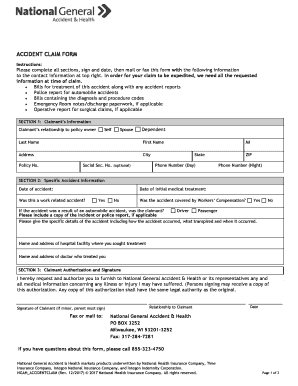
The Accident Claim Form is a healthcare document used by individuals involved in accidents to submit claims for related medical expenses.
pdfFiller scores top ratings on review platforms




Who needs Accident Claim Form?
Explore how professionals across industries use pdfFiller.

Accident Claim Form is needed by:
-
Participants in activities sponsored by organizations
-
Staff members of participating organizations
-
Parents/Guardians of claimants
-
Adult claimants seeking benefits
-
Medical service providers submitting claims
-
Insurance professionals handling claims
Comprehensive Guide to Accident Claim Form
What is the Accident Claim Form?
The Accident Claim Form, known as AXIS CF-062015, is a vital document designed for individuals involved in accidents during organized activities sponsored by a participating organization. This form enables users to report details about their injuries and is essential for the claims process associated with accident insurance policies. Typically, participants, including members of organizations and guardians, use this form. It is crucial to complete and submit the form within 90 days of the accident to ensure timely processing of claims.
Purpose and Benefits of the Accident Claim Form
The primary objective of the Accident Claim Form is to facilitate coverage for medical bills resulting from accidents. By completing this form, users can secure financial support, ensuring that they receive compensation for their injuries. Timely submission of this form not only speeds up the claims process but also helps maintain proper documentation, which is vital for effective claim management.
Who Needs the Accident Claim Form?
Various individuals typically need to fill out the Accident Claim Form, including:
-
Participating Organization Representatives
-
Parents or Guardians of minors
-
Adult Claimants
This form is necessary in instances where injuries occur during activities organized by a participating entity. Understanding eligibility criteria is essential, as certain exceptions may apply depending on specific situations.
How to Fill Out the Accident Claim Form Online
To ensure accurate completion of the Accident Claim Form online, follow these general guidelines:
-
Start by providing your organization details and policy number.
-
Complete all relevant fields, ensuring the information is precise.
-
Review common pitfalls, such as missing signatures or incorrect information, before submission.
Double-checking each entry is crucial to avoid delays in processing, ensuring that your claim is submitted correctly.
Required Documents and Supporting Materials
Gathering the right supporting documents is essential for processing your accident claim effectively. Important materials to collect include:
-
Itemized medical bills
-
Proof of the accident, such as police reports
Each document serves a significant purpose in verifying the details of your claim. Organize these materials methodically to facilitate their submission alongside the completed claim form.
Submission Methods and Delivery Options
There are several methods available for submitting the completed Accident Claim Form:
-
Online submission via an e-filing platform
-
Mailing the form to the designated address
-
Submitting in person at the organization’s office
Be mindful of the submission deadlines to avoid any processing delays, and anticipate receiving confirmation once your form has been submitted.
What Happens After You Submit the Accident Claim Form
Upon submission, the form enters a review process by the insurance provider. Common reasons for claim rejections may include incomplete information or missing documentation. To stay informed, follow up on the claim's status within the designated timeline, which is generally communicated after submission.
Security and Compliance for the Accident Claim Form
When submitting the Accident Claim Form, data protection is paramount. Measures such as 256-bit encryption ensure the confidentiality of personal information during the submission process. Compliance with standards like HIPAA and GDPR further enhances the security surrounding sensitive documents.
Why Use pdfFiller for Your Accident Claim Form?
Using pdfFiller to manage your Accident Claim Form is advantageous due to its user-friendly platform. Features such as document editing, eSigning, and comprehensive form management streamline the claims process significantly. With pdfFiller, users can handle their claims swiftly and efficiently, ensuring that all requirements are met without hassle.
Sample or Example of a Completed Accident Claim Form
To aid in your understanding of how to fill out the Accident Claim Form, a downloadable sample is available. This example illustrates how each section corresponds to the required fields, providing a clear reference as you complete your own form. Utilize this resource to facilitate accuracy in your submission.
How to fill out the Accident Claim Form
-
1.Access pdfFiller and search for 'Accident Claim Form' or input the direct link provided by your organization.
-
2.Open the form in pdfFiller's interface, which allows for easy navigation and editing.
-
3.Before filling out the form, gather necessary information such as accident details, medical bills, and your insurance policy number.
-
4.Begin with Part I of the form, ensuring to fully answer each item with accurate details about the incident.
-
5.In Part II, read the instructions carefully and provide all required information related to the claimant’s status.
-
6.Utilize pdfFiller’s features such as checkbox options and dropdown menus to make selections efficiently.
-
7.After completing the form, review each section to ensure all information is accurate and complete.
-
8.Check the fraud warning statement at the bottom of the form and the signature fields for the required signatories.
-
9.Finalizing the form is crucial; ensure that both the participating organization representative and the parent/guardian sign where required.
-
10.Once reviewed, you can save your progress. In pdfFiller, click on the save button to store your form securely.
-
11.Download the completed form using the download option, or directly submit it through the platform to ensure it reaches the appropriate entity.

Who is eligible to fill out the Accident Claim Form?
This form is designed for individuals who have been involved in an accident during activities sponsored by a participating organization, including participants, parents, guardians, and adult claimants.
What is the deadline for submitting the form?
The completed Accident Claim Form must be submitted within 90 days of the accident to ensure eligibility for processing medical claims.
How can I submit the completed form?
You can submit the Accident Claim Form by downloading it from pdfFiller and sending it via mail or through your insurance provider's designated submission method.
What supporting documents do I need to attach?
You will need to include itemized medical bills related to the accident, along with any necessary personal identification and the signatures of involved parties.
What are some common mistakes to avoid when filling out the form?
Ensure all sections are thoroughly completed, particularly signature fields, and double-check that your medical bills are attached; incorrect or missing information can delay processing.
How long does it take to process the claim after submission?
Processing times for accident claims can vary, but typically, it may take several weeks to get a response from the insurance provider after the form is submitted.
Are there any fees associated with submitting the Accident Claim Form?
Typically, there are no fees for submitting the Accident Claim Form itself, but your insurance provider may have specific policies regarding claims processing.
Related Forms



Get the latest insights from our blog



If you believe that this page should be taken down, please follow our DMCA take down process
here
.
This form may include fields for payment information. Data entered in these fields is not covered by PCI DSS compliance.