
Last updated on
Sep 26, 2026
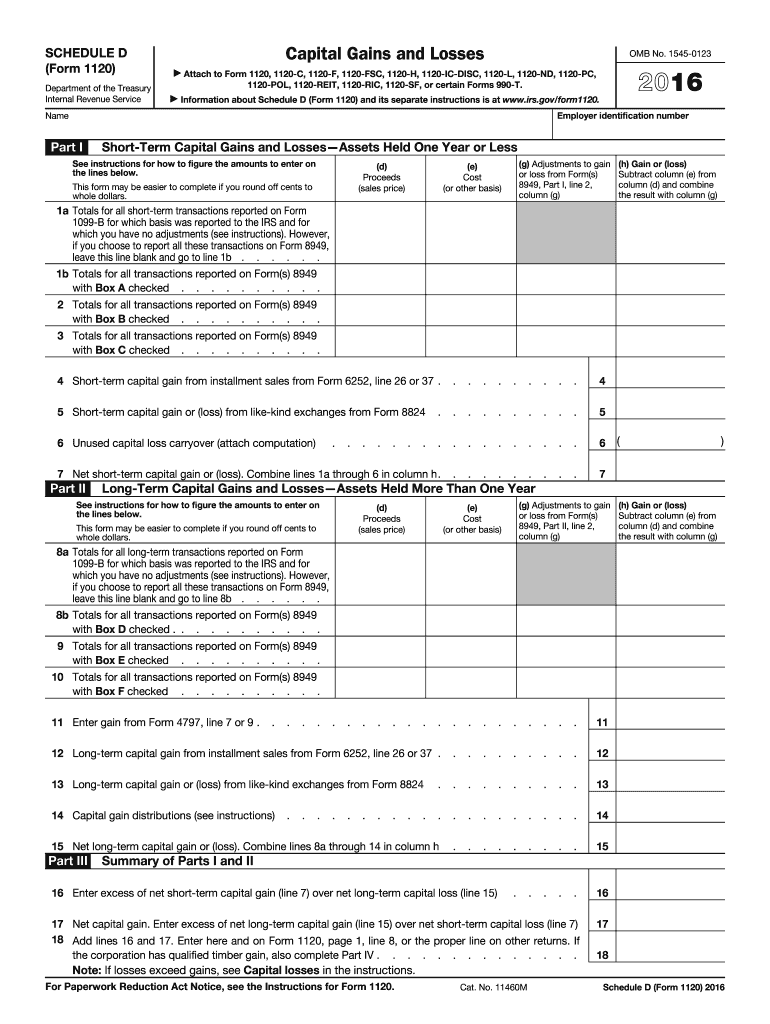
IRS 1120 - Schedule D 2016 free printable template
pdfFiller is not affiliated with IRS

Fill out
Complete the form online in a simple drag-and-drop editor.

eSign
Add your legally binding signature or send the form for signing.

Share
Share the form via a link, letting anyone fill it out from any device.

Export
Download, print, email, or move the form to your cloud storage.
Why pdfFiller is the best tool for your documents and forms


End-to-end document management
From editing and signing to collaboration and tracking, pdfFiller has everything you need to get your documents done quickly and efficiently.
Accessible from anywhere
pdfFiller is fully cloud-based. This means you can edit, sign, and share documents from anywhere using your computer, smartphone, or tablet.
Secure and compliant
pdfFiller lets you securely manage documents following global laws like ESIGN, CCPA, and GDPR. It's also HIPAA and SOC 2 compliant.
What is IRS 1120 - Schedule D
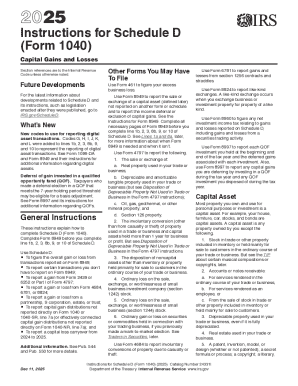
Schedule D (Form 1120) 2016 is a tax document used by corporations to report capital gains and losses from property sales or exchanges.
pdfFiller scores top ratings on review platforms




Who needs IRS 1120 - Schedule D?
Explore how professionals across industries use pdfFiller.

IRS 1120 - Schedule D is needed by:
-
Corporate taxpayers filing federal income tax returns
-
C corporations claiming capital gains or losses
-
Accountants preparing corporate tax documents
-
Tax professionals advising businesses
-
Business owners handling investments
Comprehensive Guide to IRS 1120 - Schedule D
What is Schedule D (Form 1120) 2016?
Schedule D (Form 1120) 2016 is a crucial tax form used by corporations in the United States to report capital gains and losses resulting from property transactions. This form plays an essential role in the overall tax return process for U.S. corporations, helping to ensure accurate reporting of financial activities. By detailing both short-term and long-term capital gains and losses, it helps corporations stay compliant with federal tax regulations. The proper completion of Schedule D Form 1120 is vital to avoid discrepancies in corporate tax submissions.
Purpose and Benefits of Completing Schedule D (Form 1120) 2016
Completing Schedule D (Form 1120) accurately is significant for multiple reasons. Firstly, it helps corporations report capital gains correctly, which can positively impact tax liability. Additionally, proper reporting aids in avoiding penalties and ensures compliance with IRS requirements, ultimately safeguarding the corporation's financial standing. Accurately reporting capital gains and losses can also influence future tax obligations, making this form pivotal in effective tax planning.
Who Needs to Use Schedule D (Form 1120) 2016?
Certain entities are required to file Schedule D (Form 1120) to report their capital gains and losses. Primarily, corporations, including C corporations, as well as certain tax-exempt organizations, must complete this form when dealing in investment properties or securities. Understanding eligibility criteria is essential for these businesses to fulfill their tax obligations correctly.
Key Features of Schedule D (Form 1120) 2016
The Schedule D (Form 1120) includes several key components that facilitate the reporting of capital gains and losses. These essential features include sections dedicated to short-term and long-term gains, as well as fields for reporting transactions sourced from other forms, such as 1099-B and 8949. Specific calculations, including those for alternative tax concerning qualified timber gain, are also present, ensuring that all financial activities are accurately accounted for.
How to Fill Out Schedule D (Form 1120) 2016 Online (Step-by-Step)
Filling out Schedule D (Form 1120) online can be done efficiently by following these steps:
-
Access the online form through a reliable platform like pdfFiller.
-
Carefully enter details in the designated fields, ensuring all information is up-to-date.
-
Attach necessary documents, such as previous tax returns or Form 1099-B.
-
Review the completed form for accuracy, focusing on reported gains and losses.
-
Submit the form electronically through the portal.
These steps help streamline the form completion process while utilizing pdfFiller’s features enhances efficiency.
Common Errors to Avoid When Filing Schedule D (Form 1120) 2016
While filling out Schedule D (Form 1120), avoid these common errors:
-
Omitting transactions that should be reported from Forms like 1099-B.
-
Inaccurately calculating short-term and long-term gains and losses.
-
Failing to double-check entries before submission for accuracy.
-
Neglecting to include supporting documentation or necessary signatures.
Paying attention to these areas will help ensure the submission is error-free, reducing the likelihood of penalties.
Filing Deadline and Submission Methods for Schedule D (Form 1120) 2016
Corporations must adhere to the filing deadlines established by the IRS for Schedule D (Form 1120). Late submissions may result in penalties and interest on any taxes owed. When submitting, businesses have various options, including electronic submissions through platforms like pdfFiller or traditional paper filing. Utilizing electronic methods can enhance the submission process by providing quicker processing times.
What Happens After Submitting Schedule D (Form 1120) 2016?
After submitting Schedule D (Form 1120), corporations will receive confirmation of their filing. It is crucial to track the submission status to ensure successful processing. If errors are identified post-submission, there are procedures in place to amend the form, securing compliance with IRS standards and minimizing potential repercussions.
Security and Compliance When Using Schedule D (Form 1120) 2016
When handling sensitive tax documents such as Schedule D (Form 1120), security is paramount. pdfFiller incorporates advanced security features like 256-bit encryption to protect user data. Compliance with regulations such as HIPAA and GDPR further enhances the security measures, fostering trust among users as they complete their tax forms.
Maximize Your Efficiency with pdfFiller for Schedule D (Form 1120) 2016
By leveraging pdfFiller’s capabilities, users can streamline the completion and eSigning of Schedule D (Form 1120). This platform simplifies the form-filling process, promoting accuracy and security throughout. Additionally, exploring features like document management and sharing options can enhance overall efficiency in handling tax documentation.
How to Fill Out Small Business Tax Forms Online with pdfFiller
Struggling with your Schedule C or not sure how to file business taxes as a sole proprietor, LLC, or self-employed professional? This step-by-step pdfFiller tutorial walks you through completing IRS Schedule C quickly and accurately — no printing, no scanning, no stress. Whether you're handling small business tax deductions, tracking self-employed taxes, or preparing your full business tax return, pdfFiller makes it simple right in your browser.

How to fill out the IRS 1120 - Schedule D
-
1.Access pdfFiller and search for 'Schedule D (Form 1120) 2016' in the document library.
-
2.Open the form by clicking on it in the search results to load it into the editing interface.
-
3.Ensure you have all necessary documents ready, such as Forms 1099-B, 8949, and any transaction reports relevant to your capital gains and losses.
-
4.Review each section of the form, filling out required fields carefully with the relevant data on short-term and long-term capital transactions.
-
5.Utilize pdfFiller's tools to highlight fields and enable checkboxes where necessary as you navigate through different segments of the form.
-
6.After completing each section, double-check the calculations, especially the sections for calculating the alternative tax for qualified timber gain.
-
7.Once you have reviewed and completed the form, ensure all fields are filled correctly and save your changes.
-
8.Choose the save option to keep the form for future reference, or select download to get a copy in PDF format.
-
9.For submission, either print the form to mail it or follow pdfFiller's submitting options for online filing, if applicable.

Who needs to file Schedule D (Form 1120)?
Schedule D (Form 1120) must be filed by corporations that have capital gains or losses to report from property sales or exchanges, especially C corporations.
What is the deadline for submitting Schedule D (Form 1120)?
The deadline to submit Schedule D typically aligns with the due date for the corporate tax return, which is usually April 15th for calendar year filers.
How can I submit Schedule D (Form 1120)?
You can submit Schedule D by mailing it with your corporate tax return or electronically, depending on the IRS guidelines and software availability.
What supporting documents do I need for Schedule D (Form 1120)?
You need supporting documents such as Forms 1099-B, 8949, and any other records highlighting property transactions affecting capital gains or losses.
What are common mistakes to avoid when filling out Schedule D?
Common mistakes include miscalculating capital gains or losses, forgetting to include all transactions, and not matching amounts reported on supporting forms.
How long does it take for the IRS to process Schedule D (Form 1120)?
Processing times for Schedule D can vary, but typically you can expect to wait several weeks to a few months, depending on the IRS's workload.
Is notarization required for Schedule D (Form 1120)?
No, notarization is not required for Schedule D (Form 1120). Just ensure all the required information is accurately filled out and signed where necessary.
IRS 1120 - Schedule D Form Versions
Related Content
Related Forms

Related Catalogs
Get the latest insights from our blog


If you believe that this page should be taken down, please follow our DMCA take down process
here
.
This form may include fields for payment information. Data entered in these fields is not covered by PCI DSS compliance.