
Last updated on
Nov 7, 2026

FGCU Grade Forgiveness Application 2016-2026 free printable template
pdfFiller is not affiliated with any government organization

Fill out
Complete the form online in a simple drag-and-drop editor.

eSign
Add your legally binding signature or send the form for signing.

Share
Share the form via a link, letting anyone fill it out from any device.

Export
Download, print, email, or move the form to your cloud storage.
Why pdfFiller is the best tool for your documents and forms


End-to-end document management
From editing and signing to collaboration and tracking, pdfFiller has everything you need to get your documents done quickly and efficiently.
Accessible from anywhere
pdfFiller is fully cloud-based. This means you can edit, sign, and share documents from anywhere using your computer, smartphone, or tablet.
Secure and compliant
pdfFiller lets you securely manage documents following global laws like ESIGN, CCPA, and GDPR. It's also HIPAA and SOC 2 compliant.
What is FGCU Grade Forgiveness Application
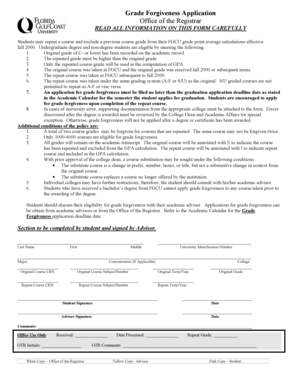
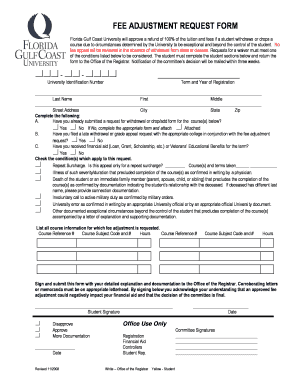
The Grade Forgiveness Application is a student form used by undergraduate students at Florida Gulf Coast University (FGCU) to request the exclusion of a previous course grade from their GPA calculations.
pdfFiller scores top ratings on review platforms




Who needs FGCU Grade Forgiveness Application?
Explore how professionals across industries use pdfFiller.

FGCU Grade Forgiveness Application is needed by:
-
Undergraduate students at FGCU seeking grade forgiveness
-
Academic advisors assisting students with GPA concerns
-
Enrollment and registration offices at FGCU
-
University administration reviewing academic appeals
-
Counselors advising students on academic policies
Comprehensive Guide to FGCU Grade Forgiveness Application
What is the Grade Forgiveness Application?
The Grade Forgiveness Application is a crucial tool for undergraduate students at Florida Gulf Coast University (FGCU). This application enables students to request the exclusion of a prior course grade from their GPA calculations. By utilizing the Grade Forgiveness Application, students can improve their academic performance without the burden of previous grades affecting their overall GPA.
Purpose and Benefits of the Grade Forgiveness Application
The primary purpose of the Grade Forgiveness Application is to positively influence a student's GPA and academic standing. This tool is particularly advantageous for those who may have struggled in a course but are determined to succeed upon retaking it. In making informed decisions when repeating courses, students can better manage their academic trajectory and enhance their prospects for graduation.
Eligibility Criteria for the Grade Forgiveness Application
To successfully use the Grade Forgiveness Application, students must meet specific eligibility criteria. Key conditions for grade forgiveness include:
-
Must be an undergraduate student at FGCU
-
The course in question must be repeatable for grade forgiveness
-
Only certain grades are eligible for forgiveness
It is essential to understand the implications of using this application, particularly concerning GPA calculation exclusion.
How to Fill Out the Grade Forgiveness Application Online (Step-by-Step)
Filling out the Grade Forgiveness Application online requires careful attention to detail. Follow these steps using pdfFiller:
-
Access the application on the pdfFiller platform.
-
Fill in all required fields, including personal information and course details.
-
Review the application for completeness.
-
Ensure both the student and advisor sign the application.
-
Submit the application electronically.
In navigating the online form, pay close attention to important instructions and required fields to avoid errors.
Required Documents and Supporting Materials
When submitting the Grade Forgiveness Application, students must gather the following documents:
-
Completed application form
-
Advisor signature form
-
University identification number
Collecting these documents efficiently is crucial to avoid processing delays and ensure timely submission.
When to Submit the Grade Forgiveness Application
Students must adhere to specific deadlines for the Grade Forgiveness Application to ensure that their requests are processed in a timely manner. Failing to submit applications on time can result in serious consequences, including the potential loss of eligibility for GPA improvement. Regularly check the academic calendar for important submission dates.
Common Errors When Submitting the Grade Forgiveness Application
Submitting the Grade Forgiveness Application comes with its own set of challenges. Common errors include:
-
Omissions of required fields
-
Improper signatures from the student or advisor
-
Incorrect course details
To avoid these mistakes, utilize a review and validation checklist before submission, ensuring accuracy and completeness.
How to Sign and Submit the Grade Forgiveness Application
The signing process for the Grade Forgiveness Application is critical. Both the student and the advisor must provide their signatures. Students have the option to choose between traditional wet signatures or utilize eSign capabilities available through pdfFiller, simplifying the submission process.
What Happens After You Submit the Grade Forgiveness Application?
After submitting the Grade Forgiveness Application, students can expect a review process to take place. It is important to stay informed about the status of the application. Typically, the processing times can vary, but students can check their application status using the FGCU student portal for updates.
Enhance Your Application Process with pdfFiller
Utilizing pdfFiller for the Grade Forgiveness Application ensures a seamless document management experience. This platform allows for easy filling, signing, and sending of the necessary forms while ensuring data protection through its secure infrastructure. Students can confidently manage their applications and focus on their academic goals.
How to fill out the FGCU Grade Forgiveness Application
-
1.Begin by accessing pdfFiller. Navigate to the pdfFiller website and sign in or create an account if you don't have one.
-
2.Once logged in, use the search feature to find the Grade Forgiveness Application form. Enter its name in the search bar and select it from the results.
-
3.Upon opening the form, familiarize yourself with the layout. You will notice multiple fields and checkboxes that need to be filled out.
-
4.Before filling out the form, gather necessary information. This includes details about your original and repeated courses, required signatures, and any relevant academic history.
-
5.Start filling out the top section with your personal information. Include your name, university identification number, and contact details.
-
6.Continue to the section detailing the original course. Specify the course name, grade received, and reason for requesting forgiveness.
-
7.Next, fill in the repeated course section, indicating the course name and the grade you aim to achieve to boost your GPA.
-
8.Ensure you include a clear reason for your request in the provided field. This explanation helps in reviewing your application.
-
9.After completing your part, save the form and proceed to notify your academic advisor for their review and signature.
-
10.Once both you and your advisor have signed, review the entire form for accuracy. Check that all fields are filled and signature sections are complete.
-
11.Finally, save the completed form to your device and submit it as instructed. Depending on FGCU's procedures, you may need to submit it electronically or physically at the enrollment office.

What are the eligibility requirements for the Grade Forgiveness Application?
To be eligible for the Grade Forgiveness Application, you must be an undergraduate student at FGCU. You can only apply for a course you have previously passed and are now repeating with the intention of improving your GPA. Further eligibility criteria may apply.
When is the deadline for submitting the Grade Forgiveness Application?
Deadlines for the Grade Forgiveness Application may vary each semester. Always check the academic calendar provided by FGCU or consult the enrollment office for specific deadlines relevant to your request.
What should I do if my advisor is unavailable to sign the form?
If your advisor is unavailable, consider seeking alternative advisers or academic support staff who can provide a signature. It's essential to submit the form with the required signatures to avoid delays.
Which documents do I need to submit along with the Grade Forgiveness Application?
Typically, you will only need to submit the completed form itself. However, if instructed, you may need to attach supporting documents explaining your reasons for requesting grade forgiveness.
What common mistakes should I avoid when completing the Grade Forgiveness Application?
Ensure that all fields are accurately filled in, and signatures from both you and your advisor are obtained. Avoid submitting the form without reviewing it for completeness, as omissions can lead to processing delays.
How long does it take to process the Grade Forgiveness Application?
Processing times for the Grade Forgiveness Application can vary depending on the department's workload. Typically, you might expect a response within a few weeks, but it's advisable to check with the university for specific timelines.
Can I appeal if my Grade Forgiveness Application is denied?
Yes, there is usually an appeal process available if your application is denied. Contact the appropriate academic office at FGCU to understand the steps and criteria for submitting an appeal.
FGCU Grade Forgiveness Application Form Versions
Related Content
Related Forms





Get the latest insights from our blog



If you believe that this page should be taken down, please follow our DMCA take down process
here
.
This form may include fields for payment information. Data entered in these fields is not covered by PCI DSS compliance.