Form preview

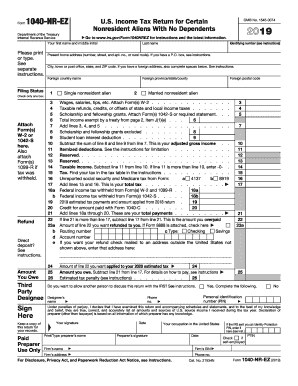
IRS 1040-NR 2016 free printable template


Get Form
pdfFiller is not affiliated with IRS
Screenshot
Screenshot
Screenshot

Get, Create, Make, and Sign IRS 1040-NR

Edit your IRS 1040-NR online
Type text, complete fillable fields, insert images, highlight or blackout data for discretion, add comments, and more.
Screenshot
Add your legally-binding signature
Draw or type your signature, upload a signature image, or capture it with your digital camera.
Screenshot
Share your form instantly
Email, fax, or share your IRS 1040-NR via URL. You can also download, print, or export forms to your preferred cloud storage service.
Screenshot

Instructions and Help about IRS 1040-NR

How to edit IRS 1040-NR

To edit the IRS 1040-NR tax form, you can use pdfFiller tools that allow you to make necessary changes directly on the form. Import the form into pdfFiller, where you can add or modify text as needed. After editing, ensure that all required information is accurate before saving or printing.

How to fill out IRS 1040-NR

To fill out the IRS 1040-NR form, follow these general steps:
01
Obtain a blank copy of IRS 1040-NR through the IRS website or pdfFiller.
02
Begin by entering your name, address, and other personal information at the top of the form.
03
Fill in income details in the subsequent sections, including wages, dividends, and interest.
04
Report any deductions and tax credits applicable to your situation.
05
Finally, calculate your total tax liability and enter the amount in the designated space.

About IRS 1040-NR 2016 previous version

What is IRS 1040-NR?

IRS 1040-NR is a tax form used by non-resident aliens to report their income and calculate federal income tax liability in the United States. This form is primarily used by individuals who are not U.S. citizens yet earn income from U.S. sources.

Who needs the form?

Non-resident aliens who have U.S. income are required to file IRS 1040-NR. This includes foreign students, teachers, researchers, and individuals who engage in business activities within the U.S. If a taxpayer does not meet the criteria for resident status, they must file this form to report their income accurately.

Components of the form

The IRS 1040-NR form consists of several key sections, including personal information fields, income reporting sections, deductions and credits, and tax calculation components. Each section requires detailed information regarding the filer’s income sources, applicable exemptions, and tax rates. Understanding these components is crucial for precise completion of the form.

What are the penalties for not issuing the form?

Failing to file IRS 1040-NR on time can result in penalties, which may include fines based on the amount of tax due. The IRS may impose interest on unpaid taxes and additional charges for late filing. Non-compliance can lead to further scrutiny of one’s tax affairs.

Is the form accompanied by other forms?

IRS 1040-NR may need to be accompanied by additional forms depending on an individual's specific tax circumstances. Commonly required forms include schedules and additional statements if income types or deductions exceed certain limits. It's important to review IRS guidance to determine the necessary accompanying paperwork.

What is the purpose of this form?

The purpose of IRS 1040-NR is to determine the tax obligations of non-resident alien individuals. It is essential for ensuring compliance with U.S. tax regulations, allowing the IRS to assess tax due on income earned in the U.S. from activities such as employment, business operations, or investments.

When am I exempt from filling out this form?

You are exempt from filing IRS 1040-NR if your income is below the minimum threshold set by the IRS for the tax year. Notably, certain individuals, including some foreign students and exchange visitors, may also qualify for exemptions under tax treaties between their home country and the U.S. It is advisable to refer to IRS guidelines to determine specific exemptions applicable to your situation.

Due date

The due date for submitting the IRS 1040-NR form typically falls on the 15th day of the 4th month after the end of the tax year. For example, for the tax year ending December 31, the form is usually due by April 15 of the following year. It is important to adhere to this deadline to avoid penalties.

What information do you need when you file the form?

When filing IRS 1040-NR, you need to provide personal information such as your name, address, and identification number. Additionally, you will require documentation of your income sources, treaty benefits, and any deductions you plan to claim. Accurate records and supporting documents are essential for a successful filing.

Where do I send the form?

The IRS 1040-NR form should be sent to the address specified in the form's instructions, which can vary based on whether you are enclosing payment or seeking a refund. Typically, non-residents must send their forms to a specific processing center identified by the IRS for international filers.

FAQ about IRS 1040-NR

If you realize there are mistakes on your 1040 nr 2016 form after filing, you can submit an amended return using Form 1040-X. Ensure that you clearly indicate which parts of the form are being corrected and include any necessary documentation to support the changes. It’s essential to file the amendment as soon as you identify the error to minimize any potential penalties or issues.

To verify the status of your 1040 nr 2016 form, you can use the IRS 'Where's My Refund?' tool online if expecting a refund. If you filed electronically, you can also see if your submission was accepted or rejected. Keep track of common rejection codes so you can quickly address any issues that arise during processing.

If you receive an audit notice concerning your 1040 nr 2016 form, it’s crucial to read the notice carefully and respond within the given time frame. Prepare any documentation that supports your claims, such as income statements and deductions, and consider consulting a tax professional for assistance with the audit process.

Yes, when opting for e-filing your 1040 nr 2016 form, some tax preparation services may charge a fee for their service. It’s important to compare different providers to find the one that suits your needs while being aware of any additional fees, especially if your submission is rejected and requires resubmission.

To e-file your 1040 nr 2016 form, you should ensure that your software is compatible with IRS standards and that your browser is updated to the latest version. Additionally, having a stable internet connection is essential to successfully submit your form, as interruptions may lead to processing issues.

See what our users say

Read user feedback and try pdfFiller to explore all its benefits for yourself
This is a superb tool that's easy to use providing more readable documents than had they been filled out manually with less legible handwriting.
William D. B
iliant, fast and easy to use. Best pdf signer on the market.
Deimos
See what our users say
Trust Seal
Trust Seal
Trust Seal
Trust Seal
Trust Seal
Trust Seal
Trust Seal
Trust Seal
Rate free form
4.4
satisfied
1,650 votes

How to Fill Out Small Business Tax Forms Online with pdfFiller

Struggling with your Schedule C or not sure how to file business taxes as a sole proprietor, LLC, or self-employed professional? This step-by-step pdfFiller tutorial walks you through completing IRS Schedule C quickly and accurately — no printing, no scanning, no stress. Whether you're handling small business tax deductions, tracking self-employed taxes, or preparing your full business tax return, pdfFiller makes it simple right in your browser.

Related Forms

If you believe that this page should be taken down, please follow our DMCA take down process here .
This form may include fields for payment information. Data entered in these fields is not covered by PCI DSS compliance.