
Last updated on
Oct 24, 2026
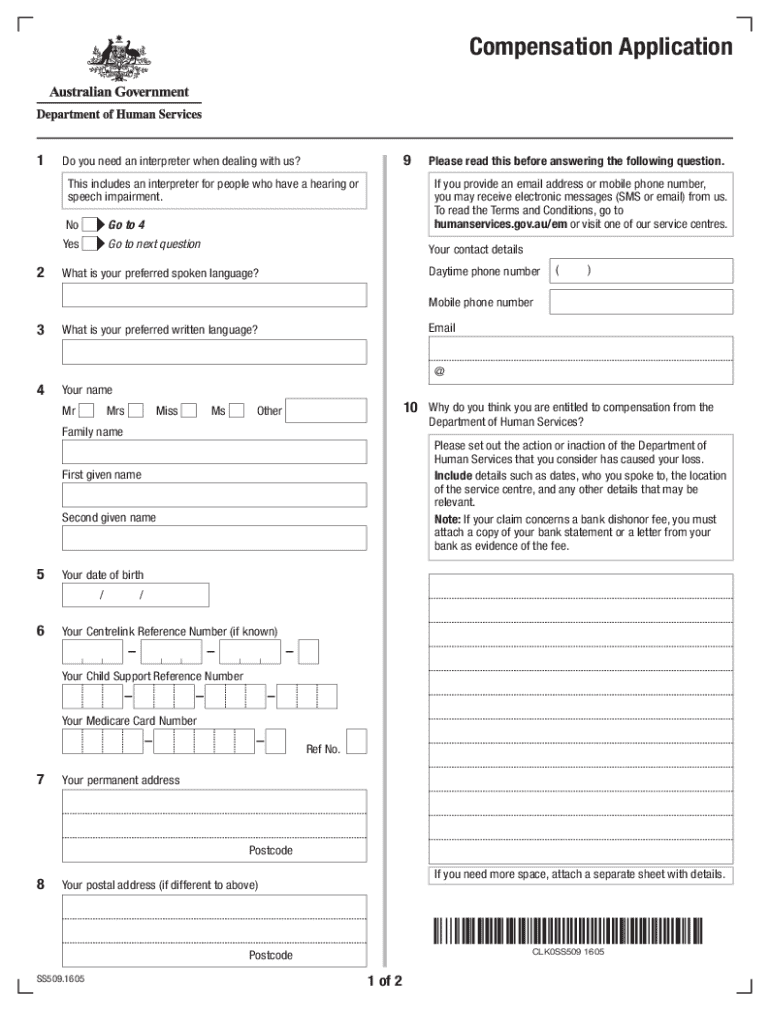
AU SS509 2016 free printable template
We are not affiliated with any brand or entity on this form

Fill out
Complete the form online in a simple drag-and-drop editor.

eSign
Add your legally binding signature or send the form for signing.

Share
Share the form via a link, letting anyone fill it out from any device.

Export
Download, print, email, or move the form to your cloud storage.
Why pdfFiller is the best tool for your documents and forms


End-to-end document management
From editing and signing to collaboration and tracking, pdfFiller has everything you need to get your documents done quickly and efficiently.
Accessible from anywhere
pdfFiller is fully cloud-based. This means you can edit, sign, and share documents from anywhere using your computer, smartphone, or tablet.
Secure and compliant
pdfFiller lets you securely manage documents following global laws like ESIGN, CCPA, and GDPR. It's also HIPAA and SOC 2 compliant.
What is AU SS509
The AU SS509 is a form used by Australian taxpayers to report and verify their State and Territory taxes obligations effectively.
pdfFiller scores top ratings on review platforms




Who needs AU SS509?
Explore how professionals across industries use pdfFiller.

AU SS509 is needed by:
-
Australian taxpayers reporting state tax obligations
-
Small business owners in Australia
-
Individuals claiming tax deductions or credits
-
Accountants managing client tax affairs
-
Financial consultants assisting with tax compliance
-
Tax advisors providing guidance on state taxes
Comprehensive Guide to AU SS509
What is the AU SS509?
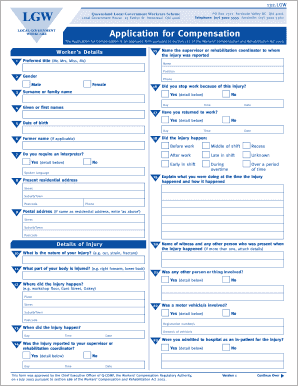
The AU SS509 form is a crucial document used in various sectors for streamlined documentation and compliance processes. Essentially, it serves as a type of document designed to collect necessary information effectively. In the realm of document management, the AU SS509 plays a vital role by ensuring that the correct data is presented in a standardized manner, facilitating easier handling and processing.
Purpose and Benefits of the AU SS509
The AU SS509 serves multiple purposes, primarily to ensure accuracy and efficiency during data collection. Utilizing this form can lead to several advantages, such as reducing processing time and minimizing errors in documentation. Certain situations, such as regulatory compliance or organizational assessments, require the use of the AU SS509 to maintain legal standards and improve operational efficiency.
Who Needs the AU SS509?
The AU SS509 is typically needed by a diverse group of users, including businesses, governmental agencies, and individual consumers. For instance, businesses may require this form for employee onboarding or financial assessments, while individuals might need it for personal documentation needs. Understanding the specific user scenarios helps clarify who benefits most from the AU SS509.
How to Fill Out the AU SS509 Online (Step-by-Step)
To fill out the AU SS509 online, follow these straightforward steps:
-
Access the form through a reliable platform like pdfFiller.
-
Fill in the required fields with accurate information.
-
Utilize tools to review each entry for correctness.
-
Save your progress periodically to prevent data loss.
-
Submit the completed form directly through the platform.
Using pdfFiller simplifies this process, offering features that enhance usability and efficiency when filling out the AU SS509.
Field-by-Field Instructions for the AU SS509
Each section of the AU SS509 form requires specific information. Here’s a detailed guide on filling out some of the key fields:
-
Personal Information: Ensure names and addresses are accurate and formatted correctly.
-
Contact Details: Provide updated phone numbers and email addresses to facilitate communication.
-
Document Purpose: Clearly state the reason for filling out the form to avoid confusion.
By paying attention to these details, users can minimize errors and streamline the submission process.
Common Mistakes and How to Avoid Them
When completing the AU SS509, users often encounter certain mistakes that can delay processing. Common errors include:
-
Omitting required fields, which can result in rejection.
-
Providing inaccurate information, leading to potential legal issues.
-
Failing to review the document thoroughly before submission.
To avoid these pitfalls, double-check all entries and review the form for completeness. This will ensure a smooth submission experience.
Submission Methods for the AU SS509
Once the AU SS509 is filled out, it can be submitted through various methods. Users can choose to submit it electronically, which is often faster and more efficient, or send it via mail. Each method has its own advantages, so selecting the one that best fits your circumstances is essential.
Tracking and Confirming Your AU SS509 Submission
Tracking your AU SS509 submission is vital to ensure it has been received and processed correctly. Users should:
-
Keep a copy of the submission confirmation for their records.
-
Check with the receiving agency for updates on the status of the submission.
-
Utilize tracking features if submitting electronically through a platform like pdfFiller.
Being proactive about tracking submissions can help avoid complications down the line.
Security and Compliance for the AU SS509
Filling out the AU SS509 through pdfFiller ensures that users' information is kept secure. The platform uses advanced security measures, including 256-bit encryption, to protect sensitive data. Additionally, pdfFiller adheres to compliance standards such as HIPAA and GDPR, ensuring that your information is handled responsibly and legally.
Why Use pdfFiller for Your AU SS509 Needs?
Choosing pdfFiller for filling out the AU SS509 offers numerous benefits. Users gain access to an intuitive platform that simplifies the editing and submission process. With features like eSign capabilities and document management tools, pdfFiller enhances user experience, providing a seamless approach to completing necessary forms.
How to fill out the AU SS509
-
1.To access the AU SS509 form on pdfFiller, visit the pdfFiller website and use the search function to locate the form by its name.
-
2.Once found, click on the form title to open it in the pdfFiller editor interface, allowing you to begin editing immediately.
-
3.Familiarize yourself with the form’s layout, and identify each field that requires information according to your tax obligations.
-
4.Before filling in the form, compile necessary documentation such as your financial statements and identification to ensure all required data is at hand.
-
5.On the pdfFiller platform, click on each field and enter the relevant information precisely, confirming its accuracy as you go along.
-
6.If required, use the comment or notes feature in pdfFiller to highlight important sections or clarify your entries for future reference.
-
7.After completing all fields, take time to review the form carefully, checking for spelling errors and ensuring all information is complete and accurate.
-
8.Once you are satisfied with your entries, finalize your form within pdfFiller, ensuring that all aspects are appropriately filled out before proceeding.
-
9.Save your filled form by using the 'Save' option. You may also download a copy in various formats or directly submit it via the provided submission options in pdfFiller.

Who needs to fill out the AU SS509 form?
Individuals and businesses in Australia who are subject to State and Territory taxes must fill out the AU SS509 form to ensure compliance with tax regulations.
What information do I need before starting the AU SS509 form?
Before filling out the AU SS509 form, gather your personal identification, income records, and details related to your State and Territory tax obligations to ensure accuracy.
How can I submit the AU SS509 form?
The AU SS509 form can be submitted electronically via the tax authority’s website or through authorized platforms after completing it appropriately.
Are there any deadlines for submitting the AU SS509 form?
Typically, the AU SS509 form must be submitted by the tax return deadline specified by the Australian tax authority, which varies annually.
What common mistakes should I avoid when filling out the AU SS509 form?
Common mistakes include incorrect details on income amounts, missing signatures, and not following the required format for submission.
How long does it take for the AU SS509 form to be processed?
Processing times for the AU SS509 form can vary, but normally it takes a few weeks to receive confirmation of submission, depending on the tax authority’s workload.
Is notarization required for the AU SS509 form?
No, notarization is not required for the AU SS509 form as it is intended for tax reporting and verification purposes.
AU SS509 Form Versions
Related Forms






Related Catalogs
Get the latest insights from our blog


If you believe that this page should be taken down, please follow our DMCA take down process
here
.
This form may include fields for payment information. Data entered in these fields is not covered by PCI DSS compliance.