
Last updated on
Nov 9, 2026

Karvy No-Dues Form free printable template
pdfFiller is not affiliated with any government organization

Fill out
Complete the form online in a simple drag-and-drop editor.

eSign
Add your legally binding signature or send the form for signing.

Share
Share the form via a link, letting anyone fill it out from any device.

Export
Download, print, email, or move the form to your cloud storage.
Why pdfFiller is the best tool for your documents and forms


End-to-end document management
From editing and signing to collaboration and tracking, pdfFiller has everything you need to get your documents done quickly and efficiently.
Accessible from anywhere
pdfFiller is fully cloud-based. This means you can edit, sign, and share documents from anywhere using your computer, smartphone, or tablet.
Secure and compliant
pdfFiller lets you securely manage documents following global laws like ESIGN, CCPA, and GDPR. It's also HIPAA and SOC 2 compliant.
What is Karvy No-Dues Form
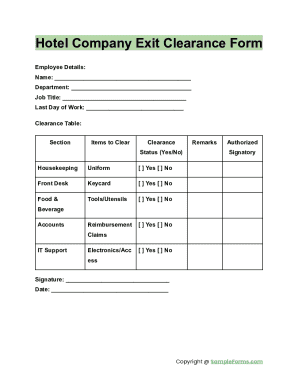
The No-Dues Form for Exiting Employees is an employment document used by resigning employees to confirm the return of company property and clearance of financial obligations.
pdfFiller scores top ratings on review platforms




Very good customer services prior 1st day of using service.
After using many other PDF editors finally a user-friendly, is fast, does not freeze and gives me any problems login in or crashing after I purchased.
Who needs Karvy No-Dues Form?
Explore how professionals across industries use pdfFiller.

Karvy No-Dues Form is needed by:
-
Employees resigning from their positions
-
Human Resources departments managing employee separations
-
Managers overseeing employee transitions
-
Finance departments tracking company dues
-
Exit interview coordinators
-
Legal departments ensuring compliance with company policies
Comprehensive Guide to Karvy No-Dues Form
What is the No-Dues Form for Exiting Employees?
The No-Dues Form serves as a critical document for resigning employees, enabling them to formally declare that they have returned all necessary company documents and assets. This form is essential to ensure a smooth offboarding process, protecting both the employee and the employer. Typically, it includes relevant sections for detailing financial dues, company property, and personal information such as the employee's name, code, and designation.
Purpose and Benefits of the No-Dues Form for Exiting Employees
This form plays a vital role in the offboarding process. By completing the No-Dues Form, employees help ensure that all financial obligations are settled and that company property is returned. This streamlines the resignation process for both employees and the HR department, reducing the potential for disputes or misunderstandings.
Moreover, having a standardized employee resignation form simplifies the exit procedure, making it easier for all parties involved to track necessary tasks, ultimately promoting a smooth transition.
Key Features of the No-Dues Form for Exiting Employees
The No-Dues Form is designed with ease of use in mind, featuring fillable fields and checkboxes for a straightforward experience. It includes comprehensive instructions to assist employees in correctly filling out the document, making the process efficient and user-friendly.
-
Fillable fields for personal and company information
-
Checkboxes to mark the return of specific assets
-
Clear instructions for filling out and signing the form
Who Needs the No-Dues Form for Exiting Employees?
Any employee planning to resign voluntarily will need to complete the No-Dues Form. The form is a necessity for individuals who are leaving the company to ensure all dues are accounted for and property is returned. Situations such as voluntary resignations or retirement typically trigger the requirement for this document.
How to Fill Out the No-Dues Form for Exiting Employees Online (Step-by-Step)
Filling out the No-Dues Form online is a straightforward process. Follow these steps for successful completion:
-
Access the No-Dues Form on the pdfFiller platform.
-
Enter your personal information, including your name, code, and designation.
-
Specify your resignation date.
-
List any company property returned and any dues settled.
-
Review the form carefully before signing.
How to Sign the No-Dues Form for Exiting Employees
Signing the No-Dues Form can be done digitally or via physical signature. Both methods are valid for form submission, though digital signatures may provide added convenience. It is essential to ensure that the signature is included to validate the document and complete the offboarding process effectively.
Submission Process for the No-Dues Form for Exiting Employees
Once the No-Dues Form is completed, it needs to be submitted promptly. Employees should send the form to their HR coordinator on their last working day. It's crucial to be aware of any deadlines for form submission and processing to avoid delays in the resignation process.
-
Submit the form directly to HR via email or physical delivery.
-
Check for any specified deadlines for submission.
What Happens After You Submit the No-Dues Form for Exiting Employees?
After submitting the No-Dues Form, employees can expect a confirmation from HR regarding the status of their submission. It’s advisable to keep track of communications and follow up if confirmation is not received within the expected timeframe. Understanding the common reasons for rejection can help facilitate a smoother process.
Security and Compliance When Using the No-Dues Form for Exiting Employees
Security in handling the No-Dues Form is paramount, especially considering the sensitive information involved. pdfFiller ensures that all documents are processed under stringent security measures, including 256-bit encryption and compliance with privacy regulations. Employees can have confidence that their data is safeguarded throughout the form completion and submission process.
Get Started with the No-Dues Form for Exiting Employees Today!
Utilizing pdfFiller simplifies the process of filling out, signing, and submitting the No-Dues Form. The platform's user-friendly interface ensures that the documentation process is efficient, secure, and supported by robust customer assistance, making it the ideal choice for exiting employees.
How to fill out the Karvy No-Dues Form
-
1.Access the No-Dues Form for Exiting Employees on pdfFiller by searching for the form in the template library or entering the form’s name in the search bar.
-
2.Once the form is open, begin by reading through the instructions at the top to understand the required fields and information needed for completion.
-
3.Gather necessary information before starting. This includes your employee ID, name, designation, resignation date, and any relevant details about company property and dues you must clear.
-
4.Use the form's interactive fields to input your information. Click on each blank field and type in the requested data.
-
5.Check boxes as needed, specifically indicating which company property has been returned and any financial dues settled.
-
6.Review the completed form carefully for accuracy, ensuring all fields are filled and any pertinent checkboxes are marked.
-
7.Once everything is in order, find the signing area. You need to electronically sign the form to validate it.
-
8.Upon finalizing the form, choose the option to save it directly onto your device. You can download a copy for your records.
-
9.If required, submit the completed No-Dues Form through pdfFiller by following prompts to email it to your HR coordinator or using additional submission methods available on the platform.

Who is eligible to use the No-Dues Form?
Any employee resigning from their position and who needs to confirm the return of company items and settle dues is eligible to use the No-Dues Form.
What is the submission method for this form?
The completed No-Dues Form must be submitted to the HR coordinator on your last working day. This can typically be done via email or in-person submission.
Are there any documents required to accompany the No-Dues Form?
Usually, you need to return items such as company IDs or equipment. It's important to provide any receipts for returned items with the form if requested by HR.
What should I do if I forget to submit the form?
If you miss the deadline to submit the No-Dues Form on your last working day, contact your HR department immediately for guidance on rectifying the situation.
How can I ensure my form is processed correctly?
Complete all fields accurately, ensure you have returned all company property, and double-check for any missing information to avoid processing delays.
Is notarization required for this form?
No, the No-Dues Form for Exiting Employees does not require notarization. Just an employee's signature is necessary.
What common mistakes should I avoid when filling out this form?
Common mistakes include leaving fields blank, forgetting to sign, or failing to return all company property. Review your form thoroughly to prevent these issues.
Related Forms




Related Catalogs
Get the latest insights from our blog


If you believe that this page should be taken down, please follow our DMCA take down process
here
.
This form may include fields for payment information. Data entered in these fields is not covered by PCI DSS compliance.