Form preview

IRS 1040-X 2017 free printable template


Get Form
pdfFiller is not affiliated with IRS
Screenshot
Screenshot
Screenshot

Get, Create, Make, and Sign IRS 1040-X

Edit your IRS 1040-X online
Type text, complete fillable fields, insert images, highlight or blackout data for discretion, add comments, and more.
Screenshot
Add your legally-binding signature
Draw or type your signature, upload a signature image, or capture it with your digital camera.
Screenshot
Share your form instantly
Email, fax, or share your IRS 1040-X via URL. You can also download, print, or export forms to your preferred cloud storage service.
Screenshot

Instructions and Help about IRS 1040-X

How to edit IRS 1040-X

To edit IRS 1040-X, obtain a physical copy of the form or access a digital version through the IRS website or other tax resource providers. Make sure to complete the form by following the instructions provided on the document. If using pdfFiller, utilize the editing tools to fill out the form accurately and efficiently.

How to fill out IRS 1040-X

Filling out IRS 1040-X requires a systematic approach. Begin by gathering your original tax return and relevant information regarding the changes that need to be made. This includes corrected figures or additional income details:
01
Review the original return for entries that need amendments.
02
Complete the sections of IRS 1040-X, detailing the changes and providing an explanation.
03
Ensure that all figures are accurately reported to avoid potential delays.

About IRS 1040-X 2017 previous version

What is IRS 1040-X?

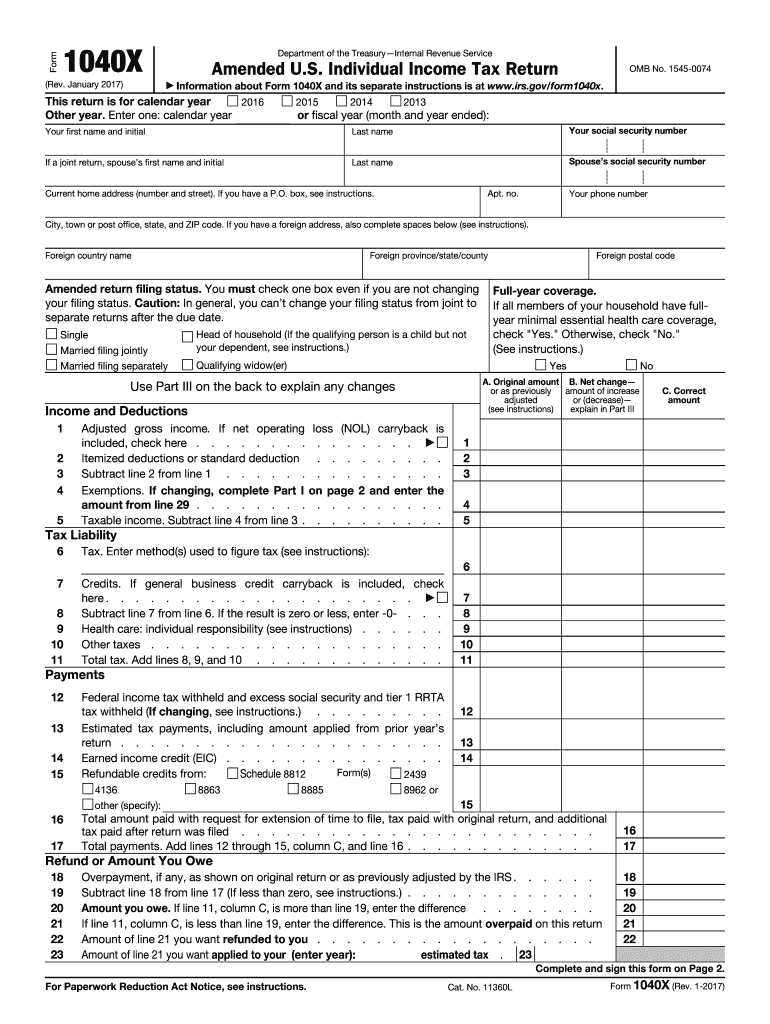
IRS 1040-X is the Amended U.S. Individual Income Tax Return form used by taxpayers to amend their previously filed returns. This form allows individuals to correct errors, make adjustments, or claim overlooked deductions and credits. Submitting IRS 1040-X is essential for compliance with U.S. tax laws.

When am I exempt from filling out this form?

You may be exempt from filing IRS 1040-X if you did not make any changes that impact your taxable income or tax liability. Situations such as receiving a notice from the IRS that requires no action on your part could also exempt you from needing to file this form.

What are the penalties for not issuing the form?

Failing to submit IRS 1040-X when required may result in penalties, including fines for incorrect tax reporting or failing to pay owed taxes. Furthermore, if the amendment impacts your tax liability, the IRS may impose interest on any amounts owed due to late payment.

What information do you need when you file the form?

When filing IRS 1040-X, gather the following information: your original tax return, notices from the IRS, and any documentation supporting the changes made. This may include W-2s, 1099s, and receipts for deductions claimed. Accurate record-keeping ensures a smooth amendment process.

What is the purpose of this form?

The purpose of IRS 1040-X is to enable taxpayers to correct mistakes on their original tax returns. The form can be used to adjust filing status, income, deductions, or credits. Additionally, it serves as a tool for claiming tax refunds or making additional payments.

Who needs the form?

Taxpayers who identify errors or omissions in their filed tax returns need IRS 1040-X. This includes individuals who wish to report additional income, correct filing statuses, or amend deductions to better reflect their tax obligations. If significant errors are discovered post-filing, the use of this form is warranted.

Components of the form

The IRS 1040-X consists of three main parts: a summary of the changes, the explanations for the amendments, and the taxpayer's signature and date. Each section must be filled out meticulously to ensure a clear understanding of the changes made. It also includes a section for any additional forms that may need to accompany the amendment.

Is the form accompanied by other forms?

IRS 1040-X may need to be accompanied by additional forms if your amendments affect other schedules or forms directly. For instance, if your changes impact a previously filed Schedule C, you may need to include that revised schedule along with IRS 1040-X.

Where do I send the form?

Send the completed IRS 1040-X to the address specified in the form instructions. This varies based on your state of residence and whether you are enclosing a payment. Ensure that you verify the correct mailing address to avoid delays in processing your amendment.

FAQ about IRS 1040-X

After submitting your IRS 1040-X, you can verify its receipt through the IRS 'Where's My Amended Return?' tool on the IRS website. This tool allows you to track the status of your amended return, providing updates on processing times and any potential issues. It's important to note that processing may take up to 16 weeks, so patience is key during this period.

When preparing your IRS 1040-X, watch out for errors such as incorrect Social Security numbers, mismatched income data, and failure to sign the form. Double-check calculations and ensure all required information is included. These mistakes can lead to delays in processing or even rejection of your submission, which is why careful attention is crucial.

In case your IRS 1040-X is rejected, review the rejection notice to understand the specific issue. You may correct the errors and resubmit the form. If you used e-filing services, check if they offer support or guarantee for re-submissions to help streamline the process. Keeping comprehensive documentation will aid in rectifying the problem efficiently.

To enhance the security of your personal data while filing your IRS 1040-X electronically, use reputable tax software that utilizes encryption and other protective measures. Additionally, enable two-factor authentication on your accounts where possible and avoid using public Wi-Fi networks to submit sensitive information.

Yes, you can authorize someone else to file your IRS 1040-X by completing Form 2848, Power of Attorney and Declaration of Representative. This allows your designated representative to handle your amendments on your behalf, ensuring they have access to the necessary information to support your case. Make sure to provide clear instructions regarding the scope of their representation.

See what our users say

Read user feedback and try pdfFiller to explore all its benefits for yourself
Been great and easy accessible when need to re send claims when denied 100 times.
Mindi
Excellent tool. It's very feature rich and can be a bit confusing when trying to do some basic tasks. Once you explore a bit, it accomplishes what is required.
JK
See what our users say
Trust Seal
Trust Seal
Trust Seal
Trust Seal
Trust Seal
Trust Seal
Trust Seal
Trust Seal
Rate free form
4.3
satisfied
134 votes

How to Fill Out Small Business Tax Forms Online with pdfFiller

Struggling with your Schedule C or not sure how to file business taxes as a sole proprietor, LLC, or self-employed professional? This step-by-step pdfFiller tutorial walks you through completing IRS Schedule C quickly and accurately — no printing, no scanning, no stress. Whether you're handling small business tax deductions, tracking self-employed taxes, or preparing your full business tax return, pdfFiller makes it simple right in your browser.

If you believe that this page should be taken down, please follow our DMCA take down process here .
This form may include fields for payment information. Data entered in these fields is not covered by PCI DSS compliance.