
Last updated on
Nov 6, 2026
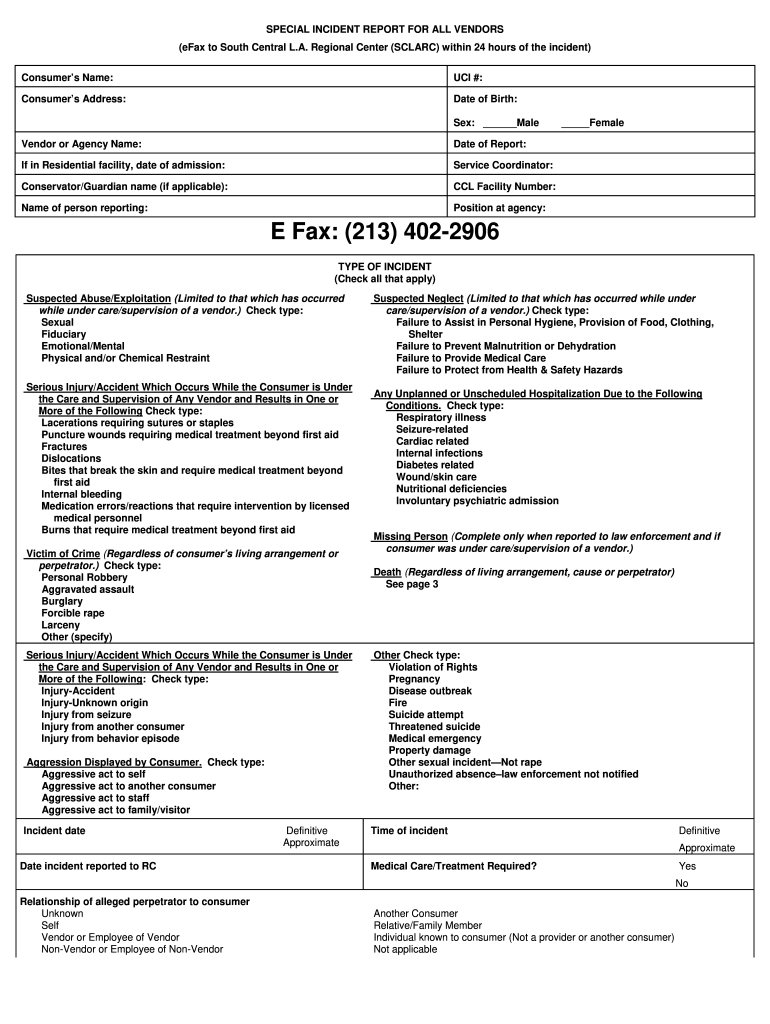
CA Special Incident Report for All Vendors free printable template
pdfFiller is not affiliated with any government organization

Fill out
Complete the form online in a simple drag-and-drop editor.

eSign
Add your legally binding signature or send the form for signing.

Share
Share the form via a link, letting anyone fill it out from any device.

Export
Download, print, email, or move the form to your cloud storage.
Why pdfFiller is the best tool for your documents and forms


End-to-end document management
From editing and signing to collaboration and tracking, pdfFiller has everything you need to get your documents done quickly and efficiently.
Accessible from anywhere
pdfFiller is fully cloud-based. This means you can edit, sign, and share documents from anywhere using your computer, smartphone, or tablet.
Secure and compliant
pdfFiller lets you securely manage documents following global laws like ESIGN, CCPA, and GDPR. It's also HIPAA and SOC 2 compliant.
What is CA Special Incident Report for All Vendors
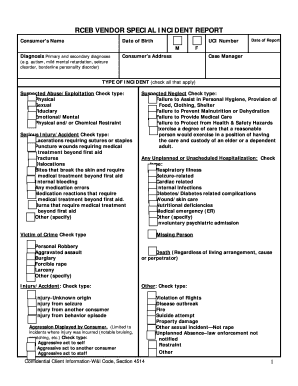
The Special Incident Report for Vendors is a healthcare form used by vendors in California to report incidents involving consumers under their care.
pdfFiller scores top ratings on review platforms




I really like it. Easy to use, a great program.
It is nice to have all the features in one place
Who needs CA Special Incident Report for All Vendors?
Explore how professionals across industries use pdfFiller.

CA Special Incident Report for All Vendors is needed by:
-
Vendors providing services to consumers in California
-
Healthcare agencies involved with vendor services
-
Social workers managing consumer welfare
-
Compliance officers ensuring adherence to regulations
-
Administrative staff processing incident reports
Comprehensive Guide to CA Special Incident Report for All Vendors
What is the Special Incident Report for Vendors?
The Special Incident Report for Vendors is a crucial document employed in California to document incidents involving consumers who are under vendor care. This formal reporting mechanism ensures the timely and accurate submission of incidents, with an essential requirement that the report must be submitted within 24 hours of the occurrence. The main objective of the form is to protect consumers and ensure their safety by facilitating immediate attention to incidents that arise within the healthcare system.
Importance of Completing the Special Incident Report for Vendors
Timely reporting through the Special Incident Report for Vendors is vital for safeguarding consumer rights. Completing this report not only fulfills legal obligations but also helps maintain the integrity of the California healthcare system. Failure to file these reports on time can lead to serious consequences, including potential legal ramifications and diminished trust in vendor agencies.
-
Protects consumer rights and safety.
-
Ensures compliance with state regulations.
-
Avoids legal implications related to negligence.
Who Needs to File the Special Incident Report for Vendors?
The responsibility of filing the Special Incident Report falls on specific individuals outlined as the Person Reporting, as well as vendors or agencies part of the California healthcare system. Those in these roles must ensure the accurate and efficient completion of the report, knowing their duties to protect the interests of consumers under their care.
-
Person Reporting: responsible for documenting incidents.
-
Vendors or Agencies: obligated to ensure compliance with reporting standards.
Eligibility Criteria for the Special Incident Report for Vendors
To qualify for utilizing the Special Incident Report, certain criteria and specific instances must be met. Incidents that necessitate filing typically involve consumers receiving care from vendors and require detailed documentation to ascertain the nature of the incident. Understanding these eligibility requirements is crucial in determining when a report needs to be filed.
-
Incidents involving consumers under vendor care.
-
Immediate reporting of specific incidents.
-
Criteria assessment for report necessity.
How to Fill Out the Special Incident Report for Vendors Online
Filling out the Special Incident Report for Vendors online involves a straightforward process. Users must navigate through various fillable fields like the Consumer’s Name and Vendor or Agency Name, ensuring the accuracy of each entry. Following the detailed instructions within the form is essential for successful submission.
-
Open the form and locate the fillable fields.
-
Input Consumer’s Name and Vendor or Agency details.
-
Provide a detailed description of the incident.
Common Errors When Filing the Special Incident Report for Vendors
To minimize mistakes and enhance the effectiveness of the reporting process, vendors should be aware of common errors that can occur when filing the Special Incident Report. Typical pitfalls include omitting vital details or formatting the report incorrectly. It is important to thoroughly review the document before submission to ensure completeness and accuracy.
-
Omitting essential incident details.
-
Incorrect formatting or incomplete sections.
-
Failing to review the report prior to submission.
Submission Process for the Special Incident Report for Vendors
After completing the Special Incident Report, users must follow a clear submission process. The report can be submitted via eFax to the South Central L.A. Regional Center, ensuring adherence to submission deadlines and requirements.
-
Submit via eFax to the appropriate regional center.
-
Be aware of submission deadlines and processing times.
-
Track submission status and request confirmations as needed.
How pdfFiller Can Help with the Special Incident Report for Vendors
PdfFiller significantly eases the process of completing the Special Incident Report for Vendors. The platform offers a variety of features tailored to streamline form filling and management, with robust security measures in place to protect sensitive information. Users benefit from a user-friendly interface that supports editing and eSigning, enhancing the overall experience.
-
Features for easy form filling and management.
-
Enhanced security for sensitive data handling.
-
User-friendly options for editing and eSigning documents.
Next Steps After Submitting the Special Incident Report for Vendors
Following the submission of the Special Incident Report, users can expect a specified timeline for responses and may need to follow up for further information. It’s essential to have a clear understanding of how to check the status of the submitted report, as well as the process for making any needed corrections or amendments.
-
Anticipate follow-up responses from the regional center.
-
Learn how to verify the status of your submission.
-
Understand the process for correcting or amending submitted forms.
Get Started with the Special Incident Report for Vendors Today
Utilizing pdfFiller for your Special Incident Report for Vendors needs offers unmatched convenience and accessibility. The platform’s security and user-friendly features ensure a seamless experience, enabling you to focus on completing the necessary documentation efficiently.
How to fill out the CA Special Incident Report for All Vendors
-
1.Access pdfFiller's website and search for the Special Incident Report for Vendors in the forms section.
-
2.Open the form to view the fillable sections, which include various blank fields and checkboxes for easy data entry.
-
3.Before you begin, gather all necessary information about the incident, including consumer details, type of incident, location, and description.
-
4.Carefully complete each field in the form, ensuring accurate and comprehensive information is provided.
-
5.Utilize pdfFiller's instruction prompts to assist you with any specific field requirements.
-
6.Once all fields are filled, review the form thoroughly to ensure all required information is included and accurate.
-
7.Finalize the form by checking for any errors or missing information and make necessary corrections.
-
8.After completing the review, save the form to your pdfFiller account to keep a record.
-
9.You can download the completed form or eFax it directly to the South Central L.A. Regional Center as per submission guidelines.

Who is eligible to submit the Special Incident Report?
Any vendor providing services to consumers in California is eligible to submit the Special Incident Report. This report is specifically designed for incidents involving consumers under the vendors' care.
What is the deadline for submitting the report?
The Special Incident Report must be completed and eFaxed to the South Central L.A. Regional Center within 24 hours of the incident occurring to ensure compliance.
How do I submit the Special Incident Report?
You can submit the Special Incident Report by eFaxing it to the South Central L.A. Regional Center or by using the download option to share it through other means. Ensure you meet the submission deadline.
What information do I need to complete the form?
Before filling out the Special Incident Report, gather the consumer's name, UCI number, vendor or agency name, incident type, location, and a detailed description of the incident.
What common mistakes should I avoid when filling out the form?
Avoid incomplete fields or mislabeling the type of incident. Make sure all information is accurate and matches the incident details to prevent delays in processing.
How long does it take to process the Special Incident Report?
Processing times may vary, but once submitted, the report is typically reviewed promptly by the South Central L.A. Regional Center. Ensuring completeness can help expedite this process.
Is notarization required for this report?
No, the Special Incident Report for Vendors does not require notarization. However, it must be accurately completed and submitted as per the guidelines.
Related Forms





Get the latest insights from our blog


If you believe that this page should be taken down, please follow our DMCA take down process
here
.
This form may include fields for payment information. Data entered in these fields is not covered by PCI DSS compliance.