
Last updated on
Nov 6, 2026

Get the free Subscription Rebate Form
We are not affiliated with any brand or entity on this form

Fill out
Complete the form online in a simple drag-and-drop editor.

eSign
Add your legally binding signature or send the form for signing.

Share
Share the form via a link, letting anyone fill it out from any device.

Export
Download, print, email, or move the form to your cloud storage.
Why pdfFiller is the best tool for your documents and forms


End-to-end document management
From editing and signing to collaboration and tracking, pdfFiller has everything you need to get your documents done quickly and efficiently.
Accessible from anywhere
pdfFiller is fully cloud-based. This means you can edit, sign, and share documents from anywhere using your computer, smartphone, or tablet.
Secure and compliant
pdfFiller lets you securely manage documents following global laws like ESIGN, CCPA, and GDPR. It's also HIPAA and SOC 2 compliant.
What is BHG Rebate Form
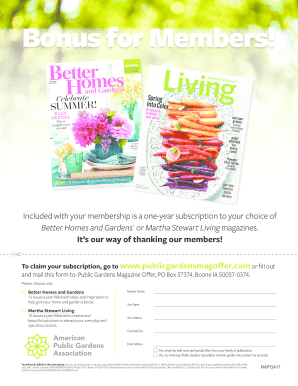
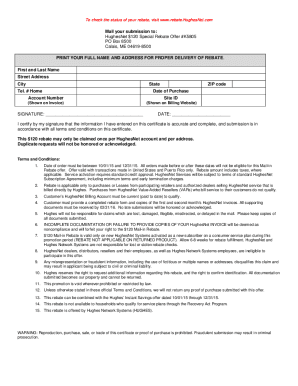
The Subscription Rebate Form is a business document used by customers to request a rebate for the Better Homes and Gardens magazine subscription they do not wish to receive.
pdfFiller scores top ratings on review platforms




Helped me make a seamless counter offer…
Helped me make a seamless counter offer on a real estate property without using an agent! Thanks!
Ryan - Support Team
Ryan on the Support Team was extremely helpful and patient. He walked me through all of the steps to complete the form to my satisfaction. Thank you Ryan for teaching me!
Who needs BHG Rebate Form?
Explore how professionals across industries use pdfFiller.

BHG Rebate Form is needed by:
-
Individuals purchasing Better Homes and Gardens magazine
-
Customers seeking rebates for unwanted subscriptions
-
Residents of the United States eligible for rebates
-
Households that wish to opt out of specific magazine offers
-
Subscribers looking for effective ways to manage subscription costs
Comprehensive Guide to BHG Rebate Form
What is the Subscription Rebate Form?
The Subscription Rebate Form allows customers to opt out of a one-year subscription to Better Homes and Gardens magazine included with certain purchases. This form is specifically intended for U.S. residents and is limited to one submission per household. By using this form, users can formally request their rebate and manage their subscriptions effectively.
Purpose and Benefits of Using the Subscription Rebate Form
Applying for a rebate via the Subscription Rebate Form offers valuable benefits. Firstly, users can save money by opting out of the automatically included magazine subscription. Successful submission can lead to significant savings if the form is completed accurately and filed within the required 30-day period from purchase. This reminder emphasizes the importance of timely action for securing rebates.
Key Features of the Subscription Rebate Form
-
The form includes essential fillable fields such as Name, Address, and Email.
-
It provides simple instructions, making it user-friendly.
-
The design focuses on ease of completion, ensuring a smooth user experience.
Eligibility Criteria for the Subscription Rebate Form
Eligibility for the Subscription Rebate Form is clearly defined to ensure compliance. Only U.S. residents can apply, emphasizing the geographical restriction. Furthermore, the form is applicable only for purchases of designated products or services, and submissions are limited to one per household to prevent abuse.
How to Fill Out the Subscription Rebate Form Online
-
Access the Subscription Rebate Form on the designated platform.
-
Carefully fill out each required field, including your Name, Address, and Email.
-
Review the form using the provided checklist to ensure all necessary information is accurately completed.
Submission Methods for the Subscription Rebate Form
Users can submit the completed Subscription Rebate Form through specified methods. Typically, it is advisable to mail the form to the address provided, ensuring that it is sent within the 30-day submission window. Options for tracking your submission may also be available, along with details regarding any applicable fees and processing times.
Common Errors and How to Avoid Them
-
Ensure that all required fields are filled in, as missing information can delay the process.
-
Double-check the accuracy of your provided details, especially regarding contact information.
-
Consult the instructions if there is any uncertainty about filling out the form.
Security and Compliance for the Subscription Rebate Form
When handling the Subscription Rebate Form, users can be assured of data safety. The platform utilizes 256-bit encryption to secure personal information. Additionally, compliance with privacy regulations, including HIPAA and GDPR, underlines the commitment to user data protection. Privacy measures are further established to safeguard processed forms.
How pdfFiller Can Help You with the Subscription Rebate Form
pdfFiller facilitates the completion of the Subscription Rebate Form with its robust editing capabilities. Users can easily access the platform to fill out and edit the form as needed. Additional features like eSigning and sharing further enhance the usability and efficiency of managing this document, which ultimately leads to better user experience and document organization.
Get Started with Your Subscription Rebate Form Today!
Now is the ideal time to take advantage of pdfFiller for completing your Subscription Rebate Form. The cloud-based service allows for immediate access without any downloads required, streamlining the process. Timely submission is crucial, and using the platform helps users manage their expenses and ensure they receive the rebates they deserve.
How to fill out the BHG Rebate Form
-
1.Access pdfFiller and locate the Subscription Rebate Form by searching for its name in the search bar. Open the form to begin.
-
2.Familiarize yourself with the interface. Use the toolbar to zoom in or out as necessary and to navigate through different sections of the form easily.
-
3.Gather all necessary personal information before starting to fill out the form. This includes your full name, address, city, state, zip code, and email address.
-
4.Begin filling in the fields on the form, ensuring to enter accurate details in the designated spaces for your name, address, city/state/zip, and email address.
-
5.After completing the form, take a moment to review all your entries. Ensure that the information provided is correct and complete to avoid delays in processing your rebate.
-
6.Once you are satisfied with your information, use the tools provided in pdfFiller to save your completed form. You can choose to download it to your device or save it in your pdfFiller account.
-
7.Finally, print the form if required and mail it to the specified address within the 30-day period to ensure your rebate request is processed promptly.

Who is eligible to use the Subscription Rebate Form?
Only residents of the United States who purchased a Better Homes and Gardens magazine subscription are eligible to use this form for a rebate. It is limited to one rebate per household.
What is the deadline for submitting the form?
You must complete and mail your Subscription Rebate Form within 30 days of your purchase. Late submissions may not be processed.
How do I submit the completed form?
After filling out the form, print it and mail it to the specified address indicated in the instructions. Ensure it is sent before the deadline for successful processing.
Are there any documents required to be submitted with the form?
The form may require proof of purchase or identification, so ensure you include necessary documents if specified in the instructions to avoid processing delays.
What mistakes should I avoid when filling out the form?
Common mistakes include providing incorrect personal information, missing fields, and failing to mail the form before the deadline. Carefully review your entries to avoid these errors.
How long does it take to process my rebate after submitting the form?
Processing times can vary; however, it usually takes several weeks after submission. Keep an eye out for correspondence if you provided an email address.
What if I need help completing the form?
If you encounter issues while filling out the Subscription Rebate Form on pdfFiller, consider reaching out to their customer support for assistance.
Related Forms




Related Catalogs
Get the latest insights from our blog


If you believe that this page should be taken down, please follow our DMCA take down process
here
.
This form may include fields for payment information. Data entered in these fields is not covered by PCI DSS compliance.