
Last updated on
Oct 2, 2026

Get the free Resignation Letter Template
We are not affiliated with any brand or entity on this form

Fill out
Complete the form online in a simple drag-and-drop editor.

eSign
Add your legally binding signature or send the form for signing.

Share
Share the form via a link, letting anyone fill it out from any device.

Export
Download, print, email, or move the form to your cloud storage.
Why pdfFiller is the best tool for your documents and forms


End-to-end document management
From editing and signing to collaboration and tracking, pdfFiller has everything you need to get your documents done quickly and efficiently.
Accessible from anywhere
pdfFiller is fully cloud-based. This means you can edit, sign, and share documents from anywhere using your computer, smartphone, or tablet.
Secure and compliant
pdfFiller lets you securely manage documents following global laws like ESIGN, CCPA, and GDPR. It's also HIPAA and SOC 2 compliant.
What is Resignation Letter
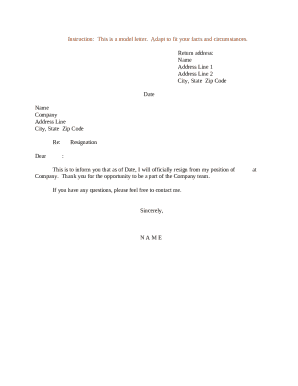
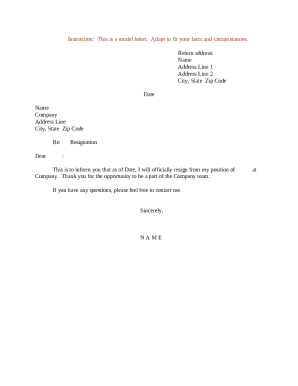
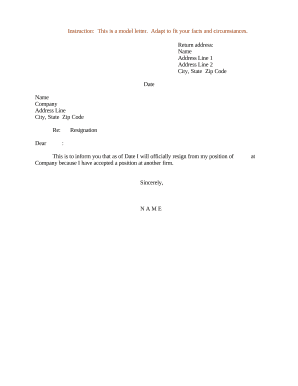
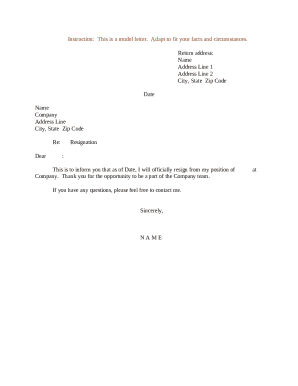
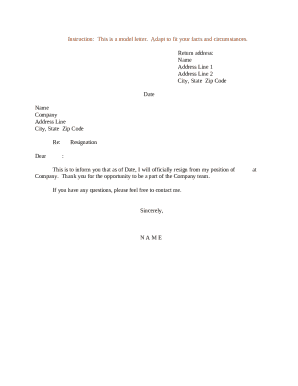
The Resignation Letter Template is a document used by employees to formally notify their employer of their decision to resign from their position.
pdfFiller scores top ratings on review platforms




Who needs Resignation Letter?
Explore how professionals across industries use pdfFiller.

Resignation Letter is needed by:
-
Employees preparing to resign
-
Human resources professionals managing resignations
-
Managers requiring documentation for employee departures
-
Job seekers looking for resignation standards
-
Career counselors advising employees on resignation processes
-
Legal experts focusing on employment matters
Comprehensive Guide to Resignation Letter
What is a Resignation Letter Template?
A resignation letter template serves as a formal notification for employees who are planning to depart from their job roles. It is crucial for maintaining professionalism and clarity during what can often be a sensitive time. This template typically includes important fields such as the employee's name, job title, and last day of work, allowing for a standard format in resignation communications.
Using a resignation letter template not only enhances the professionalism of the document but also facilitates an organized approach to resigning from a position.
Why Use a Resignation Letter Template?
Utilizing a standard resignation letter template simplifies the process for employees, ensuring that all necessary details are thoroughly covered. Including all relevant information helps in maintaining a positive relationship with the employer, which can be valuable for future references or networking.
By adhering to a structured format, employees reduce the likelihood of omitting essential elements that can lead to confusion or misunderstandings during the resignation process.
Key Features of the Resignation Letter Template
-
Fillable fields for personalized input, such as the manager’s name and company name.
-
User-friendly instructions guide users on filling out the form correctly.
-
Options for eSigning provide a secure way to finalize the document.
These features enhance the usability of the resignation letter template, making it accessible for employees across various settings.
Who Needs a Resignation Letter Template?
A resignation letter template is essential for any employee planning to leave their current position. This includes individuals in diverse industries and roles, making it applicable to a wide range of professionals. Even fresh graduates entering the workforce can benefit from utilizing this template to ensure they communicate their intentions effectively and professionally.
How to Fill Out the Resignation Letter Template Online (Step-by-Step)
-
Access the resignation letter template through the pdfFiller platform.
-
Complete each fillable field accurately, including the introduction, body, and conclusion.
-
Review the template for completeness and accuracy before submission.
This structured approach helps ensure that all necessary components are included, enhancing the quality and effectiveness of the resignation letter.
How to Sign or Notarize the Resignation Letter Template
When signing or notarizing the resignation letter template, it is important to differentiate between digital signatures and wet signatures. For most situations, a digital signature suffices, especially when using platforms like pdfFiller that streamline the eSigning process. Understanding when notarization is necessary can further solidify the legitimacy of the document.
Where to Submit the Resignation Letter Template
Once the resignation letter template is completed, there are several typical delivery methods to consider. You can submit your letter via email, deliver a printed copy in person, or even send it through traditional mail, depending on the workplace culture and protocols. Following up after submission can reinforce your professionalism, and keeping a copy for personal records is advisable.
Security and Compliance for Handling Your Resignation Letter
When using pdfFiller to manage your resignation letter, you can be assured of the document's security. Key features include 256-bit encryption and compliance with HIPAA and GDPR regulations. Protecting sensitive information throughout the resignation process is crucial for maintaining privacy.
Practical Tips for Crafting Your Resignation Letter
In drafting your resignation letter, focus on your wording and tone. Expressing gratitude and professionalism can leave a lasting positive impression on your employer. Avoid common errors, such as vague language and negative sentiments, to ensure your communication remains respectful and constructive.
Leverage pdfFiller to Create Your Resignation Letter Template Today
Using pdfFiller allows for the convenience of filling out, editing, and signing your resignation letter directly from any browser. The platform provides not just ease of use but also emphasizes the importance of producing a legally sound and professionally presented resignation letter. With robust security features, pdfFiller ensures that your sensitive documents remain protected throughout the editing process.
How to fill out the Resignation Letter
-
1.To begin, access the Resignation Letter Template by visiting pdfFiller and searching for the document in the template library. Open the template by clicking on it, which will launch the editor interface.
-
2.Familiarize yourself with the fields in the document. Look for fields labeled 'Manager/CEOs Name', 'Address, City, Zip', 'Job Title', 'Company Name', 'date', and 'Your signature'. Each field is where you will enter your personal and job-related information.
-
3.Before you start filling in the form, have the relevant information ready. Collect details such as your employer's name, your job title, the company name, and your last working day. This will streamline the completion process.
-
4.Using pdfFiller's interface, click on each field to enter your information. Start with your name, followed by your job title and the company's name. Ensure the information is typed accurately.
-
5.In the section where it asks for your last day of work, include the date on which you intend to resign. If you'd like to offer assistance during the transition, add that in the designated section of the letter.
-
6.After completing the necessary fields, review the document for any errors or missing information. Ensure that your typed name matches your signature sign-off to maintain consistency.
-
7.Once you are satisfied with the content, finalize the document. Use the 'Save' feature on pdfFiller to secure your progress.
-
8.To download a copy for your records, click on 'Download' and choose the preferred file format, or use 'Submit' if the platform offers direct submission options.

Who is eligible to use the Resignation Letter Template?
Any employee planning to resign from their job can use the Resignation Letter Template. It is designed for those who wish to formally communicate their intention to their employer.
Is there a specific deadline for submitting the resignation letter?
While there isn’t a fixed deadline, it’s advisable to submit your resignation letter as early as possible, typically two weeks before your intended last working day, to ensure a smooth transition.
How should the resignation letter be submitted?
The resignation letter can be submitted either in person or via email, depending on your organization's preference. Be sure to confirm the submission method with your HR department.
Are there any documents required to accompany the resignation letter?
Typically, no additional documents are required when submitting a resignation letter. However, it’s good practice to prepare any pending handover reports or tasks for your replacement.
What mistakes should I avoid when filling out the resignation letter?
Common mistakes include spelling errors, failing to include your last working day, and addressing the letter to the wrong person. Always proofread before submission.
How long does it take for the resignation process to be processed?
Processing times vary by organization, but usually, employers acknowledge resignations within a few days after submission. Follow up if you haven’t received confirmation.
Can I use a different format for my resignation letter?
While the Resignation Letter Template offers a structured format, you can customize the letter based on your preferences. Ensure it remains professional and clear regarding your intent.
Related Forms

Related Catalogs
Get the latest insights from our blog


If you believe that this page should be taken down, please follow our DMCA take down process
here
.
This form may include fields for payment information. Data entered in these fields is not covered by PCI DSS compliance.