
Last updated on
Nov 9, 2026

CT Frontier Lifeline Application 2017-2026 free printable template
pdfFiller is not affiliated with any government organization

Fill out
Complete the form online in a simple drag-and-drop editor.

eSign
Add your legally binding signature or send the form for signing.

Share
Share the form via a link, letting anyone fill it out from any device.

Export
Download, print, email, or move the form to your cloud storage.
Why pdfFiller is the best tool for your documents and forms


End-to-end document management
From editing and signing to collaboration and tracking, pdfFiller has everything you need to get your documents done quickly and efficiently.
Accessible from anywhere
pdfFiller is fully cloud-based. This means you can edit, sign, and share documents from anywhere using your computer, smartphone, or tablet.
Secure and compliant
pdfFiller lets you securely manage documents following global laws like ESIGN, CCPA, and GDPR. It's also HIPAA and SOC 2 compliant.
What is CT Frontier Lifeline Application
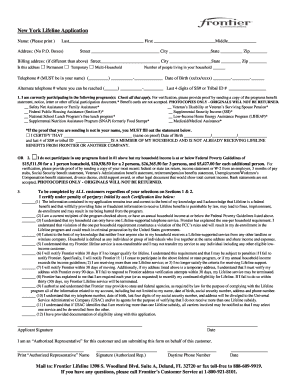
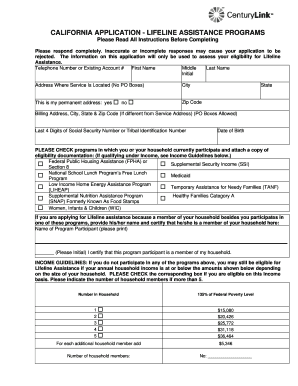
The Connecticut Lifeline Application is a government form used by Connecticut residents to apply for monthly discounts on telephone and internet services.
pdfFiller scores top ratings on review platforms




Who needs CT Frontier Lifeline Application?
Explore how professionals across industries use pdfFiller.

CT Frontier Lifeline Application is needed by:
-
Low-income residents seeking telecommunication discounts
-
Eligible participants in government assistance programs
-
Legal Authorized Representatives submitting on behalf of applicants
-
Families needing affordable internet and phone services
-
Connecticut citizens utilizing public services
Comprehensive Guide to CT Frontier Lifeline Application
What is the Connecticut Lifeline Application?
The Connecticut Lifeline Application is a critical form designed to assist residents in accessing discounted telecommunication services. This application is intended for individuals and households in Connecticut seeking financial relief on their home or mobile telephone and internet services. By providing essential information through the lifeline application form, applicants can connect with assistance that helps reduce their monthly communication costs.
Purpose and Benefits of the Connecticut Lifeline Application
The primary purpose of the Connecticut Lifeline Application is to enable residents to save significantly on telecommunication expenses. By completing this government assistance form, eligible individuals may receive discounts that can lead to substantial savings on their home or mobile telephone and internet services. This financial support helps residents maintain access to essential communication tools while managing their budget more effectively.
Eligibility Criteria for the Connecticut Lifeline Application
To qualify for the Lifeline program, applicants must meet specific eligibility criteria, which often focus on income and participation in qualifying assistance programs. Individuals who fall into the low-income bracket can submit a low income assistance application if they are also enrolled in federally recognized assistance programs. This ensures that the benefits reach those who most need financial support.
Required Documents for the Connecticut Lifeline Application
When applying for the Connecticut Lifeline Application, it is important to prepare the necessary documentation to support your request. Required documents typically include:
-
Proof of income verification
-
Documentation of participation in assistance programs
Ensuring that these supporting materials are readily available can streamline your application process and enhance the likelihood of approval.
How to Fill Out the Connecticut Lifeline Application Online
Filling out the Connecticut Lifeline Application online can be straightforward if you follow these steps:
-
Access the online application form.
-
Enter personal details such as 'First Name' and 'Date of Birth.'
-
Complete all required fields, including 'Applicant Signature.'
Make sure to review your information for accuracy before submitting the form to avoid common errors.
Common Errors and How to Avoid Them
When completing the Connecticut Lifeline Application, applicants often encounter several common errors. To ensure a smooth application process, consider the following tips:
-
Double-check all personal information for accuracy.
-
Ensure that all required sections of the form are completed.
-
Review your application for any missing signatures.
By following a review and validation checklist, you can minimize mistakes that could delay processing.
How to Sign and Submit the Connecticut Lifeline Application
The signing process for the Connecticut Lifeline Application includes options for both digital and wet signatures. After completing your form, submit the application through the designated channels. Possible submission methods are:
-
Online via the designated portal
-
Mailing the completed application to Frontier Lifeline
Always check the latest guidelines for where to submit the Connecticut Lifeline Application to ensure proper processing.
Tracking Your Application Status
Once your application has been submitted, you can check your application status through the official tracking system. Applicants should expect a certain processing time, which can vary based on current demand. Regularly checking your application status will keep you informed about any updates or required actions.
Privacy, Security, and Compliance for the Connecticut Lifeline Application
Protecting personal information while applying for the Connecticut Lifeline Application is essential. The application process employs various security measures to safeguard sensitive data. Notably, pdfFiller implements robust 256-bit encryption and adheres to SOC 2 Type II, HIPAA, and GDPR compliance to ensure the privacy and protection of all documents submitted.
Utilizing pdfFiller for the Connecticut Lifeline Application
pdfFiller offers seamless tools to enhance your experience when completing the Connecticut Lifeline Application. Utilize features such as editing documents, electronically signing forms, and securely sharing your application. This cloud-based PDF editor simplifies the entire process, making it easier for you to manage your applications efficiently.
How to fill out the CT Frontier Lifeline Application
-
1.Access the Connecticut Lifeline Application on pdfFiller by visiting the platform's website and searching for the form by name.
-
2.Once located, open the form to view the fillable fields directly on your screen.
-
3.Before starting, gather necessary information such as your personal details, proof of income, or documents verifying participation in an assistance program.
-
4.Begin filling in the required fields, which include your name, date of birth, and contact information. Navigate using your mouse or keyboard for easier entry.
-
5.Utilize the checkboxes and detailed instructions provided to ensure you complete all necessary sections accurately.
-
6.After completing the form, review all entries to confirm that your information is correct and complete.
-
7.Finalize your application by providing the required signatures from yourself or a legally authorized representative.
-
8.Save your work periodically to avoid data loss as you complete your application.
-
9.When finished, download a copy of your completed application or submit it directly through pdfFiller to Frontier Lifeline for processing.

Who is eligible to apply for the Connecticut Lifeline Application?
Eligibility for the Connecticut Lifeline Application typically includes low-income residents or those participating in qualifying government assistance programs. Check for specific criteria such as income limits or program participation.
What documents do I need to submit with my application?
You will need to provide personal information as well as proof of income or documentation showing your participation in qualifying programs. Ensure that all documents are current and valid to avoid delays.
How do I submit the Connecticut Lifeline Application?
The application can be submitted directly to Frontier Lifeline after completing it. You can send it via mail or submit it online through pdfFiller, which allows for easier processing.
Are there any deadlines for submitting this application?
While there may not be a strict deadline for submitting the Connecticut Lifeline Application, it's recommended to apply as soon as possible to ensure continuous benefits and avoid service interruptions.
How long does it take to process the application?
Processing times for the Connecticut Lifeline Application can vary. Typically, you may expect a response within a few weeks. Check with Frontier Lifeline if you need updates on your application status.
What are common mistakes to avoid when filling out the form?
Common mistakes include missing signatures, providing inaccurate information, and failing to attach required documents. Double-check all entries to ensure accuracy and completeness before submission.
Can someone else fill out the application on my behalf?
Yes, a Legal Authorized Representative can fill out the Connecticut Lifeline Application on your behalf. Make sure they meet all requirements and sign where necessary.
Related Forms




Related Catalogs
Get the latest insights from our blog


If you believe that this page should be taken down, please follow our DMCA take down process
here
.
This form may include fields for payment information. Data entered in these fields is not covered by PCI DSS compliance.