
Last updated on
Oct 28, 2026
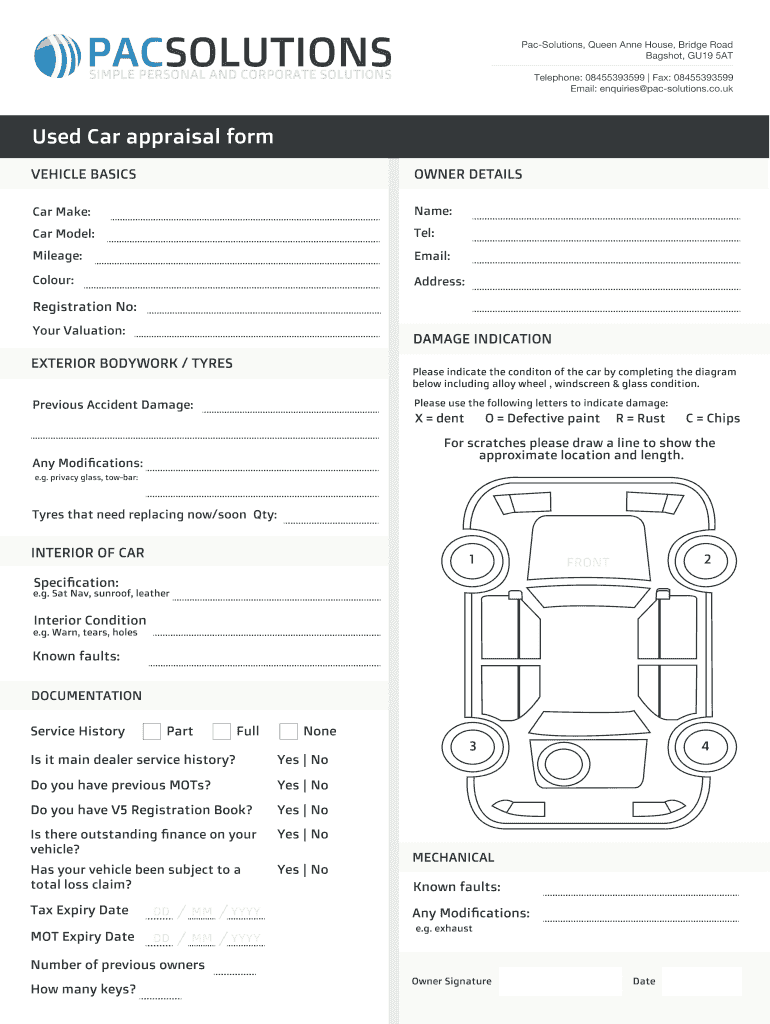
UK Pac Solutions Used Car Appraisal free printable template
pdfFiller is not affiliated with any government organization

Fill out
Complete the form online in a simple drag-and-drop editor.

eSign
Add your legally binding signature or send the form for signing.

Share
Share the form via a link, letting anyone fill it out from any device.

Export
Download, print, email, or move the form to your cloud storage.
Why pdfFiller is the best tool for your documents and forms


End-to-end document management
From editing and signing to collaboration and tracking, pdfFiller has everything you need to get your documents done quickly and efficiently.
Accessible from anywhere
pdfFiller is fully cloud-based. This means you can edit, sign, and share documents from anywhere using your computer, smartphone, or tablet.
Secure and compliant
pdfFiller lets you securely manage documents following global laws like ESIGN, CCPA, and GDPR. It's also HIPAA and SOC 2 compliant.
What is UK Pac Solutions Used Car Appraisal
The Used Car Appraisal Form is a business document used by vehicle owners to provide information for car valuation purposes.
pdfFiller scores top ratings on review platforms




Who needs UK Pac Solutions Used Car Appraisal?
Explore how professionals across industries use pdfFiller.

UK Pac Solutions Used Car Appraisal is needed by:
-
Car owners seeking to sell or trade their vehicle
-
Used car dealerships evaluating vehicles for resale
-
Appraisal services performing vehicle value assessments
-
Insurance companies requiring vehicle valuations
-
Financial institutions needing collateral assessments for loans
Comprehensive Guide to UK Pac Solutions Used Car Appraisal
What is the Used Car Appraisal Form?
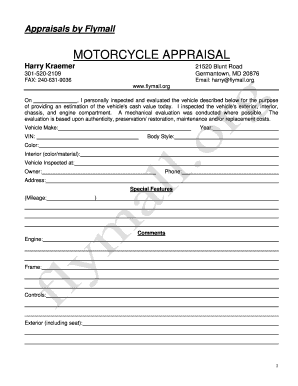
The Used Car Appraisal Form is a vital document used by vehicle owners to assess the value of their cars. This form plays a crucial role in vehicle valuation, enabling car owners to provide necessary details about their vehicles. It is especially helpful for private sellers and dealerships looking to establish a fair market value in various transaction scenarios.
By utilizing this vehicle appraisal form PDF, users can streamline the appraisal process, ensuring that all relevant information is collected efficiently.
Purpose and Benefits of the Used Car Appraisal Form
The primary advantage of the Used Car Appraisal Form lies in its ability to determine a fair market value for a vehicle. Understanding vehicle valuation is beneficial not only for sellers but also for buyers who seek to make informed decisions. Accurate appraisals can alleviate potential legal and financial issues that may arise during a transaction.
-
Assists sellers in pricing their vehicles appropriately.
-
Informs buyers about the fair market value.
-
Avoids disputes related to vehicle price.
Key Features of the Used Car Appraisal Form
The Used Car Appraisal Form includes several critical sections essential for a comprehensive appraisal. Key components within the form include basic vehicle information, owner details, and assessments of the vehicle's condition.
Each section is pivotal for the accurate appraisal process. For instance, vehicle basics provide fundamental attributes, while condition assessments give insight into the vehicle's overall state.
-
Vehicle basics: model, make, year, and mileage.
-
Owner details: name, contact information, and signature.
-
Condition assessments: mechanical and cosmetic evaluation.
Who Needs the Used Car Appraisal Form?
The users who most benefit from the Used Car Appraisal Form include private sellers and dealerships. Individuals in scenarios such as selling or trading in a vehicle will find this form necessary to facilitate the transaction smoothly.
Moreover, anyone looking to verify their vehicle's worth before making financial commitments would find this form useful in understanding their appraisal needs.
How to Fill Out the Used Car Appraisal Form Online (Step-by-Step)
Filling out the Used Car Appraisal Form online can be a straightforward process with guided steps. Begin by opening the form on pdfFiller, ensuring you have all required information at hand.
-
Locate and download the Used Car Appraisal Form on pdfFiller.
-
Fill in vehicle basics, including make, model, and year.
-
Provide your personal details in the owner section.
-
Assess the vehicle’s condition accurately, marking any damages or necessary repairs.
-
Review the information for completeness and accuracy.
Digital Signature Requirements for the Used Car Appraisal Form
Signing the Used Car Appraisal Form correctly is crucial. Understanding the difference between digital signatures and wet signatures is important for legal compliance.
Using pdfFiller, applying a digital signature is seamless, ensuring that your document is both secure and legally valid within the UK. This method enhances the integrity of your document while saving time.
How to Download and Save the Used Car Appraisal Form PDF
Once you’ve completed the Used Car Appraisal Form, saving it efficiently is essential for record-keeping. To download your completed form from pdfFiller, follow these simple steps:
-
Click on the download option in pdfFiller.
-
Choose your preferred file format for saving.
-
Ensure that the file is securely stored on your device.
Always keep a digital record of submitted documents to avoid any loss of information.
Where to Submit the Used Car Appraisal Form
Submission methods for the Used Car Appraisal Form vary depending on the requirements of the receiving entities. Users can submit their forms online or in person, depending on the relevant appraiser or organization.
-
Online submission: Convenient for those who prefer digital interactions.
-
In-person submission: Helpful for detailed discussions regarding the appraisal.
Pay attention to submission deadlines and potential fees associated with the appraisal process to prevent any delays.
Common Errors and How to Avoid Them During Appraisal
Completing the Used Car Appraisal Form can lead to potential pitfalls if not approached carefully. Common mistakes include incomplete details or incorrect vehicle assessments.
-
Always double-check personal information for accuracy.
-
Thoroughly evaluate the vehicle’s condition to avoid discrepancies.
Being mindful of these common errors will enhance the quality of the appraisal process and ensure successful transactions in the future.
Unlock the Potential: Use pdfFiller for Your Used Car Appraisal Form
pdfFiller simplifies the process of filling out the Used Car Appraisal Form, making it more efficient and user-friendly. With features that enhance document handling security, you can trust that your sensitive information is protected.
Utilizing pdfFiller allows you to manage all your documents in one cloud-based platform, empowering you to handle your appraisal forms effortlessly.
How to fill out the UK Pac Solutions Used Car Appraisal
-
1.Begin by accessing pdfFiller and searching for the 'Used Car Appraisal Form' in the template library.
-
2.Once you find the form, click to open it in the pdfFiller editor.
-
3.Gather necessary details about your vehicle including make, model, year, mileage, and any damage or special features.
-
4.Start completing the fields by clicking on each blank section in the form.
-
5.Use the checkboxes to indicate the vehicle's interior and exterior condition, marking any damages as needed.
-
6.Fill out the owner details section accurately, ensuring you enter your name and contact information.
-
7.After completing all required fields, review the overall document for any missing information.
-
8.Check that all sections are filled out accurately before adding your signature.
-
9.Once finalized, save your form by clicking the 'Save' option in the editor.
-
10.To download a copy, select the 'Download' button and choose your preferred file format.
-
11.For submission, follow the platform prompts to send the completed form directly to the intended party or print it out.

Who is eligible to use the Used Car Appraisal Form?
The Used Car Appraisal Form is primarily for vehicle owners, dealerships, and appraisal services needing to provide or obtain a vehicle valuation.
Are there any deadlines associated with this form?
While there are no specific deadlines for filling out the Used Car Appraisal Form, timely completion is recommended if the vehicle is being sold or traded.
What is the process for submitting the form?
Submission can typically be done electronically through pdfFiller or by downloading and printing the form to submit it via mail or in person to the relevant appraisal service or dealership.
What supporting documents do I need to provide?
You may need to gather documents such as the vehicle's title, registration, and maintenance records to accurately complete the appraisal form.
What common mistakes should I avoid when filling out the form?
Common mistakes include omitting vital information, failing to sign the document, or providing inaccurate vehicle conditions; double-check all entries before submitting.
What are the processing times after submission?
Processing times vary depending on the appraisal service, but it usually takes a few days to one week for evaluation and feedback.
Can I make changes to my form after submitting?
Most platforms allow you to edit submitted forms if they are returned for corrections; otherwise, it is best to start a new form for any significant changes.
Related Forms


Related Catalogs
Get the latest insights from our blog


If you believe that this page should be taken down, please follow our DMCA take down process
here
.
This form may include fields for payment information. Data entered in these fields is not covered by PCI DSS compliance.