
Last updated on
Nov 6, 2026

SG Central Provident Fund Board RFM/FORM 40 2014-2026 free printable template
We are not affiliated with any brand or entity on this form

Fill out
Complete the form online in a simple drag-and-drop editor.

eSign
Add your legally binding signature or send the form for signing.

Share
Share the form via a link, letting anyone fill it out from any device.

Export
Download, print, email, or move the form to your cloud storage.
Why pdfFiller is the best tool for your documents and forms


End-to-end document management
From editing and signing to collaboration and tracking, pdfFiller has everything you need to get your documents done quickly and efficiently.
Accessible from anywhere
pdfFiller is fully cloud-based. This means you can edit, sign, and share documents from anywhere using your computer, smartphone, or tablet.
Secure and compliant
pdfFiller lets you securely manage documents following global laws like ESIGN, CCPA, and GDPR. It's also HIPAA and SOC 2 compliant.
What is SG Central Provident Fund Board RFM/FORM 40
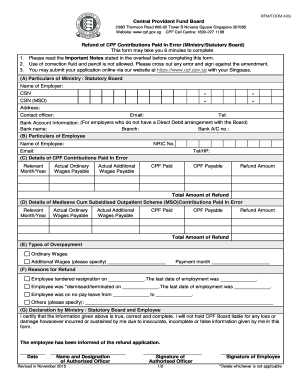
The CPF Refund of Contributions Form is a government document used by employers and employees in Singapore to request a refund of incorrect Central Provident Fund (CPF) contributions.
pdfFiller scores top ratings on review platforms




Great...Easy to use even for a technophobe...I recommend it
The product works well for the business needs that I have.
Who needs SG Central Provident Fund Board RFM/FORM 40?
Explore how professionals across industries use pdfFiller.

SG Central Provident Fund Board RFM/FORM 40 is needed by:
-
Employers seeking to rectify CPF contribution errors
-
Employees who have had erroneous CPF contributions deducted
-
Human resource professionals managing payroll
-
Financial officers in companies dealing with CPF matters
-
Individuals requiring clarification on CPF submission numbers
Comprehensive Guide to SG Central Provident Fund Board RFM/FORM 40
What is the CPF Refund of Contributions Form?
The CPF Refund of Contributions Form, also known as the RFM/FORM 40, is an essential document used in Singapore for requesting a refund of Central Provident Fund (CPF) contributions that have been paid in error. This form is designed for both employers and employees who need to rectify discrepancies in their CPF contributions.
Any employer who has incorrectly contributed to an employee's CPF account or an employee who has been affected by such an error should utilize this form to initiate the refund process.
Purpose and Benefits of the CPF Refund of Contributions Form
The primary purpose of the CPF Refund of Contributions Form is to provide a structured method for employers and employees to address errors in CPF contributions efficiently. The use of this form simplifies the process for both parties, ensuring that all necessary information is captured for a successful refund.
Employers benefit from a streamlined refund process, while employees gain assurance that incorrect contributions can be rectified quickly, allowing for a smoother financial experience.
Who is Required to Use the CPF Refund of Contributions Form?
There are specific roles designated for the CPF Refund of Contributions Form: the Authorised Officer and the Employee. The Authorised Officer is typically a representative from the employer who can submit the form, while the Employee is the individual whose CPF contributions are in question.
This form should be completed in scenarios such as when there has been an overpayment of CPF contributions or when contributions have been made in error.
Eligibility Criteria for the CPF Refund of Contributions Form
Eligibility to use the CPF Refund of Contributions Form requires that both employers and employees meet specific criteria. Employers must ensure they have the CPF Contribution Submission Number, which is essential for processing, along with accurate wage details that correspond with the refund request.
Employees, on the other hand, must provide their NRIC number and stay informed about their contribution statuses to ensure all information submitted is correct.
How to Fill Out the CPF Refund of Contributions Form Online
Filling out the CPF Refund of Contributions Form online is a straightforward process. Here’s how to do it using pdfFiller:
-
Access the form on pdfFiller’s platform.
-
Begin with entering the employer's CPF Submission Number.
-
Input the employee's NRIC number.
-
Complete the wage and contribution details as required.
-
Review all entered information for accuracy before submission.
This step-by-step approach ensures that all critical fields are completed correctly to prevent delays in processing.
Validation Checklist: Common Errors and How to Avoid Them
When completing the CPF Refund of Contributions Form, it is vital to avoid common mistakes to ensure a seamless experience. Frequent errors include missing signatures from the Authorised Officer or Employee, incorrect NRIC numbers, or omitting the CPF Submission Number.
To prevent these issues, double-check all submitted information against official documents to confirm accuracy before submission.
Submission Methods for the CPF Refund of Contributions Form
The CPF Refund of Contributions Form can be submitted through several methods. Employers can choose to submit online via the CPF portal, or they may opt for paper submission by mailing the form directly to the CPF Board.
It is important to adhere to submission deadlines to ensure timely processing of refunds. Typically, forms must be submitted within one year from the date of payment to be considered valid.
Processing Time and Confirmation of Your Submission
Once submitted, the expected processing time for the CPF Refund of Contributions Form is typically within 14 business days. During this time, you can track the status of your submission by checking the CPF portal or contacting the CPF Board for updates.
Security and Compliance When Submitting Your CPF Refund of Contributions Form
When using pdfFiller for submitting the CPF Refund of Contributions Form, users can be assured of stringent data protection measures. The platform employs 256-bit encryption and is compliant with HIPAA and GDPR regulations, ensuring a secure handling of sensitive information.
Compliance with legal requirements is also guaranteed throughout the submission process, providing peace of mind for all users.
Utilizing pdfFiller for Your CPF Refund of Contributions Form
pdfFiller significantly simplifies the filling and submission process for the CPF Refund of Contributions Form. The platform offers a user-friendly interface with features such as eSignature, cloud storage, and easy sharing options that enhance the user experience.
By leveraging pdfFiller’s capabilities, users can efficiently fill out their forms and ensure that all necessary fields are completed accurately to facilitate timely refunds.
How to fill out the SG Central Provident Fund Board RFM/FORM 40
-
1.Access the CPF Refund of Contributions Form on pdfFiller by visiting the site and searching for the form title in the search bar.
-
2.Once located, click on the form to open it in the editable pdfFiller interface.
-
3.Prepare all necessary information including the employer's CPF Submission Number, employee's NRIC number, wage details, and any needed bank account details before filling out the form.
-
4.Use the fillable fields to enter information accurately, ensuring that you pay attention to mandatory sections requiring completion.
-
5.You can navigate through the form using your mouse or tab key to move from one field to the next, making it efficient to input the required data.
-
6.After entering all necessary details, carefully review the completed form to ensure all information is correct and that both the employer and employee signatures are included.
-
7.If the employer has a Direct Debit arrangement with the CPF Board, ensure to attach a copy of the bank statement as required.
-
8.Once finalized, save the form on your device, or opt to download it directly from pdfFiller.
-
9.You can submit the filled form to the CPF Board through prescribed submission methods, ensuring you adhere to any deadlines.

Who is eligible to submit the CPF Refund of Contributions Form?
Both employers who have overpaid CPF contributions and employees whose contributions were incorrectly deducted can submit this form to request a refund.
What are the deadlines for submitting the form?
The form must be submitted within one year from the date of the erroneous payment to ensure a refund can be processed by the CPF Board.
What supporting documents are required for submission?
Along with the completed form, you may need to submit a copy of the bank statement unless you have a Direct Debit arrangement with the CPF Board.
What are common mistakes to avoid when filling out the form?
Ensure all fields are completed accurately, signatures are included, and that you are using the correct CPF Submission Number to avoid delays in processing.
How long does processing take after submitting the form?
Processing times can vary, but typically, you can expect a response from the CPF Board within a few weeks after submission.
Where should the completed form be submitted?
The completed CPF Refund of Contributions Form should be submitted directly to the CPF Board either by post or through designated online channels if available.
Can the form be edited after submitting?
Once submitted, the form cannot be modified. If additional changes are needed, you'll need to submit a new request.
Related Forms



Get the latest insights from our blog


If you believe that this page should be taken down, please follow our DMCA take down process
here
.
This form may include fields for payment information. Data entered in these fields is not covered by PCI DSS compliance.