
Last updated on
Oct 19, 2026

UT TC-62M Schedule A 2015-2026 free printable template
pdfFiller is not affiliated with any government organization

Fill out
Complete the form online in a simple drag-and-drop editor.

eSign
Add your legally binding signature or send the form for signing.

Share
Share the form via a link, letting anyone fill it out from any device.

Export
Download, print, email, or move the form to your cloud storage.
Why pdfFiller is the best tool for your documents and forms


End-to-end document management
From editing and signing to collaboration and tracking, pdfFiller has everything you need to get your documents done quickly and efficiently.
Accessible from anywhere
pdfFiller is fully cloud-based. This means you can edit, sign, and share documents from anywhere using your computer, smartphone, or tablet.
Secure and compliant
pdfFiller lets you securely manage documents following global laws like ESIGN, CCPA, and GDPR. It's also HIPAA and SOC 2 compliant.
What is UT TC-62M Schedule A
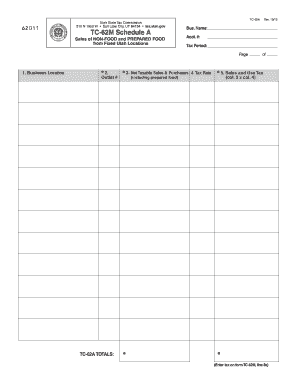
The Utah Sales Tax Form TC-62M Schedule A is a tax document used by businesses in Utah to report sales of non-food and prepared food items for tax purposes.
pdfFiller scores top ratings on review platforms




Who needs UT TC-62M Schedule A?
Explore how professionals across industries use pdfFiller.

UT TC-62M Schedule A is needed by:
-
Utah business owners selling prepared food items
-
Companies reporting sales tax from fixed locations
-
Accountants handling tax filings for Utah entities
-
Tax compliance officers within businesses operating in Utah
-
Consultants advising on Utah sales tax regulations
Comprehensive Guide to UT TC-62M Schedule A
What is the Utah Sales Tax Form TC-62M Schedule A?
The Utah Sales Tax Form TC-62M Schedule A is a crucial document used by businesses in Utah for reporting sales of both non-food and prepared food items. This form serves the essential function of accurately detailing a business's taxable sales, ensuring compliance with state tax regulations.
Businesses operating in Utah and engaged in selling taxable items are required to utilize this form to report their sales activities. Understanding and correctly filling out the TC-62M Schedule A is vital for maintaining compliance and avoiding potential penalties.
Purpose and Benefits of the Utah Sales Tax Form TC-62M Schedule A
The primary purpose of filing the Utah Sales Tax Form TC-62M Schedule A is to provide the Utah State Tax Commission with accurate sales data. By accurately reporting these figures, businesses ensure adherence to tax laws, which helps them avoid penalties associated with incorrect or late filings.
There are several benefits associated with filing this form, including:
-
Legal compliance with state tax obligations.
-
Effective tracking of taxable sales, facilitating better financial management.
-
Avoiding fines or interest penalties due to inaccuracies in tax reporting.
Who Needs to File the Utah Sales Tax Form TC-62M Schedule A?
Any business in Utah that sells non-food items or prepared food items is required to file the TC-62M Schedule A. Examples of businesses that must submit this form include grocery stores, restaurants, and vendors participating in farmers’ markets.
Specific conditions under which filing is mandatory include:
-
Businesses with fixed locations selling taxable food items.
-
Vendors exceeding the threshold for non-food sales as defined by state regulations.
Key Features of the Utah Sales Tax Form TC-62M Schedule A
The TC-62M Schedule A includes several main components vital for accurate reporting. Key fillable fields on the form consist of:
-
Business Location.
-
Account Number.
-
Tax Period.
Additionally, the form requires users to input details regarding net taxable sales, applicable tax rates, and calculations related to sales and use tax. Understanding these components is essential for ensuring accurate completion of the form.
How to Fill Out the Utah Sales Tax Form TC-62M Schedule A Online
Filling out the Utah Sales Tax Form TC-62M Schedule A online is a streamlined process. Follow these steps for an accurate submission:
-
Access the electronic version of the TC-62M Schedule A.
-
Input the Business Location and Account Number.
-
Enter the relevant Tax Period.
-
Fill in the columns for Net Taxable Sales and applicable Tax Rates.
-
Calculate and enter the total Sales and Use Tax.
To ensure accuracy, double-check all entries before submitting the form.
Submission Methods for the Utah Sales Tax Form TC-62M Schedule A
Businesses have various options for submitting the completed TC-62M Schedule A. Submission methods include:
-
Online submission via the Utah State Tax Commission website.
-
Mailing a physical copy of the completed form.
To avoid late fees, it is important to adhere to submission deadlines and understand processing times. Timely submission is essential for maintaining compliance with state deadlines.
Common Errors and How to Avoid Them When Filing the Utah Sales Tax Form TC-62M Schedule A
When filling out the TC-62M Schedule A, users often make common errors such as incorrect entries in the taxable sales fields or failing to report all applicable sales. To minimize mistakes, consider these tips:
-
Review entries for accuracy before submission.
-
Cross-reference sales records with reported figures to ensure completeness.
Understanding the potential consequences of errors, such as fines or delayed processing, underscores the importance of careful review.
Security and Compliance for the Utah Sales Tax Form TC-62M Schedule A
Handling sensitive documents like the Utah Sales Tax Form TC-62M Schedule A requires adherence to strict security protocols. Utilizing secure platforms for processing ensures that sensitive information remains protected.
Some key security measures include:
-
Data encryption to safeguard information during transmission.
-
Compliance with regulations like HIPAA and GDPR to protect user data.
How pdfFiller Can Help You with the Utah Sales Tax Form TC-62M Schedule A
pdfFiller offers a robust platform for managing the completion and submission of the Utah Sales Tax Form TC-62M Schedule A. Features like fillable forms and eSigning enhance the user experience, making the process more efficient.
Using pdfFiller provides several advantages, including:
-
Easy form management and document organization.
-
Secure handling of sensitive data with encryption.
These benefits make pdfFiller a valuable tool for businesses needing to manage tax forms efficiently.
Final Steps After Submitting Your Utah Sales Tax Form TC-62M Schedule A
After submitting the TC-62M Schedule A, users can expect to receive confirmation of their submission. Tracking options provided by the Utah State Tax Commission can help businesses monitor the status of their filings.
If there’s a need to correct or amend a submitted form, clear guidelines are available. Keeping records of submitted forms is also important for future reference and audits.
How to fill out the UT TC-62M Schedule A
-
1.Access the Utah Sales Tax Form TC-62M Schedule A by navigating to pdfFiller and searching for the specific form name.
-
2.Open the form in the pdfFiller interface where you will see the multiple fillable fields on the document.
-
3.Before starting, collect necessary information such as your business location, account number, tax period, and the amount of net taxable sales.
-
4.Begin by filling in the 'Business Location' to specify where your sales were generated.
-
5.Enter your account number accurately in the corresponding field; this is crucial for linking your submission to your business.
-
6.Select the correct tax period for which you are submitting the report; ensure it matches your sales records.
-
7.In the 'Net Taxable Sales & Purchases' section, input the total amount that is taxable during the reporting period.
-
8.Enter the applicable 'Tax Rate' for your products based on the sales tax regulations in Utah.
-
9.Utilize the provided columns to calculate your 'Sales and Use Tax,' ensuring all figures are correct and reflective of your business' transactions.
-
10.Thoroughly review all filled sections to confirm that all information is accurate and complete to avoid any discrepancies.
-
11.Once satisfied with the details, save your completed form on pdfFiller and choose the appropriate option to download or submit it electronically through the system.

Who is eligible to fill out the Utah Sales Tax Form TC-62M Schedule A?
Any business operating within Utah that sells non-food and prepared food items is eligible to fill out the TC-62M Schedule A. This includes retailers and service providers.
What is the deadline for submitting this form?
The deadline to submit the Utah Sales Tax Form TC-62M Schedule A generally aligns with your tax reporting period. It's typically due on the 20th of the month following the reporting period.
How should I submit the TC-62M Schedule A form?
The completed TC-62M Schedule A can be submitted electronically through pdfFiller or mailed to the appropriate Utah tax commission office. Ensure to keep a copy of your submission for your records.
What supporting documents are required for this form?
Typically, you may need to keep records of sales transactions and any related documentation, but the TC-62M Schedule A itself does not require attaching additional documents unless specified by the Utah tax regulations.
What common mistakes should I avoid when filling out this form?
Common mistakes include entering incorrect account numbers, miscalculating tax rates, and failing to accurately report the net taxable sales. Always double-check your figures.
How long does it take to process the submitted TC-62M Schedule A?
Processing times for the TC-62M Schedule A can vary but generally take a few weeks. Stay updated with your account on the Utah tax commission website for tracking.
Is notarization required for this form?
No, notarization is not required for the Utah Sales Tax Form TC-62M Schedule A. Simply complete and submit the form as per the outlined procedures.
UT TC-62M Schedule A Form Versions
Related Forms




Get the latest insights from our blog


If you believe that this page should be taken down, please follow our DMCA take down process
here
.
This form may include fields for payment information. Data entered in these fields is not covered by PCI DSS compliance.