
Last updated on
Oct 31, 2026

Get the free MoneyGram Money Order Claim Card
We are not affiliated with any brand or entity on this form

Fill out
Complete the form online in a simple drag-and-drop editor.

eSign
Add your legally binding signature or send the form for signing.

Share
Share the form via a link, letting anyone fill it out from any device.

Export
Download, print, email, or move the form to your cloud storage.
Why pdfFiller is the best tool for your documents and forms


End-to-end document management
From editing and signing to collaboration and tracking, pdfFiller has everything you need to get your documents done quickly and efficiently.
Accessible from anywhere
pdfFiller is fully cloud-based. This means you can edit, sign, and share documents from anywhere using your computer, smartphone, or tablet.
Secure and compliant
pdfFiller lets you securely manage documents following global laws like ESIGN, CCPA, and GDPR. It's also HIPAA and SOC 2 compliant.
What is Money Order Claim
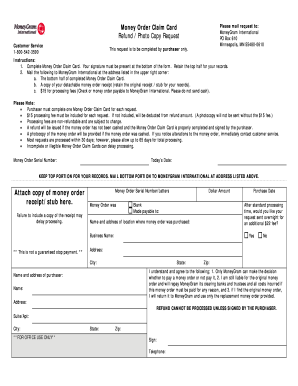
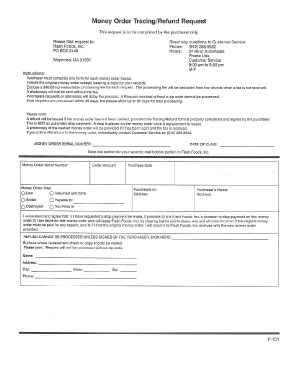
The MoneyGram Money Order Claim Card is a business form used by purchasers to request a refund or photocopy of lost, destroyed, stolen, or returned money orders.
pdfFiller scores top ratings on review platforms




Who needs Money Order Claim?
Explore how professionals across industries use pdfFiller.

Money Order Claim is needed by:
-
Individuals who have lost a money order
-
Customers seeking refunds for stolen money orders
-
Businesses needing photocopies of issued money orders
-
Participants in financial transactions using MoneyGram
-
Consumers requiring claim documentation for insurance purposes
Comprehensive Guide to Money Order Claim
What is the MoneyGram Money Order Claim Card?
The MoneyGram Money Order Claim Card is a critical document used by purchasers to request refunds or photocopies of money orders that are lost, destroyed, or stolen. This claim card includes essential information such as the money order's serial number, the date of purchase, and the name of the business where it was acquired. The claim card plays an important role in facilitating the refund process and serves as a proof of transaction in cases of disputes.
Key details found on the claim card are vital for ensuring the success of a refund request. A correctly filled card enables the purchaser to recover funds efficiently, emphasizing the necessity of the claim card in any refund or photocopy requests related to MoneyGram money orders.
Purpose and Benefits of the MoneyGram Money Order Claim Card
The MoneyGram Money Order Claim Card offers multiple benefits for users needing to reclaim funds from lost or damaged money orders. Utilizing this claim card simplifies the refund process while providing necessary protection against potential loss. Users can expect a typical processing timeframe for claims to be between 30 to 65 days, depending on various factors.
By securing refunds and acting as a safeguard for lost transactions, this claim card serves both personal and financial assurance for its users, ensuring they experience a smooth claiming process.
Who Needs the MoneyGram Money Order Claim Card?
The claim card is primarily designed for purchasers who have encountered situations where their money orders are lost, destroyed, or stolen. To qualify for filing a claim, users must meet specific eligibility criteria, such as possessing the original receipt and adhering to the defined circumstances outlined by MoneyGram.
-
Define 'purchaser' and outline participation requirements.
-
Identify common situations that necessitate using the claim card.
-
Understand eligibility criteria for filing a claim.
How to Fill Out the MoneyGram Money Order Claim Card Online
Filling out the MoneyGram Money Order Claim Card online requires careful attention to detail to ensure all necessary fields are completed accurately. Key fields include the serial number of the money order, the purchase date, the name and address of the purchaser, and a valid signature.
It’s imperative to include a copy of the purchase receipt to accompany the claim. For a more streamlined process, users can utilize pdfFiller, which enhances the efficiency of form completion and submission.
Common Errors and How to Avoid Them
When filling out the claim card, users may encounter several common mistakes that could delay or hinder their requests. A checklist of these common errors can help identify areas where users frequently misstep, which includes overlooking the signature or failing to include necessary documents.
-
Review all entries for accuracy before submitting the form.
-
Ensure that the signature is provided at the bottom of the card.
-
Double-check document inclusion, such as receipts.
Fees, Deadlines, and Processing Time for the Claim Card
To process a claim using the MoneyGram Money Order Claim Card, there is a processing fee of $12. This fee can be paid through various acceptable methods, which are outlined in the terms provided when submitting the card.
Understanding the associated deadlines for submission is crucial, as timely filing can prevent unnecessary delays in claim processing. The standard processing time typically ranges from 30 to 65 days, emphasizing the need for prompt submission.
How to Submit the MoneyGram Money Order Claim Card
Submitting the MoneyGram Money Order Claim Card can be done through various methods, including online submission and mailing options. Users should carefully follow detailed instructions provided on how to submit the card to ensure proper handling.
Post-submission, it’s essential to remain vigilant about tracking the submission status to stay informed about any updates or requirements that may arise during the claim process.
Post-Submission Actions and Follow-up
After submitting the claim card, users should check the status of their claims regularly, as expecting a response within the designated timeframe can prevent unnecessary anxiety. If any corrections or amendments are needed post-submission, users should act quickly to avoid complications.
-
Monitor the application status for timely updates.
-
Understand common rejection reasons and how to address them.
Why Use pdfFiller for the MoneyGram Money Order Claim Card?
pdfFiller offers a range of features that enhance the process of filling out the MoneyGram Money Order Claim Card, including editing, eSigning, and secure document handling. The platform’s user-friendly interface ensures a smooth completion process, catering to users of all skill levels.
Additionally, pdfFiller prioritizes compliance and security, employing 256-bit encryption to safeguard sensitive information, making it the ideal solution for managing document submissions securely.
Sample MoneyGram Money Order Claim Card
To assist users further, a sample MoneyGram Money Order Claim Card is available, providing a visual reference for accurately completing the form. This sample highlights crucial fields and demonstrates their correct completion, ensuring clarity for users.
Utilizing tools like pdfFiller will help streamline the process of completing the claim card, making it easier for users to navigate their refund requests effectively.
How to fill out the Money Order Claim
-
1.Access the MoneyGram Money Order Claim Card on pdfFiller by searching for the form name in the platform's search bar.
-
2.Once the form opens, you will see several fillable fields that require your attention. Use the cursor to click on each field to type in your information.
-
3.Before filling out the form, gather necessary details such as the money order serial number, purchase date, and the name and address of the business where the money order was purchased.
-
4.Review the instructions clearly mentioned on the form regarding checkboxes and required information. Be precise when filling in your personal information, ensuring accuracy.
-
5.Double-check the signature line to confirm your signature is present, as it is a mandatory requirement for processing.
-
6.After completion, thoroughly review all entered information in the form to avoid any mistakes that could delay processing.
-
7.Save the completed form using pdfFiller’s save functionality, and consider downloading a copy for your records. Ensure to keep the receipt copy as required.
-
8.You can submit the form directly through pdfFiller by selecting the submission option if available, or print it for mailing.

Who is eligible to use the MoneyGram Money Order Claim Card?
Anyone who has purchased a MoneyGram money order can use this claim card if they have lost, destroyed, stolen, or need a photocopy of their order.
What documents are required to submit this form?
You need to include a copy of the money order receipt along with your claim card submission, and a $12 processing fee is required.
How long does it take to process the claim once submitted?
The processing time is typically between 30 to 65 days from the date your form is received.
What common mistakes should I avoid when filling out the claim card?
Ensure that your signature is present and all relevant fields are completed accurately, particularly the money order serial number and your contact information.
Can the submitted claim be tracked?
Tracking information is typically provided after your claim is processed. Keep your receipt for reference until you receive your refund or copy.
How do I submit the completed form?
You can either submit the form electronically through pdfFiller or print it out and send it via mail to MoneyGram's processing center.
Related Forms



Related Catalogs
Get the latest insights from our blog



If you believe that this page should be taken down, please follow our DMCA take down process
here
.
This form may include fields for payment information. Data entered in these fields is not covered by PCI DSS compliance.