
Last updated on
Oct 31, 2026

Get the free Credit Card Authorization Form
We are not affiliated with any brand or entity on this form

Fill out
Complete the form online in a simple drag-and-drop editor.

eSign
Add your legally binding signature or send the form for signing.

Share
Share the form via a link, letting anyone fill it out from any device.

Export
Download, print, email, or move the form to your cloud storage.
Why pdfFiller is the best tool for your documents and forms


End-to-end document management
From editing and signing to collaboration and tracking, pdfFiller has everything you need to get your documents done quickly and efficiently.
Accessible from anywhere
pdfFiller is fully cloud-based. This means you can edit, sign, and share documents from anywhere using your computer, smartphone, or tablet.
Secure and compliant
pdfFiller lets you securely manage documents following global laws like ESIGN, CCPA, and GDPR. It's also HIPAA and SOC 2 compliant.
What is Credit Card Authorization
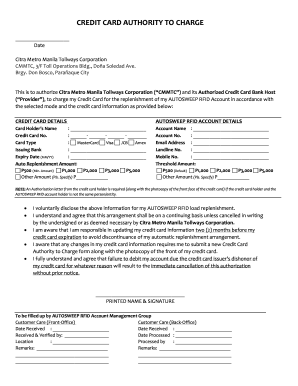
The Credit Card Authorization Form is a financial document used by individuals to authorize a representative for auto-replenishment of an RFID account with Citra Metro Manila Tollways Corporation.
pdfFiller scores top ratings on review platforms




GREAT SOFTWARE, ITS VERY EASY TO USE AND HAS COME IN VERY HANDY.
wonderful, fillable pdfs made easy. would love 4$ u 5$ a documents instead of monthly
Who needs Credit Card Authorization?
Explore how professionals across industries use pdfFiller.

Credit Card Authorization is needed by:
-
Credit card holders looking to authorize payments
-
Users of Citra Metro Manila Tollways RFID accounts
-
Financial administrators managing transactions
-
Businesses utilizing automated payment systems
-
Individuals in Metro Manila needing tollway access
Comprehensive Guide to Credit Card Authorization
What is the Credit Card Authorization Form?
The Credit Card Authorization Form is a vital document that enables individuals to permit the use of their credit card for specific transactions. This form is particularly significant for authorizing payments related to RFID account replenishment at Citra Metro Manila Tollways. It is necessary for users intending to make tollway transactions in the Philippines, as it ensures that the cardholder's payment is processed smoothly and securely.
Purpose and Benefits of the Credit Card Authorization Form
The primary purpose of the Credit Card Authorization Form is to facilitate the auto-replenishment of RFID accounts. This process simplifies the payment experience for regular tollway users, allowing for seamless travel without the hassle of manual top-ups. The form also enhances security by establishing clear authorization, minimizing the risk of unauthorized charges.
-
Convenience of auto-replenishment for RFID accounts.
-
Simplification of the toll payment process.
-
Implementation of security measures to protect sensitive information.
Key Features of the Credit Card Authorization Form
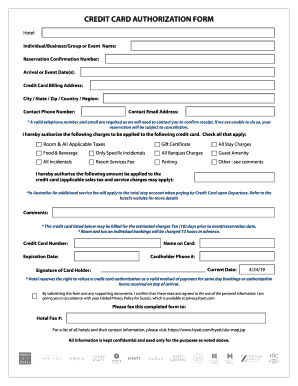
This form includes essential fields that users must complete, such as the cardholder’s name, credit card number, and signature. Understanding the critical components of the form is important for accurate submission and includes specific terms and conditions outlined to clarify the responsibilities of the cardholder.
-
Name of cardholder
-
Credit Card No.
-
Signature requirements
-
Checkboxes for authorization
Who Needs the Credit Card Authorization Form?
This form is intended for individuals who utilize their credit cards for tollway payments. It is particularly important for frequent travelers who regularly use the Citra Metro Manila Tollways, as authorization ensures their RFID accounts are automatically replenished without interruption.
-
Credit card holders needing auto-replenishment
-
Frequent travelers on Citra Metro Manila Tollways
How to Fill Out the Credit Card Authorization Form Online (Step-by-Step)
Filling out the Credit Card Authorization Form online can be straightforward when following these steps. Begin by gathering all necessary information before accessing the form. Ensure that all details are accurate and clearly presented to avoid delays in processing.
-
Access the Credit Card Authorization Form on pdfFiller.
-
Input the required information, ensuring accuracy.
-
Double-check all entries for correct details.
-
Sign the form electronically as required.
-
Submit the form according to the provided instructions.
Common Errors and How to Avoid Them
When completing the Credit Card Authorization Form, users often make several common mistakes. Identifying these errors beforehand can help improve the accuracy of submissions and reduce processing time.
-
Incomplete fields that need to be filled out.
-
Incorrect credit card numbers.
-
Missing signatures or dates.
-
Neglecting to double-check provided information.
How to Submit the Credit Card Authorization Form
Once you have completed the Credit Card Authorization Form, you can submit it through various methods. Understanding these submission methods and any deadlines involved is crucial for ensuring that your transactions are processed efficiently.
-
Online submission through pdfFiller.
-
Physical mailing options for offline submission.
-
Know important deadlines related to form submission.
Security and Compliance for the Credit Card Authorization Form
Security is a top priority when handling the Credit Card Authorization Form. Users can be assured that robust measures protect their sensitive data during submission. Compliance with applicable regulations, such as GDPR and HIPAA, further ensures that users’ privacy is maintained.
-
256-bit encryption for data protection.
-
Compliance with industry standards like GDPR and HIPAA.
Experience Ease of Filing with pdfFiller
Utilizing pdfFiller for managing the Credit Card Authorization Form provides a range of benefits. This cloud-based platform allows users to edit, eSign, and manage their documents securely, all from the convenience of their browser without the need for downloads.
-
User-friendly interface for effortless document management.
-
Secure features, including encryption and compliance with privacy laws.
-
Comprehensive capabilities to edit and fill out forms accurately.
How to fill out the Credit Card Authorization
-
1.Access the Credit Card Authorization Form by navigating to pdfFiller's website and searching for the form title in the search bar.
-
2.Once found, click on the form to open it in pdfFiller’s editing interface.
-
3.Gather the necessary information: your credit card details, RFID account information, and personal identification.
-
4.Begin filling out the form by clicking on the blank fields. Enter your card holder’s name in the designated space.
-
5.Input your credit card number carefully, ensuring each digit is correct to avoid any issues with future transactions.
-
6.Complete the section for the RFID account holder by specifying the relevant account details related to your RFID usage.
-
7.Review the terms and conditions outlined in the form, ensuring you understand your obligations regarding updating credit card information.
-
8.Once all fields are completed, double-check for accuracy. Ensure that your signature is correctly entered at the end of the form.
-
9.After finishing the form, look for options to review your entries one last time before finalizing.
-
10.Lastly, save the completed form to your device or use the submission options provided by pdfFiller to send it to the intended recipient.

Who is eligible to use the Credit Card Authorization Form?
Any individual who holds a credit card and wishes to authorize a representative to use it for replenishing their RFID account with Citra Metro Manila Tollways is eligible to complete this form.
Is there a deadline for submitting the form?
While there may not be a specific deadline, it is advisable to submit the Credit Card Authorization Form prior to your next tollway transaction to ensure uninterrupted service.
How can I submit the completed form?
You can submit the completed form through pdfFiller directly, or download it and email it to Citra Metro Manila Tollways Corporation as per their submission guidelines.
What supporting documents are required with this form?
Typically, you will need to provide proof of identity and possibly additional documentation related to your RFID account, although specifics may vary based on requirements established by the tollway authority.
What are common mistakes to avoid when filling out this form?
Ensure that you enter all credit card details accurately and check that your signature is present; omissions or errors can lead to delays or issues in processing.
How long does it take to process the authorization?
Processing times can vary, but generally, submissions are processed within a few business days. Early submission helps ensure timely processing for upcoming transactions.
Can I edit the form after submitting?
Once submitted, modifications may not be allowed unless specifically stated by the recipient. Always review your information carefully before submitting.
Related Forms

Related Catalogs
Get the latest insights from our blog


If you believe that this page should be taken down, please follow our DMCA take down process
here
.
This form may include fields for payment information. Data entered in these fields is not covered by PCI DSS compliance.