
Last updated on
Oct 19, 2026

Get the free DA Form 2442
We are not affiliated with any brand or entity on this form

Fill out
Complete the form online in a simple drag-and-drop editor.

eSign
Add your legally binding signature or send the form for signing.

Share
Share the form via a link, letting anyone fill it out from any device.

Export
Download, print, email, or move the form to your cloud storage.
Why pdfFiller is the best tool for your documents and forms


End-to-end document management
From editing and signing to collaboration and tracking, pdfFiller has everything you need to get your documents done quickly and efficiently.
Accessible from anywhere
pdfFiller is fully cloud-based. This means you can edit, sign, and share documents from anywhere using your computer, smartphone, or tablet.
Secure and compliant
pdfFiller lets you securely manage documents following global laws like ESIGN, CCPA, and GDPR. It's also HIPAA and SOC 2 compliant.
What is DA 2442
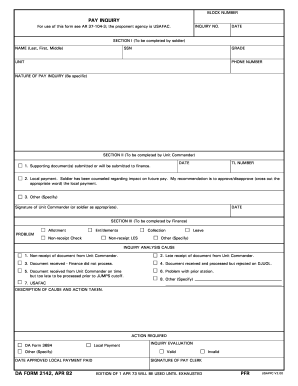
The DA Form 2442 is a military pay inquiry form used by U.S. Army personnel to request information related to pay issues.
pdfFiller scores top ratings on review platforms




Who needs DA 2442?
Explore how professionals across industries use pdfFiller.

DA 2442 is needed by:
-
U.S. Army soldiers seeking clarification on their military pay
-
Human Resources personnel managing soldier pay issues
-
Military administrative staff assisting with pay inquiries
-
Veterans needing information on past military pay
-
Financial advisors assisting military clients with pay-related questions
Comprehensive Guide to DA 2442
What is the DA Form 2442?
The DA Form 2442 is a U.S. Army form specifically designed for military pay inquiries. This important document allows service members to address any issues related to their pay accurately.
As a fillable form, it requires users to input relevant information and provide signatures to ensure that requests are valid and actionable. The DA Form 2442 serves as a crucial tool for all military personnel navigating the complexities of military pay.
Purpose and Benefits of the DA Form 2442
The DA Form 2442 is essential for military personnel facing pay issues. It streamlines the process of communicating with payroll offices, ensuring that service members can resolve discrepancies swiftly.
This military pay form not only assists in the resolution of pay problems but also promotes clarity and efficiency in inquiries, enhancing the overall experience for users.
Key Features of the DA Form 2442
The fillable nature of the DA Form 2442 is a significant feature, allowing users to complete the document conveniently online. The clear instructions provided enhance the user experience, ensuring individuals know exactly what information is required.
-
Accessible electronic fillable format.
-
Includes clear instructions for completion.
-
Fields designated for all necessary user inputs.
Who Needs to Complete the DA Form 2442?
The DA Form 2442 is primarily intended for military personnel who encounter pay discrepancies or inquiries. This form is essential for those needing to clarify their pay status or rectify issues with their payroll.
Situations that may necessitate filling out the DA Form 2442 include pay grade changes or unresolved bonus payments, making it a vital resource for service members.
How to Fill Out the DA Form 2442 Online (Step-by-Step)
To complete the fillable DA Form 2442 online, follow these steps:
-
Access the DA Form 2442 through the designated platform.
-
Navigating the form, ensure all fields are appropriately filled out.
-
Gather all necessary information, including identification details and any relevant documentation.
-
Review the completed form for accuracy before submission.
Submission Methods for the DA Form 2442
After completion, users can submit the DA Form 2442 through various methods. Submissions can be made electronically or through traditional mail, depending on user preference.
-
Online submission for immediate processing.
-
Mailing the form if required by specific circumstances.
-
Adhere to submission deadlines to ensure timely handling of inquiries.
What Happens After You Submit the DA Form 2442?
Once the DA Form 2442 is submitted, users can track and confirm their submission, ensuring it reaches the appropriate payroll department. It is vital to monitor any follow-up communications regarding the inquiry.
Service members can expect a response or feedback regarding their pay issues based on established timelines dictated by the payroll office.
How to Correct or Amend the DA Form 2442
If any mistakes are discovered post-submission, it's crucial to understand the amendment process for the DA Form 2442. Users should familiarize themselves with the typical steps required to submit corrections.
-
Identify the specific errors needing amendments.
-
Follow the procedures provided by the payroll department for corrections.
Why Trust pdfFiller for Your DA Form 2442
Using pdfFiller for managing the DA Form 2442 provides numerous benefits. The platform is equipped with robust security features, including 256-bit encryption, ensuring that sensitive information remains protected.
Additionally, the user-friendly interface allows for seamless editing, signing, and sharing of documents, making it an ideal choice for completing the DA Form 2442 efficiently.
Get Started Today with pdfFiller
Getting started with pdfFiller is simple. Users can easily access forms online, fill them out securely, and take advantage of the platform's features for effective document management.
With a commitment to security and efficiency, pdfFiller stands out as a trusted platform for handling all needs related to the DA Form 2442.
How to fill out the DA 2442
-
1.To access and open the DA Form 2442 on pdfFiller, start by navigating to the pdfFiller website. You can search for 'DA Form 2442' in the search bar or find it in the government forms section.
-
2.Once you have located the form, click on it to open the interactive fillable template. This will allow you to begin entering the necessary information directly into the fields.
-
3.Before completing the form, gather all required information, such as your military identification details, specific pay inquiry issues, and any relevant dates or financial records. Having this information ready will make the filling process smoother.
-
4.As you navigate the form, click into each field to input your information. Be sure to read any instructions provided on the form to understand what details are required. Utilize pdfFiller’s tools to add checkmarks to any applicable checkboxes.
-
5.Review your completed form for any errors or missing information. Double-check that all sections are filled out correctly to avoid submission delays. You can use pdfFiller’s preview function to see how your form looks before finalizing.
-
6.Once you are satisfied with the form, save your work by clicking on the save button. You can download the completed form to your device or choose to submit it directly through pdfFiller, depending on your needs.

Who is eligible to use the DA Form 2442?
The DA Form 2442 is primarily for U.S. Army soldiers and military personnel who have questions or issues related to their pay. Other eligible users include human resources personnel and administrators involved in managing military pay.
What information do I need to complete the DA Form 2442?
When filling out the DA Form 2442, you need your military identification details, specific information regarding the pay issue, any relevant dates, and financial documentation to support your inquiry.
How do I submit the completed DA Form 2442?
After completing the DA Form 2442, you can submit it by downloading the form and emailing it to the appropriate office, or you may submit it directly through pdfFiller if your organization allows for electronic submissions.
Are there any deadlines for submitting the DA Form 2442?
There is typically no formal deadline for submitting the DA Form 2442; however, it's advisable to address pay inquiries as soon as possible to prevent delays in processing your payment issues.
What are common mistakes to avoid when filling out the DA Form 2442?
Common mistakes include providing incomplete information, missing signatures, and not reviewing the form for errors. Ensure all fields are filled accurately and check for any specific instructions related to your inquiry.
How long does it take to process the DA Form 2442?
Processing times for the DA Form 2442 can vary depending on the nature of the inquiry and the office handling it. Generally, expect a response within a few weeks, especially for complex inquiries.
Related Forms






Get the latest insights from our blog


If you believe that this page should be taken down, please follow our DMCA take down process
here
.
This form may include fields for payment information. Data entered in these fields is not covered by PCI DSS compliance.