
Last updated on
Sep 20, 2026

UK University of Prifysgol OHSS 02.39.6.1 2012-2026 free printable template
We are not affiliated with any brand or entity on this form

Fill out
Complete the form online in a simple drag-and-drop editor.

eSign
Add your legally binding signature or send the form for signing.

Share
Share the form via a link, letting anyone fill it out from any device.

Export
Download, print, email, or move the form to your cloud storage.
Why pdfFiller is the best tool for your documents and forms


End-to-end document management
From editing and signing to collaboration and tracking, pdfFiller has everything you need to get your documents done quickly and efficiently.
Accessible from anywhere
pdfFiller is fully cloud-based. This means you can edit, sign, and share documents from anywhere using your computer, smartphone, or tablet.
Secure and compliant
pdfFiller lets you securely manage documents following global laws like ESIGN, CCPA, and GDPR. It's also HIPAA and SOC 2 compliant.
What is UK University of Prifysgol OHSS 02.39.6.1
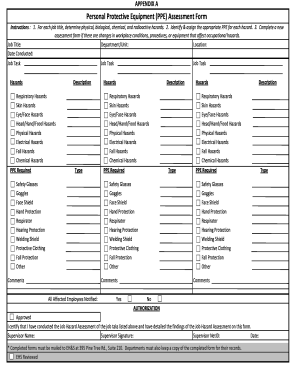
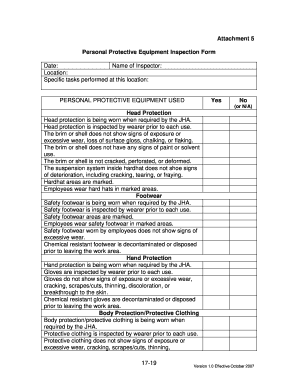
The PPE Issue Form is a document used by healthcare and industrial entities to record the issuance of personal protective equipment (PPE) to individuals.
pdfFiller scores top ratings on review platforms




Who needs UK University of Prifysgol OHSS 02.39.6.1?
Explore how professionals across industries use pdfFiller.

UK University of Prifysgol OHSS 02.39.6.1 is needed by:
-
Healthcare facilities issuing PPE to staff
-
Industrial companies distributing safety equipment
-
Safety officers ensuring compliance with equipment distribution
-
Employees receiving protective gear for their roles
-
Human resources personnel managing employee safety records
-
Aliated organizations requiring PPE documentation
Comprehensive Guide to UK University of Prifysgol OHSS 02.39.6.1
1. What is the PPE Issue Form?
The PPE Issue Form is a vital document used to record the distribution of personal protective equipment (PPE) to individuals. Its primary purpose is to ensure accurate documentation and accountability, making it critical in various settings, particularly in healthcare and industrial environments. By tracking PPE issuance, organizations can enhance safety measures and maintain compliance with relevant regulations.
-
This form serves to document the specifics of PPE distribution, facilitating transparency.
-
Commonly utilized in healthcare and industrial settings to address safety needs.
-
Tracking each issuance helps promote accountability and ensures the safety of personnel.
2. Purpose and Benefits of the PPE Issue Form
Understanding the importance of the PPE Issue Form allows organizations to enhance their safety and compliance measures. This form acts as a comprehensive record-keeping tool that ensures proper documentation of PPE distribution, significantly benefiting organizational safety protocols.
-
Proper record-keeping enhances the overall safety program of an organization.
-
Compliance with safety regulations is improved by using this form effectively.
-
Mitigating risks associated with PPE shortages protects the health and safety of staff.
3. Key Features of the PPE Issue Form
The PPE Issue Form contains several essential fields designed to facilitate accurate documentation. These features play a crucial role in maintaining accountability and tracking PPE distribution effectively.
-
Main fields include the type of PPE, description, recipient name, date of issue, and signature.
-
The requirement for signatures highlights the importance of confirming receipt by the individual.
-
Tracking functionalities enable organizations to monitor PPE issued over time efficiently.
4. Who Needs the PPE Issue Form?
The PPE Issue Form is tailored for various roles and industries that prioritize safety and compliance. Understanding who benefits from this form reinforces its significance in organizational operations.
-
Safety officers and HR personnel are the primary users of the PPE Issue Form.
-
Industries such as healthcare and manufacturing benefit greatly from the compliance it ensures.
5. How to Fill Out the PPE Issue Form Online
Filling out the PPE Issue Form online is straightforward, provided you follow the right steps. This section will guide you through completing each field accurately to avoid common mistakes.
-
Begin by entering the type and description of PPE in the respective fields.
-
Clearly write the name of the individual receiving the PPE and the date of issue.
-
Ensure the recipient signs the form to confirm receipt before submission.
Additionally, be aware of common mistakes, such as leaving fields blank or incorrect name spellings. Ensure you understand the options available for digital signatures and the secure storage of completed forms.
6. Submission and Delivery Options for the PPE Issue Form
Once the PPE Issue Form is filled out, different submission methods are available. Organizations should choose the method aligning with their operational requirements.
-
Submit the form online using platforms like pdfFiller or via email for convenience.
-
Traditional mail is also an option, depending on organizational protocols.
-
Be mindful of any associated fees, deadlines, and processing times for submissions.
7. Security and Compliance for the PPE Issue Form
Handling the PPE Issue Form involves ensuring compliance and security, particularly when dealing with sensitive information. Implementing best practices is crucial for maintaining privacy and data protection.
-
Utilize strong passwords and secure networks when filling out the form online.
-
Understand pdfFiller's compliance with HIPAA and GDPR when dealing with healthcare documentation.
-
Electronic signatures should be captured securely, ensuring their legitimacy.
8. Sample of a Completed PPE Issue Form
Providing users with a completed example of the PPE Issue Form can enhance understanding and accuracy in filling it out.
-
A visual example of a filled-out PPE Issue Form helps clarify each field's requirements.
-
Breaking down sections of the example enables users to grasp the necessary details for completion.
9. Using pdfFiller for Your PPE Issue Form Needs
Utilizing pdfFiller not only simplifies the process of managing your PPE Issue Form but also enhances efficiency and security. This tool offers multiple functionalities designed to maximize productivity in form management.
-
pdfFiller’s capabilities include eSigning, sharing, and secure storage of forms to meet users' needs.
-
Users can effortlessly create, edit, and fill out their PPE Issue Forms with ease.
How to fill out the UK University of Prifysgol OHSS 02.39.6.1
-
1.To access the PPE Issue Form on pdfFiller, navigate to the website and use the search feature to find the form by typing 'PPE Issue Form'.
-
2.Open the form within pdfFiller's interface, which provides tools for editing and filling out the document.
-
3.Before starting, gather necessary information including PPE type, description, recipient's name, and the date of issue to ensure a smooth completion process.
-
4.Complete the required fields by clicking on each text box and typing the relevant information, making sure to accurately reflect the PPE being issued.
-
5.After filling in all information, review the form for any errors or missing details by checking each section carefully.
-
6.Once you've confirmed that all information is accurate, proceed to sign the form electronically. Make sure the recipient’s signature is included as required.
-
7.After finalizing the form, choose the save or download option to keep a copy for your records. You can also submit the form directly through pdfFiller if required.

Who is eligible to use the PPE Issue Form?
Anyone involved in the distribution of personal protective equipment, including healthcare staff, safety personnel, and industrial managers, can use the PPE Issue Form to document PPE issuance.
Is there a deadline for submitting the PPE Issue Form?
There are typically no strict deadlines for filling out the PPE Issue Form; however, timely documentation is important for compliance and safety tracking in healthcare and industrial environments.
How do I submit the PPE Issue Form once completed?
Once the PPE Issue Form is completed on pdfFiller, you can submit it directly online or download it and email it to the relevant department as required.
What supporting documents should accompany the PPE Issue Form?
While specific supporting documents may not be required, it’s good practice to include any relevant training certifications or safety compliance documents to reinforce the necessity of PPE issuance.
What are common mistakes to avoid when filling out the form?
Common mistakes include leaving fields blank or incorrect information. Ensure all fields are filled accurately, especially the recipient’s name and PPE details.
How long does it take to process the PPE Issue Form?
Processing time may vary, but typically, forms are reviewed and acknowledged within a few business days depending on the organization’s internal procedures.
Is notarization required for the PPE Issue Form?
No, notarization is not required for the PPE Issue Form. It simply requires the recipient’s signature to validate the issue.
Related Forms




Get the latest insights from our blog


If you believe that this page should be taken down, please follow our DMCA take down process
here
.
This form may include fields for payment information. Data entered in these fields is not covered by PCI DSS compliance.