
Last updated on
Oct 31, 2026

Get the free Emergency Medical Expense Claim Form
We are not affiliated with any brand or entity on this form

Fill out
Complete the form online in a simple drag-and-drop editor.

eSign
Add your legally binding signature or send the form for signing.

Share
Share the form via a link, letting anyone fill it out from any device.

Export
Download, print, email, or move the form to your cloud storage.
Why pdfFiller is the best tool for your documents and forms


End-to-end document management
From editing and signing to collaboration and tracking, pdfFiller has everything you need to get your documents done quickly and efficiently.
Accessible from anywhere
pdfFiller is fully cloud-based. This means you can edit, sign, and share documents from anywhere using your computer, smartphone, or tablet.
Secure and compliant
pdfFiller lets you securely manage documents following global laws like ESIGN, CCPA, and GDPR. It's also HIPAA and SOC 2 compliant.
What is Medical Expense Claim
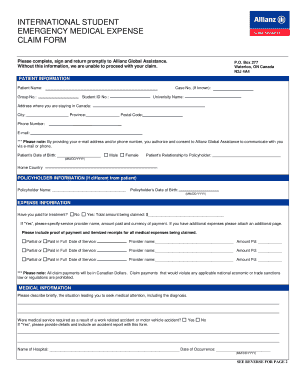
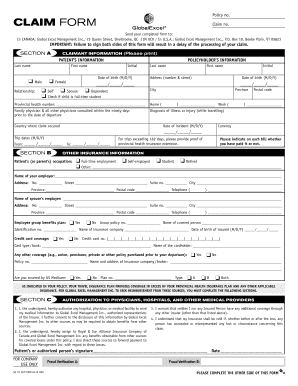
The Emergency Medical Expense Claim Form is a healthcare document used by patients and policyholders to file claims for medical expenses incurred during travel.
pdfFiller scores top ratings on review platforms




Who needs Medical Expense Claim?
Explore how professionals across industries use pdfFiller.

Medical Expense Claim is needed by:
-
Patients requiring reimbursement for medical expenses while traveling.
-
Policyholders seeking to file claims with their insurance provider.
-
Travelers who have incurred emergency medical costs abroad.
-
Individuals covered under Canadian health insurance plans.
-
People utilizing Allianz Global Assistance for claims processing.
-
Anyone needing to coordinate with other insurance coverage relevant to their medical expenses.
Comprehensive Guide to Medical Expense Claim
What is the Emergency Medical Expense Claim Form?
The Emergency Medical Expense Claim Form is essential for travelers seeking reimbursement for medical expenses incurred during their journeys. This form, specifically designed for use with Allianz Global Assistance, is crucial for ensuring policyholders receive the financial support they need in times of medical emergencies. Its proper completion facilitates a smoother claims process, directly impacting the overall experience and resolution for travelers.
Benefits of Using the Emergency Medical Expense Claim Form
Utilizing the Emergency Medical Expense Claim Form can significantly streamline the claims process for both policyholders and patients. It helps speed up reimbursements by providing a clear structure for submitting necessary information. Moreover, it enables easier coordination with various insurance plans, ensuring a comprehensive handling of medical expenses.
-
Simplifies documentation for claims.
-
Facilitates faster reimbursement.
-
Enhances coordination with other insurance providers.
Who Needs to Complete the Emergency Medical Expense Claim Form?
Both patients and policyholders play pivotal roles in the claims process, with specific requirements for each. Patients who incur medical expenses while traveling are eligible to complete the claim form, while policyholders, usually responsible for initiating the claim process, must also provide signatures. Understanding who needs to fill out this form is essential for ensuring that claims are submitted accurately and timely.
Required Information to Complete the Emergency Medical Expense Claim Form
Completing the Emergency Medical Expense Claim Form necessitates gathering various pieces of essential information to ensure compliance and accuracy. Key details include:
-
Personal and travel information of the patient.
-
Insurance coverage details from the policyholder.
-
Specific medical data related to expenses incurred.
Accurate data entry is vital for a successful claims process, preventing unnecessary delays or rejections due to incorrect or incomplete information.
How to Fill Out the Emergency Medical Expense Claim Form Online
Filling out the Emergency Medical Expense Claim Form online is a straightforward process, especially with a user-friendly tool like pdfFiller. Follow these steps to complete the form digitally:
-
Access the claim form using the pdfFiller platform.
-
Fill in the required personal and medical details in the designated fields.
-
Review all entries for accuracy to minimize errors.
-
Submit the form electronically or prepare it for physical submission.
Common Errors and How to Avoid Them When Filing the Form
Common mistakes can hinder the claims process, so being aware of them is crucial. Frequent errors include missing signatures or omitting necessary information. To avoid these pitfalls:
-
Double-check all entries before submission.
-
Ensure both patient and policyholder signatures are included.
-
Review documentation requirements to ensure all necessary paperwork is attached.
Where and How to Submit the Emergency Medical Expense Claim Form
Submitting the Emergency Medical Expense Claim Form can be done through various methods, including online through pdfFiller or by mailing a physical copy. Documentation required for submission typically includes:
-
The completed claim form.
-
Receipts or proof of medical expenses.
-
Additional forms as required by specific insurance providers.
Knowing the correct submission method is vital for ensuring timely processing of claims.
Tracking Your Submission and What to Expect After Submission
After submitting the Emergency Medical Expense Claim Form, tracking its status is a critical next step. Typically, you can confirm the receipt of your submission and monitor the claim’s progress through online portals. Claim processing times vary, but it’s essential to remain vigilant and follow up if a claim is denied, ensuring clarity on the next steps to take in that scenario.
The Security and Compliance Aspects of Submitting the Emergency Medical Expense Claim Form
When submitting the Emergency Medical Expense Claim Form, protecting personal information is paramount. Compliance with regulations surrounding privacy and data protection is strictly adhered to. pdfFiller ensures enhanced security measures, such as 256-bit encryption, to safeguard sensitive documents during the claims process.
Harness the Power of pdfFiller for Your Emergency Medical Expense Claim Form
pdfFiller equips users with robust functionalities to fill out the Emergency Medical Expense Claim Form efficiently. From editing to eSigning capabilities, this platform enhances not only the convenience of form management but also the security of sensitive information. Experience seamless integration and responsible document handling by leveraging pdfFiller's offerings.
How to fill out the Medical Expense Claim
-
1.Access the Emergency Medical Expense Claim Form on pdfFiller by searching for the form title in the search bar or navigating directly to the relevant section of the website.
-
2.Open the form and familiarize yourself with the layout, including all required fields and sections, identified by clear labels and placeholders.
-
3.Before filling out the form, gather necessary information such as your medical records, travel itinerary, and policyholder details to ensure all data is accurate and complete.
-
4.Use pdfFiller’s interface to click on each field and enter the information clearly. Ensure proper spelling and clarity in your entries, particularly for names and dates.
-
5.If the form contains checkboxes, make selections as appropriate by clicking on each checkbox provided within the document for ease of filling.
-
6.Follow any specific prompts or instructions within the form for providing signatures, ensuring that all required signatures from both the patient and the policyholder are included.
-
7.After completing all fields, review the entire form thoroughly to confirm that all information provided is correct and corresponds to supporting documents.
-
8.Finalize the form by clicking the appropriate options to save or download it in your preferred format, ensuring that you retain easy access for submission.
-
9.Submit your completed form by following the submission methods indicated on the form, which may include mailing directly to Allianz Global Assistance or submitting online through their platform.

Who is eligible to use the Emergency Medical Expense Claim Form?
Eligibility for using the Emergency Medical Expense Claim Form generally includes patients who incurred medical expenses during travel and policyholders with active insurance coverage with Allianz Global Assistance.
What supporting documents are required for submission?
When submitting the Emergency Medical Expense Claim Form, you'll typically need to include medical receipts, travel itineraries, and any relevant insurance information that may support your claim.
How do I submit the completed claim form?
You can submit the completed Emergency Medical Expense Claim Form by mailing it to Allianz Global Assistance or using their online submission portal, as outlined on the form itself.
Are there any deadlines for submitting the claim form?
It's essential to submit your Emergency Medical Expense Claim Form promptly. Typically, claims need to be filed within a specified timeframe following the date of service, which may vary based on your policy agreement.
What are common mistakes to avoid when completing the form?
Common mistakes include incomplete fields, incorrect personal information, or failing to include required signatures. Always double-check the form before submission to minimize errors.
How long does it take to process the claim?
Processing times for the Emergency Medical Expense Claim Form can vary based on the complexity of the claim and the volume of claims received by Allianz Global Assistance, but expect notifications within a few weeks.
Can I fill out the claim form electronically?
Yes, you can fill out the Emergency Medical Expense Claim Form electronically using pdfFiller, which allows for easy input, editing, and signing of the document before submission.
Related Content
Related Forms




Get the latest insights from our blog


If you believe that this page should be taken down, please follow our DMCA take down process
here
.
This form may include fields for payment information. Data entered in these fields is not covered by PCI DSS compliance.