
Last updated on
Nov 9, 2026

CA Residential Lease Agreement 2013 free printable template
pdfFiller is not affiliated with any government organization

Fill out
Complete the form online in a simple drag-and-drop editor.

eSign
Add your legally binding signature or send the form for signing.

Share
Share the form via a link, letting anyone fill it out from any device.

Export
Download, print, email, or move the form to your cloud storage.
Why pdfFiller is the best tool for your documents and forms


End-to-end document management
From editing and signing to collaboration and tracking, pdfFiller has everything you need to get your documents done quickly and efficiently.
Accessible from anywhere
pdfFiller is fully cloud-based. This means you can edit, sign, and share documents from anywhere using your computer, smartphone, or tablet.
Secure and compliant
pdfFiller lets you securely manage documents following global laws like ESIGN, CCPA, and GDPR. It's also HIPAA and SOC 2 compliant.
What is CA Residential Lease Agreement
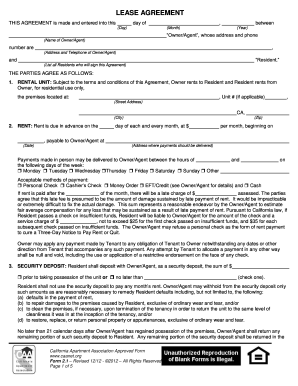
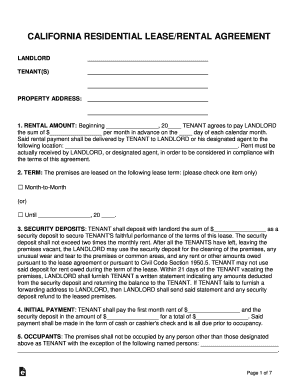
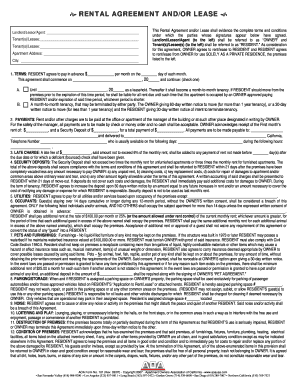
The California Residential Lease Agreement is a legal document used by landlords and tenants to establish a rental agreement for residential property in California.
pdfFiller scores top ratings on review platforms




Very helpful with filling out forms in a quick and easy way.
Easy to use and makes my job more efficient!
This is a great, easy to use product and helped me out significantly.
I have used PDFfiller for several documents so far and I'm getting used to the format. I like that I can make any necessary changes.
I use this to do my tenant leases
Overall, I have to have access to a software program like this. Some landlords issue leases on ancient old pdfs that are hard to work with. This program allows me to alter, merge, and arrange these in a fairly intuitive way. It took a minute for me to be comfortable with the document storage setup that pdffiller uses, but I am happy with it bc I can access these documents from anywhere!
I love the way you can just insert a text box, or erase. Wow its so nice to be able to do this with documents.
I find merging to be hard. I had to get help early one Sunday morning from support. The support was there and ready to instruct me. It just wasn't intuitive. I might even have to ask how to do it again.
The website is smooth.
I was able to get all of my work done here!
Who needs CA Residential Lease Agreement?
Explore how professionals across industries use pdfFiller.

CA Residential Lease Agreement is needed by:
-
Landlords seeking to lease their residential property in California
-
Tenants looking to rent a residential property in California
-
Real estate agents facilitating lease agreements for clients
-
Property management companies overseeing residential leases
-
Attorneys advising clients on lease agreements
-
Investors involved in rental property management
Comprehensive Guide to CA Residential Lease Agreement
What is the California Residential Lease Agreement?
The California Residential Lease Agreement is a legal contract that establishes the terms between a landlord and tenant for renting a residential property in California. This document is crucial in California's rental market as it ensures clarity and compliance with local regulations. To create a binding agreement, signatures from both parties are required, indicating their acceptance of the outlined terms.
Purpose and Benefits of the California Residential Lease Agreement
This form serves several essential purposes for both landlords and tenants. It establishes clear terms concerning:
-
Rent payment amounts
-
Security deposit requirements
-
Property maintenance responsibilities
By detailing lease conditions, the agreement helps prevent disputes and provides legal enforceability once signed by both parties. Understanding the benefits of this residential lease agreement can enhance the rental experience for everyone involved.
Key Features of the California Residential Lease Agreement
The structure of the California Residential Lease Agreement includes key fields such as:
-
Names and contact information of the landlord and tenant
-
Property details including address and description
-
Rent amount and payment due dates
Additionally, this document encompasses various clauses addressing termination conditions and maintenance responsibilities. With fillable fields and provided instructions for completion, the format facilitates ease of use.
Who Needs the California Residential Lease Agreement?
Individuals who require the California rental lease form primarily include:
-
Landlords renting out residential properties
-
Tenants seeking a new rental agreement
-
Real estate professionals managing rental transactions
Understanding who needs this document is essential, as failing to adhere to its guidelines may lead to legal implications for those operating outside this framework.
How to Fill Out the California Residential Lease Agreement Online
To complete the California Residential Lease Agreement digitally, follow these steps:
-
Access the form through pdfFiller.
-
Fill in all required fields, including your name, rent amount, and signatures.
-
Review the document for accuracy before submission.
Ensuring completeness and correctness is vital to avoid issues in the rental process.
Signing the California Residential Lease Agreement
Signing the California Residential Lease Agreement can be done in two ways: digital signatures or wet signatures. It is essential for both parties to sign the document to ensure its legal enforceability. Incorrect signing can lead to complications, emphasizing the importance of following the signing requirements carefully.
Where to Submit the California Residential Lease Agreement
Once the agreement is signed, it may need to be submitted to various locations depending on local regulations. Guidelines for submission include:
-
Identifying physical or digital submission locations
-
Keeping copies for personal records
Understanding local regulations on submission is crucial to ensure compliance.
Security and Compliance for the California Residential Lease Agreement
When handling the California Residential Lease Agreement, document security and compliance should be top priorities. pdfFiller implements security measures like:
-
256-bit encryption for data protection
-
Compliance with GDPR and HIPAA regulations
It's vital to follow recommendations for securely storing signed agreements to protect sensitive information.
How pdfFiller Can Facilitate Your California Residential Lease Agreement
Using pdfFiller to manage your California Residential Lease Agreement comes with many advantages. The platform allows for:
-
Editing and filling documents easily online
-
eSigning securely and swiftly
-
Accessing a user-friendly interface
This cloud-based solution ensures that sensitive documents are handled with privacy and security in mind.
Take the Next Step with Your California Residential Lease Agreement
Getting started with your California lease agreement is straightforward on pdfFiller. Simply begin filling out your lease agreement online to benefit from the ease of use and secure environment that pdfFiller offers. Users can rely on support available throughout the entire process to assist with any questions or issues.
How to fill out the CA Residential Lease Agreement
-
1.To access the California Residential Lease Agreement form, visit pdfFiller and search for the form's name in the search bar.
-
2.Once you find the form, click on it to open the document in the pdfFiller interface.
-
3.Before filling out the form, gather essential information such as the names of the landlord and tenant, property address, rent amount, and security deposit details.
-
4.Use pdfFiller's tools to navigate through the form. Click on each fillable field to enter the required information, such as 'Name', 'Date', and 'Signature'.
-
5.Ensure you read the terms and conditions outlined in the document to complete it accurately and comprehensively.
-
6.After filling out the necessary fields, review the form for any errors or omissions. Pay attention to all sections to ensure compliance with California rental laws.
-
7.If required, add any additional comments or special conditions in the designated areas of the form to clarify agreements.
-
8.Once you are satisfied with your entries, finalize the form. Use the 'Save' option to save your work as you go along.
-
9.To download the completed lease agreement, click on the 'Download' button to obtain a PDF copy for your records.
-
10.You can also print the document directly from pdfFiller or submit it electronically, if preferred, following the submission instructions provided.

Who is eligible to sign the California Residential Lease Agreement?
Both landlords and tenants must be legal adults to sign the California Residential Lease Agreement. It’s essential that all parties involved in the lease are present during signing.
What details are required to complete this lease agreement?
You need to provide details such as the landlord and tenant names, property address, rent amount, security deposit, maintenance responsibilities, and lease start and end dates.
What happens after I complete the form?
After completing the California Residential Lease Agreement, both parties must sign it. Make sure to keep copies of the signed agreement for your records.
Can this lease agreement be modified?
Yes, the California Residential Lease Agreement can be modified. However, all amendments should be documented and signed by both parties to remain legally binding.
Is notarization required for this lease agreement?
No, the California Residential Lease Agreement does not require notarization to be valid. It becomes legally binding once signed by both parties.
What are common mistakes to avoid when filling out the lease agreement?
Common mistakes include failing to include all necessary details, neglecting signatures, and not reviewing the terms thoroughly. Ensure accuracy to avoid disputes.
How do I submit the signed lease agreement?
You can submit the signed lease agreement by providing copies to all parties involved and retaining some for your records. Submission can also occur electronically if agreed upon.
CA Residential Lease Agreement Form Versions
Related Forms


Related Catalogs
Get the latest insights from our blog


If you believe that this page should be taken down, please follow our DMCA take down process
here
.
This form may include fields for payment information. Data entered in these fields is not covered by PCI DSS compliance.