
Last updated on
Oct 31, 2026

Get the free Rental Agreement
We are not affiliated with any brand or entity on this form

Fill out
Complete the form online in a simple drag-and-drop editor.

eSign
Add your legally binding signature or send the form for signing.

Share
Share the form via a link, letting anyone fill it out from any device.

Export
Download, print, email, or move the form to your cloud storage.
Why pdfFiller is the best tool for your documents and forms


End-to-end document management
From editing and signing to collaboration and tracking, pdfFiller has everything you need to get your documents done quickly and efficiently.
Accessible from anywhere
pdfFiller is fully cloud-based. This means you can edit, sign, and share documents from anywhere using your computer, smartphone, or tablet.
Secure and compliant
pdfFiller lets you securely manage documents following global laws like ESIGN, CCPA, and GDPR. It's also HIPAA and SOC 2 compliant.
What is Rental Agreement
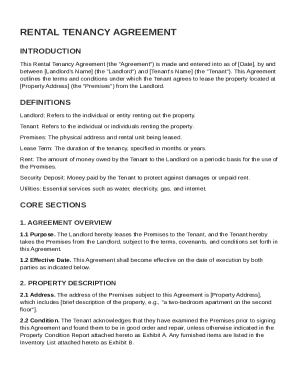
The Rental Agreement is a legal document used by landlords and tenants to establish terms for a residential lease. It outlines the conditions of tenancy to ensure both parties are clear on their responsibilities.
pdfFiller scores top ratings on review platforms




Who needs Rental Agreement?
Explore how professionals across industries use pdfFiller.

Rental Agreement is needed by:
-
Landlords seeking to formalize rental agreements
-
Tenants looking to understand their rights and obligations
-
Real estate agents assisting clients with leasing properties
-
Property management companies managing rental units
-
Individuals involved in month-to-month rental situations
Comprehensive Guide to Rental Agreement
What is a Rental Agreement?
A rental agreement is a legally binding contract that establishes the relationship between landlords and tenants. It serves as a framework for residential tenancy, outlining the terms to ensure both parties understand their rights and obligations. This agreement is essential for detailing important elements such as rent, security deposits, and responsibilities.
Having a well-defined rental agreement enhances clarity regarding rental payment terms and expectations, which helps in reducing potential conflicts that may arise during the lease period.
Purpose and Benefits of a Rental Agreement
The primary purpose of a rental agreement is to provide legal protections for both landlords and tenants. By outlining the terms of the tenancy, both parties gain clarity on rental payment terms and other conditions of occupancy.
Having a rental agreement in place minimizes misunderstandings and provides a framework for conflict resolution, making it integral to successful landlord-tenant relationships.
Key Features of the Rental Agreement Template
A standard rental agreement template includes essential sections that cover various aspects of the lease. Key elements typically featured are:
-
Rental amount and payment schedules.
-
Security deposit requirements and conditions for refunds.
-
Rights and obligations of both tenants and landlords.
-
Space for signatures and important dates.
The template also comprises fillable fields that allow for customization, enhancing the agreement's effectiveness for specific situations.
Who Needs a Rental Agreement?
Rental agreements are essential documents for anyone involved in the rental process. They are particularly important for:
-
Landlords seeking legal protection when renting out residential properties.
-
Tenants aiming to establish secure housing conditions.
-
Individuals entering month-to-month leases to ensure all terms are clear.
Regardless of the lease duration, having a rental agreement delineates expectations for all parties involved.
How to Fill Out the Rental Agreement Online (Step-by-Step)
Filling out a rental agreement online using pdfFiller is a straightforward process. Follow these steps to complete the agreement:
-
Open the rental agreement template on pdfFiller.
-
Fill in the required fields, including the property address and payment details.
-
Review the information for accuracy before submission.
-
Utilize e-signature options for both parties to sign the document electronically.
These steps ensure that the rental agreement is correctly filled out and legally binding.
Common Mistakes and How to Avoid Them When Filling the Rental Agreement
When filling out a rental agreement, there are several common mistakes that users might encounter. These can include:
-
Leaving fields incomplete, which can lead to misunderstandings.
-
Entering incorrect amounts for rent or security deposits.
Such inaccuracies can have serious implications. To avoid these errors, it's crucial to double-check all entered information before finalizing the agreement.
Maintaining Security in Your Rental Agreement
Security is paramount when handling rental agreements. pdfFiller provides robust data protection measures that include:
-
256-bit encryption to safeguard sensitive information.
-
Compliance with industry regulations such as HIPAA and GDPR.
Ensuring that personal details are protected within the rental agreement not only fosters trust but is also essential for legal compliance.
What Happens After You Submit Your Rental Agreement?
After submitting your rental agreement, it is important to understand the next steps involved. Landlords and tenants should expect:
-
Confirmation of receipt of the agreement.
-
Tracking options for monitoring the submission status.
-
Clear timelines regarding responses from the other party.
Additionally, both parties should be aware of the options available for amending or renewing the agreement as necessary.
Get Started with pdfFiller Today
Create and manage your rental agreement easily with pdfFiller. The platform allows you to experience a streamlined document creation process and offers user-friendly features for efficient management.
Explore various templates and customization options tailored to your specific needs, making it simple to generate a legally sound rental agreement.
How to fill out the Rental Agreement
-
1.Access the Rental Agreement form on pdfFiller by navigating to the website and using the search bar to find the document.
-
2.Once opened, familiarize yourself with the layout of the form and locate the fillable fields designated for information input.
-
3.Gather necessary details such as the property address, rental amount, security deposit, and information about both the landlord and tenant.
-
4.Fill in each field with the required information, making sure to enter accurate data to avoid confusion later.
-
5.Review the document as you fill to ensure all details are correct, paying special attention to sections regarding rental terms and late fees.
-
6.Once all fields are completed, take time to read through the entire agreement to confirm that it reflects the intended agreements between both parties.
-
7.If any changes are necessary, make those adjustments before finalizing the document.
-
8.Save your completed Rental Agreement by clicking the save button on pdfFiller to keep a copy for your records.
-
9.If needed, download the document directly to your device or print it for signatures using the options provided.
-
10.Submit the signed agreement to all parties involved and keep a copy for future reference.

Who needs to sign the Rental Agreement?
Both the landlord and tenant must sign the Rental Agreement to make it legally binding. Signatures indicate that both parties agree to the terms outlined in the document.
Are there any required documents to attach?
While not mandatory, it’s advised to attach any supporting documents like move-in/move-out forms or disclosures to complement the Rental Agreement.
Is this Rental Agreement valid without notarization?
No notarization is required for this Rental Agreement; it becomes valid upon signing by both parties. However, check local laws for any specific requirements.
What happens if one party wants to end the agreement?
Either party can give notice of non-renewal as specified in the agreement to end the rental arrangement. Check the notice period required in your document.
Can this Rental Agreement be modified?
Yes, both parties can agree to modifications. It’s best practice to document any changes in writing and have both parties sign the updated agreement.
What are common mistakes to avoid when filling out the Rental Agreement?
Ensure all fields are completed accurately, including dates and payment amounts. Misunderstanding terms or omitting signatures can lead to future disputes.
How can I ensure my Rental Agreement is legally enforceable?
To ensure enforceability, both parties should sign the document, and it's advisable to keep copies for record-keeping. Consider local laws to ensure compliance.
Related Forms

Related Catalogs
Get the latest insights from our blog


If you believe that this page should be taken down, please follow our DMCA take down process
here
.
This form may include fields for payment information. Data entered in these fields is not covered by PCI DSS compliance.