
Last updated on
Oct 31, 2026

Get the free Assignment Form
We are not affiliated with any brand or entity on this form

Fill out
Complete the form online in a simple drag-and-drop editor.

eSign
Add your legally binding signature or send the form for signing.

Share
Share the form via a link, letting anyone fill it out from any device.

Export
Download, print, email, or move the form to your cloud storage.
Why pdfFiller is the best tool for your documents and forms


End-to-end document management
From editing and signing to collaboration and tracking, pdfFiller has everything you need to get your documents done quickly and efficiently.
Accessible from anywhere
pdfFiller is fully cloud-based. This means you can edit, sign, and share documents from anywhere using your computer, smartphone, or tablet.
Secure and compliant
pdfFiller lets you securely manage documents following global laws like ESIGN, CCPA, and GDPR. It's also HIPAA and SOC 2 compliant.
What is Insurance Assignment Form
The Assignment Form is a business document used by policyholders to transfer rights and obligations of an insurance policy to another party.
pdfFiller scores top ratings on review platforms




Who needs Insurance Assignment Form?
Explore how professionals across industries use pdfFiller.

Insurance Assignment Form is needed by:
-
Policyholders looking to transfer insurance rights
-
Individuals acting as Assignees for policy benefits
-
Legal representatives managing insurance claims
-
Witnesses certifying assignment transactions
-
Insurance companies processing policy transfers
-
Agents aiding clients with insurance documentation
Comprehensive Guide to Insurance Assignment Form
What is the Assignment Form?
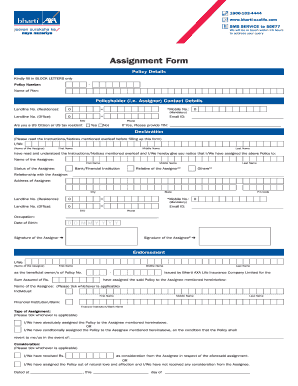
The Assignment Form serves as a critical document in Indian insurance, particularly for policy transfer between parties. This form allows the assignor, who is the current policyholder, to transfer rights and obligations to an assignee, ensuring a seamless handover of ownership and coverage. Specifically, Aviva Life Insurance Company India Ltd. utilizes this form to streamline policy assignments.
Key components of the Assignment Form include details about the assignor, assignee, and the specific insurance policy. This documentation is essential for maintaining clarity in policy ownership.
Purpose and Benefits of the Assignment Form
The Assignment Form is crucial for formalizing the transfer of policy rights, providing notable advantages to users. It ensures the rightful ownership of the insurance policy, which is imperative for future claims and coverage. Additionally, by following proper procedures and utilizing the Assignment Form, disputes over policy ownership can be significantly reduced.
Moreover, the form facilitates a smooth transition of rights and responsibilities, resulting in a more organized process for both the assignor and assignee, ultimately enhancing the ownership experience.
Key Features of the Assignment Form
The Assignment Form includes several essential fields necessary for its proper completion. Key fields comprise the names of the assignor and assignee, as well as specific policy information, which must be clearly stated.
Mandatory fields are highlighted to ensure compliance, and specific clauses like “I/We have absolutely assigned the policy” play a vital role in declaration. Furthermore, the form requires signatures from the assignor, assignee, and a witness, validating the assignment.
Who Needs the Assignment Form?
The Assignment Form is intended for various individuals and entities, primarily policyholders and beneficiaries of insurance policies. Specific scenarios warrant its use, including instances when a policy needs to be transferred to a new owner or during estate planning.
Each party involved—assignor, assignee, and witness—has distinct roles that are critical to the validity of the Assignment Form. Understanding these roles aids in ensuring that the transfer process adheres to legal standards.
How to Fill Out the Assignment Form Online
Filling out the Assignment Form has been simplified with online tools like pdfFiller. Users can access user-friendly features that allow them to effortlessly fill out the form.
When completing the Assignment Form, it is important to follow clear steps:
-
Select the type of assignment (absolute or conditional).
-
Input the necessary details for both assignor and assignee.
-
Review all entries for accuracy before submission.
Submission and Delivery of the Assignment Form
After completing the Assignment Form, users must understand the various submission methods available. Options include online submissions, emailing the completed form, or physical delivery to the relevant insurance office.
It is crucial to submit the form with any original policy documents and be aware of any processing times and tracking confirmations to ensure a smooth transition.
How to Sign the Assignment Form
Signing the Assignment Form involves understanding the requirements for both digital and wet signatures. It is essential to clarify the distinction between these forms of signatures, especially amid increasing digitization.
To maintain the form's validity, all required signatures must be obtained. In some cases, notarization may also be necessary, depending on the specifics of the assignment.
Common Errors and How to Avoid Them
Users often encounter pitfalls when filling out the Assignment Form. Common mistakes include missing signatures and incorrect details, which can delay or invalidate the assignment.
To avoid these errors, consider the following tips:
-
Double-check all entries to ensure accuracy.
-
Ensure that all required signatures are present.
-
Review the completed form before submission for any overlooked details.
Security and Compliance when Using the Assignment Form
Users can feel secure while handling the Assignment Form due to stringent security measures in place. These protocols include 256-bit encryption and full compliance with regulations such as SOC 2, HIPAA, and GDPR.
Protecting personal information is pivotal when submitting any sensitive documents, and pdfFiller ensures safe handling during the entire process.
Experience Easy Document Management with pdfFiller
pdfFiller streamlines the management of the Assignment Form, providing valuable tools for filling out, editing, and securely storing documents. With features like eSigning and form editing, users can efficiently handle their documentation needs.
By utilizing pdfFiller, users experience a hassle-free method for managing their Assignment Form and other essential documents online.
How to fill out the Insurance Assignment Form
-
1.Access the Assignment Form by visiting pdfFiller and searching for 'Assignment Form'. Click on the form to open it in the editing interface.
-
2.Familiarize yourself with the layout, noting the sections for Assignor, Assignee, and Witness details that need to be filled out.
-
3.Before filling out the form, gather all necessary information such as policy number, personal details of the Assignor and Assignee, and any witness information required.
-
4.Begin by entering the Assignor's name, policy number, and relevant details in the designated fields. Ensure all entries are accurate to avoid processing issues.
-
5.Proceed to fill in the Assignee's information, ensuring you clearly specify whether the assignment is absolute or conditional.
-
6.Don't forget to input the witness details as they are also required to sign the form, certifying the authenticity of the assignment.
-
7.Once all fields are complete, review the filled-out form thoroughly for any missing information or errors. Ensure accuracy in every section.
-
8.Finalize the document by clicking the save option on pdfFiller. You can also use the download option to save a copy on your device.
-
9.If you plan to submit the form electronically, follow the submission guidelines provided by the insurance company. Otherwise, print the form and attach any original policy documents needed.

Who is eligible to use the Assignment Form?
The Assignment Form can be utilized by policyholders, assignees, and witnesses involved in the assignment of insurance policies, specifically within the context of policies issued by companies like Aviva Life Insurance in India.
What information do I need to complete the Assignment Form?
You need the original policy number, personal details of both the Assignor and Assignee, and witness information. Additionally, be prepared to specify whether the assignment is absolute or conditional.
How do I submit the Assignment Form?
After completing the form, you can submit it by following the insurance company's submission guidelines. This may require sending it electronically or mailing a printed copy along with original policy documents.
Are there any common mistakes to avoid when filling out the Assignment Form?
Common mistakes include missing required signatures, failing to specify the type of assignment, and incomplete fields. Always double-check for accuracy before submission to prevent delays.
Is notarization required for the Assignment Form?
No, the Assignment Form does not require notarization; however, all signatures must be provided by the Assignor, Assignee, and witness for the assignment to be valid.
What are the processing times for the Assignment Form?
Processing times can vary depending on the insurance provider. Generally, once submitted, you can expect processing within a few business days, but check with your insurer for specific timelines.
Can I edit the Assignment Form after saving it?
Yes, you can return to pdfFiller to reopen and edit the Assignment Form anytime, as long as you have saved it correctly in your account.
Related Content
Related Forms



Related Catalogs
Get the latest insights from our blog



If you believe that this page should be taken down, please follow our DMCA take down process
here
.
This form may include fields for payment information. Data entered in these fields is not covered by PCI DSS compliance.