
Last updated on
Oct 31, 2026

Get the free Civil Air Patrol Encampment Application
We are not affiliated with any brand or entity on this form

Fill out
Complete the form online in a simple drag-and-drop editor.

eSign
Add your legally binding signature or send the form for signing.

Share
Share the form via a link, letting anyone fill it out from any device.

Export
Download, print, email, or move the form to your cloud storage.
Why pdfFiller is the best tool for your documents and forms


End-to-end document management
From editing and signing to collaboration and tracking, pdfFiller has everything you need to get your documents done quickly and efficiently.
Accessible from anywhere
pdfFiller is fully cloud-based. This means you can edit, sign, and share documents from anywhere using your computer, smartphone, or tablet.
Secure and compliant
pdfFiller lets you securely manage documents following global laws like ESIGN, CCPA, and GDPR. It's also HIPAA and SOC 2 compliant.
What is CAP Encampment Form
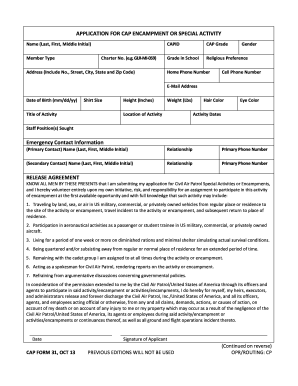
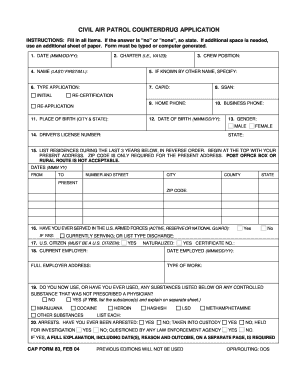
The Civil Air Patrol Encampment Application is a government form used by applicants to apply for special activities or encampments organized by the Civil Air Patrol.
pdfFiller scores top ratings on review platforms




Who needs CAP Encampment Form?
Explore how professionals across industries use pdfFiller.

CAP Encampment Form is needed by:
-
Prospective cadets seeking to participate in CAP encampments
-
Parents or guardians submitting applications on behalf of minors
-
Squadron commanders overseeing cadet activities
-
Wing commanders approving applications in their jurisdiction
-
Region commanders reviewing squadron applications
-
Military cadets interested in CAP programs
-
Individuals involved in CAP special activities
Comprehensive Guide to CAP Encampment Form
What is the Civil Air Patrol Encampment Application?
The Civil Air Patrol Encampment Application, also referred to as Form 31, is vital for individuals aspiring to participate in the structured youth military programs managed by the Civil Air Patrol (CAP). This application serves as a foundational entrance point for candidates wishing to engage in specialized activities organized by CAP.
Completing the application accurately is crucial. It ensures prospective participants are effectively enrolled in the encampment, allowing them to gain valuable experiences in leadership and skill development.
Purpose and Benefits of the Civil Air Patrol Encampment Application
Filing the Civil Air Patrol Encampment Application affords significant advantages for applicants and their guardians. Firstly, encampments provide unique opportunities for participants, including comprehensive skill development and extensive leadership training.
The application simplifies the enrollment process for engaging in special activities within the CAP framework, optimizing the experience for both youth and their families. Testimonials from previous encampment participants highlight transformative outcomes from their experiences.
Who Needs to Complete the Civil Air Patrol Encampment Application?
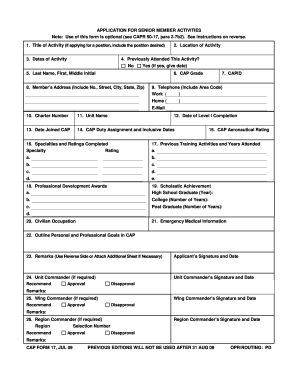
Various parties are involved in completing the Civil Air Patrol Encampment Application. The applicant is primarily responsible, but signature contributions are essential from several key individuals:
-
Parent or Guardian: Required to sign to affirm support.
-
Squadron Commander: Necessary to confirm the applicant's affiliation.
-
Wing Commander: Final signature needed to authorize participation.
Additionally, region commanders may be involved, although their signatures are not mandatory for this application.
Eligibility Criteria and Requirements
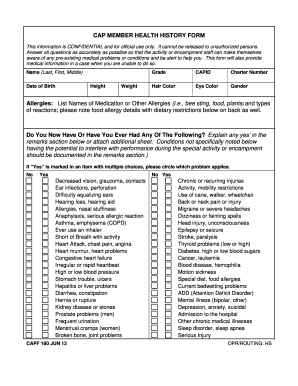
To qualify for the encampment, specific eligibility criteria exist. Applicants must meet age restrictions pertinent to CAP standards. Essential personal information, including medical history, is critical for inclusion on the application.
Furthermore, preferences for specific activities should be listed to tailor the experience to the applicant’s interests. Meeting these requirements significantly enhances the likelihood of a positive application outcome.
How to Fill Out the Civil Air Patrol Encampment Application Online
Completing the Civil Air Patrol Encampment Application online involves several steps:
-
Input personal information, including name, date of birth, and mailing address.
-
Provide comprehensive medical information as required.
-
Select preferred activities based on interest and availability.
Attention to detail is crucial; ensuring all required fields are completed accurately will minimize errors and streamline the processing of the application. Familiarizing oneself with common pitfalls can prevent delays.
How to Sign the Civil Air Patrol Encampment Application
Signing the application entails understanding the differences between digital and wet signatures. Each signature type has its specifications and requirements. All relevant parties must sign the application to validate the request.
To avoid delays, applicants should verify that all signatures are completed accurately. This helps in adhering to submission timelines and preventing any issues during processing.
Submission Methods and Deadlines
Applicants have several options for submitting their applications:
-
Online submission through the designated CAP portal.
-
Mailing the application directly to the appropriate CAP office.
-
In-person submission at a local squadron meeting or office.
It is crucial to be aware of the submission deadlines and associated processing times. Applicants should plan submissions well in advance, especially if they approach a deadline to avoid potential complications.
Tracking and Confirmation of Your Application
Post-submission, applicants should keep a record of their confirmation receipt. This acknowledgment serves as proof of submission and is important for tracking the status of the application.
Understanding how to check the application's status is essential for applicants. Common reasons for delays or potential rejection include incomplete information or missing signatures, which can be addressed promptly by following up with CAP representatives.
Why Use pdfFiller for the Civil Air Patrol Encampment Application?
Utilizing pdfFiller for the Civil Air Patrol Encampment Application offers numerous benefits. The platform facilitates easy filling, editing, and secure management of the application online without the need for downloads.
pdfFiller ensures compliance with rigorous security standards, providing users with confidence in data protection. Features such as eSigning and document sharing further enhance the application's management process, making it a preferred choice for applicants.
Start Your Civil Air Patrol Encampment Application Journey Today!
Leverage the user-friendly capabilities of pdfFiller to efficiently complete your Civil Air Patrol Encampment Application. The digital format simplifies the process, making it quicker and more accessible.
Taking the practical steps to begin filling out the application today not only ensures a thorough and well-prepared submission but also enhances your chances of a successful enrollment in the encampment.
How to fill out the CAP Encampment Form
-
1.To access the Civil Air Patrol Encampment Application, navigate to pdfFiller and use the search tool to find the specific form.
-
2.Once located, click on the form to open it in the pdfFiller interface, which provides various fillable sections.
-
3.Before you start filling out the form, gather all necessary information, including personal details, medical history, and activity preferences.
-
4.Begin filling in the fields by clicking on each section. Use the guidelines provided within the form for completing personal details like 'NAME' and 'DATE OF BIRTH.'
-
5.Ensure that you check all boxes and complete all required fields indicated by asterisks or other symbols.
-
6.Follow any specific instructions in the form, such as filling out multiple pages accurately and completely.
-
7.After you have filled in all the necessary information, review the form thoroughly for any errors or omissions.
-
8.Once satisfied with your entries, save your work regularly using the 'Save' option in pdfFiller.
-
9.To finalize the process, download the completed form or submit it directly through pdfFiller, following the provided submission guidelines.

Who is eligible to apply using the Civil Air Patrol Encampment Application?
Eligibility typically includes young individuals interested in joining CAP encampments, with applications submitted by parents or guardians if the applicant is a minor.
What is the deadline for submitting the application?
Deadlines can vary based on specific encampment dates; check with your squadron or the CAP website for the most accurate information regarding submission timelines.
How do I submit the completed application?
You can submit the Civil Air Patrol Encampment Application either through digital submission via pdfFiller or by printing the form and mailing it to the designated CAP unit.
What documents are required along with the application?
In addition to the completed application, you may need to provide supporting documents such as medical forms and consent from a parent or guardian.
What are common mistakes to avoid when filling out the application?
Common mistakes include leaving required fields blank, failing to sign the form, or not including accurate medical information. Double-check all entries before submission.
How long does it take to process the application?
Processing times can vary; however, expect it to take several days to weeks, depending on the CAP unit's workload and application volume.
Are there any fees associated with the application?
Generally, there are no fees for submitting the Civil Air Patrol Encampment Application, but it's advisable to confirm with your local squadron for any specific fees related to certain encampments.
Related Forms


Get the latest insights from our blog


If you believe that this page should be taken down, please follow our DMCA take down process
here
.
This form may include fields for payment information. Data entered in these fields is not covered by PCI DSS compliance.